<?xml version="1.0" encoding="UTF-8"?><feed
	xmlns="http://www.w3.org/2005/Atom"
	xmlns:thr="http://purl.org/syndication/thread/1.0"
	xml:lang="ja"
	>
	<title type="text">MOMENTS</title>
	<subtitle type="text">ライトノベルの感想を中心に、コンピュータやゲームの話題なども扱います。</subtitle>

	<updated>2026-03-18T08:17:54Z</updated>

	<link rel="alternate" type="text/html" href="https://www.u-1.net" />
	<id>https://www.u-1.net/feed/atom/</id>
	<link rel="self" type="application/atom+xml" href="https://www.u-1.net/feed/atom/" />

	
<icon>https://www.u-1.net/wp-content/uploads/2018/12/cropped-sitecard-2-32x32.jpg</icon>
<link rel="hub" href="https://pubsubhubbub.appspot.com" />
<link rel="hub" href="https://pubsubhubbub.superfeedr.com" />
<link rel="hub" href="https://websubhub.com/hub" />
<link rel="self" href="https://www.u-1.net/feed/atom/" />
	<entry>
		<author>
			<name>ゆーいち</name>
							<uri>http://www.u-1.net/</uri>
						</author>

		<title type="html"><![CDATA[WordPress投稿画面でAI要約やdescription、タイトル案を作れるプラグイン「WP Post Digest AI」を作りました]]></title>
		<link rel="alternate" type="text/html" href="https://www.u-1.net/2026/03/18/6247/" />

		<id>https://www.u-1.net/?p=6247</id>
		<updated>2026-03-18T08:17:54Z</updated>
		<published>2026-03-18T08:00:00Z</published>
		<category scheme="https://www.u-1.net" term="読書感想" />
		<summary type="html"><![CDATA[<p><img src="https://www.u-1.net/wp-content/uploads/2026/03/WP-Post-Digest-AI_header.jpg" class="webfeedsFeaturedVisual" /></p>WordPressの投稿画面で、AI要約やdescription、タイトル案、Xポスト文の候補を生成できるプラグイン「WP Post Digest AI」を紹介します。個人ブログの更新を少し楽にしたい人向けの支援ツールです。]]></summary>
					<content type="html" xml:base="https://www.u-1.net/2026/03/18/6247/"><![CDATA[<p><img src="https://www.u-1.net/wp-content/uploads/2026/03/WP-Post-Digest-AI_header.jpg" class="webfeedsFeaturedVisual" /></p>
<div class="wp-block-cover"><img decoding="async" width="1376" height="768" class="wp-block-cover__image-background wp-image-6251 size-full" alt="" src="https://www.u-1.net/wp-content/uploads/2026/03/WP-Post-Digest-AI_header.jpg" data-object-fit="cover" srcset="https://www.u-1.net/wp-content/uploads/2026/03/WP-Post-Digest-AI_header.jpg 1376w, https://www.u-1.net/wp-content/uploads/2026/03/WP-Post-Digest-AI_header-768x429.jpg 768w" sizes="(max-width: 1376px) 100vw, 1376px" /><span aria-hidden="true" class="wp-block-cover__background has-background-dim" style="background-color:#355372"></span><div class="wp-block-cover__inner-container is-layout-constrained wp-block-cover-is-layout-constrained">
<p class="has-text-align-center has-large-font-size"><strong>WordPress投稿画面でAI要約を行うプラグイン<br>WP Post Digest AI</strong><br></p>
</div></div>


<h1 class="wp-block-heading">自分の楽のためにプラグイン開発は正義ですね</h1>


<p>最近、自分のブログ更新を少しでも楽にできないかと思って、WordPress の Gutenberg 投稿画面上で使える AI 支援プラグインを作ってみました。<br>名前は<span class="swl-marker mark_orange"> WP Post Digest AI</span> です。<br>このプラグインでは、記事本文から以下の候補文を生成できます。</p>


<ul class="wp-block-list">
<li>要約文</li>


<li>description</li>


<li>タイトル</li>


<li>Xポスト用テキスト</li>
</ul>


<p>AI に全部任せるというより、<span class="swl-marker mark_green">候補を出してもらって、自分で選んで使う</span>ことを前提にした、個人ブログ向けの軽めな支援ツールです。</p>


<p>ほぼ自分向けに開発したプラグインですが、役に立つ人もいるかもしれないので概要とあわせて使い方を中心に紹介します。</p>


<p>なお、ポスト本文を AIモデルに読ませるため、その内容が学習に使用される場合があります。ご利用のOpenAIのアカウント設定と、利用規約を確認の上、使用するしてください。</p>


<p>個人用途のブログ記事向けで、社内向けの限定ブログなど公開されて困る情報が含まれる場合は使用しないでください。</p>


<h2 class="wp-block-heading">インストール方法</h2>


<p>ページ最下部にあります ZIP ファイルをダウンロードして、WordPress の管理画面からプラグインとしてアップロードします。</p>


<ul class="wp-block-list">
<li>WordPress 管理画面を開く</li>


<li> プラグイン」→「新規追加」→「プラグインのアップロード」</li>


<li>ZIP ファイルを選択してインストール</li>


<li>有効化</li>
</ul>


<p>これで導入は完了です。その後、設定を行ってください。</p>


<h2 class="wp-block-heading">最初にやる設定</h2>


<p>プラグインを有効化したら、設定画面を開きます。<kbd><code>設定 > WP Post Digest AI</code></kbd></p>


<p>ChatGPT の API を使用しているため、最低限必要なのは <strong>OpenAI API キー</strong>の設定を行います。<br>これを入れないと生成機能は動きません。<br>取得方法などが不明な場合は、<a href="https://www.google.com/search?q=OpenAI+API+%E3%82%AD%E3%83%BC+%E5%8F%96%E5%BE%97">検索</a>してご確認ください。<br>基本的には<span class="swl-marker mark_orange">無料では使えません</span>のでその点だけご注意。</p>


<p>そのほか、設定画面では以下のような項目を調整できます。</p>


<ul class="wp-block-list">
<li>生成プロンプトの調整</li>


<li>AIチェックによるプロンプトの校正</li>


<li>ログ関連設定</li>


<li>トークン使用量の確認</li>


<li>最近の実行履歴</li>
</ul>


<p>基本的には、最初は API キーだけ設定すれば使い始められます。<br>細かなプロンプト調整は、実際に使いながら少しずつ変えていく形で大丈夫です。</p>


<h2 class="wp-block-heading">投稿画面での使い方</h2>


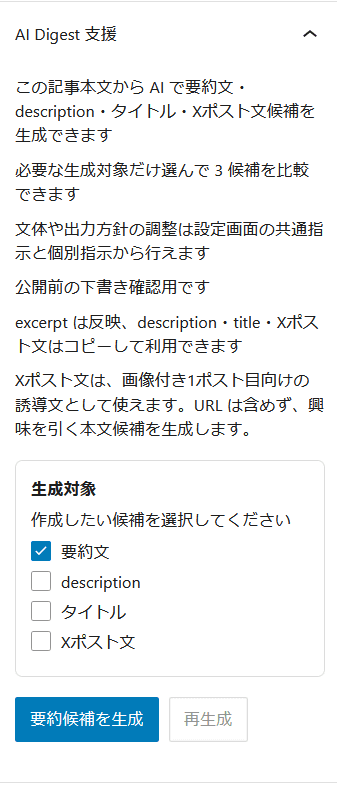
<p>投稿編集画面を開くと、AI Digest 支援パネルが表示されます。<br>ここで、生成したい項目を選択できます。</p>


<figure class="wp-block-image size-full is-resized"><img decoding="async" width="337" height="785" src="https://www.u-1.net/wp-content/uploads/2026/03/WP-Post-Digest-AI_postedit.png" alt="" class="wp-image-6253" style="width:337px;height:auto"/><figcaption class="wp-element-caption">ポスト作成画面の投稿ブロックに追加されます</figcaption></figure>


<ul class="wp-block-list">
<li>要約文</li>


<li>description</li>


<li>タイトル</li>


<li>Xポスト文</li>
</ul>


<p>デフォルトでは要約文だけ生成する形にしてあるので、必要なものだけチェックして使えば OK です。<br>不要なものまで毎回生成しないので、トークン消費を抑えやすいのもポイントです。</p>


<h3 class="wp-block-heading">要約文の生成</h3>


<p>まずは一番基本となる要約文です。</p>


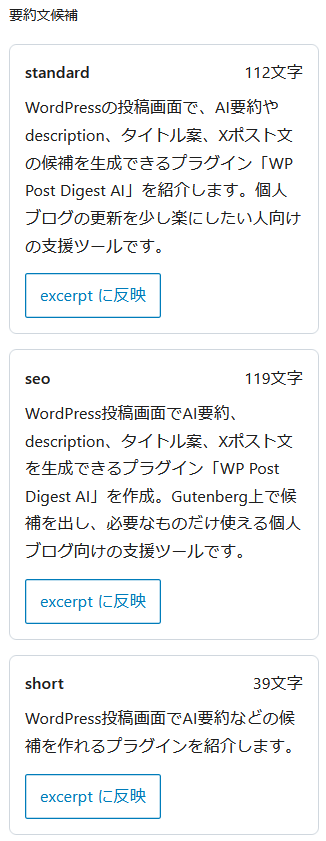
<p><kbd><code>要約文</code></kbd>にチェックを入れて生成すると、複数の候補が表示されます。<br>自分の運用では、ここから自然そうなものを選んで excerpt に反映する使い方がかなり便利でした。</p>


<p>要約文は、記事一覧や抜粋表示用の文章を作る用途に向いています。</p>


<figure class="wp-block-image size-full"><img decoding="async" width="326" height="841" src="https://www.u-1.net/wp-content/uploads/2026/03/WP-Post-Digest-AI_excerpt.png" alt="" class="wp-image-6254"/><figcaption class="wp-element-caption">要約（抜粋/excerpt）の候補生成</figcaption></figure>


<h3 class="wp-block-heading">description の生成</h3>


<p><kbd><code>description</code></kbd>にチェックを入れると、検索向けの説明文候補を生成できます。</p>


<p>WordPress コアには標準で description 入力欄があるわけではないので、このプラグインでは<span class="swl-marker mark_green">候補を生成してコピーして使う</span>形にしています。</p>


<p>SEO 系プラグインの description 欄へ貼り付けたり、必要に応じて少し手直しして使うイメージです。</p>


<h3 class="wp-block-heading">ブログタイトル案の生成</h3>


<p><code>タイトル</code>も候補を出せます。</p>


<p>こちらも自動で上書きするのではなく、<span class="swl-marker mark_green">候補を見て使いたいものをコピーして採用する</span>方式にしています。<br>記事を書いたあとで「内容はできたけどタイトルが弱いな」という時にかなり便利です。</p>


<h3 class="wp-block-heading">Xポスト文の生成</h3>


<p>これは、自分で使ってみて意外と便利だった機能です。</p>


<p>X 用の投稿文として、<span class="swl-marker mark_green">画像付き1ポスト目に使いやすい誘導文</span>を生成できます。<br>URL は次のポストに回す前提で、最初の投稿本文として使えるような短めの文章を作るイメージです。</p>


<p>ブログ更新のお知らせをそのまま書くより、少し導入文が欲しい時に役立ちます。</p>


<h3 class="wp-block-heading">再生成も可能</h3>


<p>生成結果がしっくりこない時は、<code>再生成</code>ボタンでもう一度候補を出せます。</p>


<p>記事内容をもとに別パターンを試せるので、<br>「もう少し違う言い回しが欲しい」<br>という時にも使いやすいです。</p>


<h3 class="wp-block-heading">使用トークン数も確認できる</h3>


<p>生成後には、使用したトークン数の目安も表示されます。</p>


<ul class="wp-block-list">
<li>input</li>


<li>output</li>


<li>total</li>
</ul>


<p>このあたりが見えるので、「どれくらい使ったのか」が分かりやすいです。<br>個人ブログ用途なら、必要な項目だけ生成する形にしておけば、そこまで大きな負担にはなりにくい印象でした。</p>


<h2 class="wp-block-heading">管理画面でできること</h2>


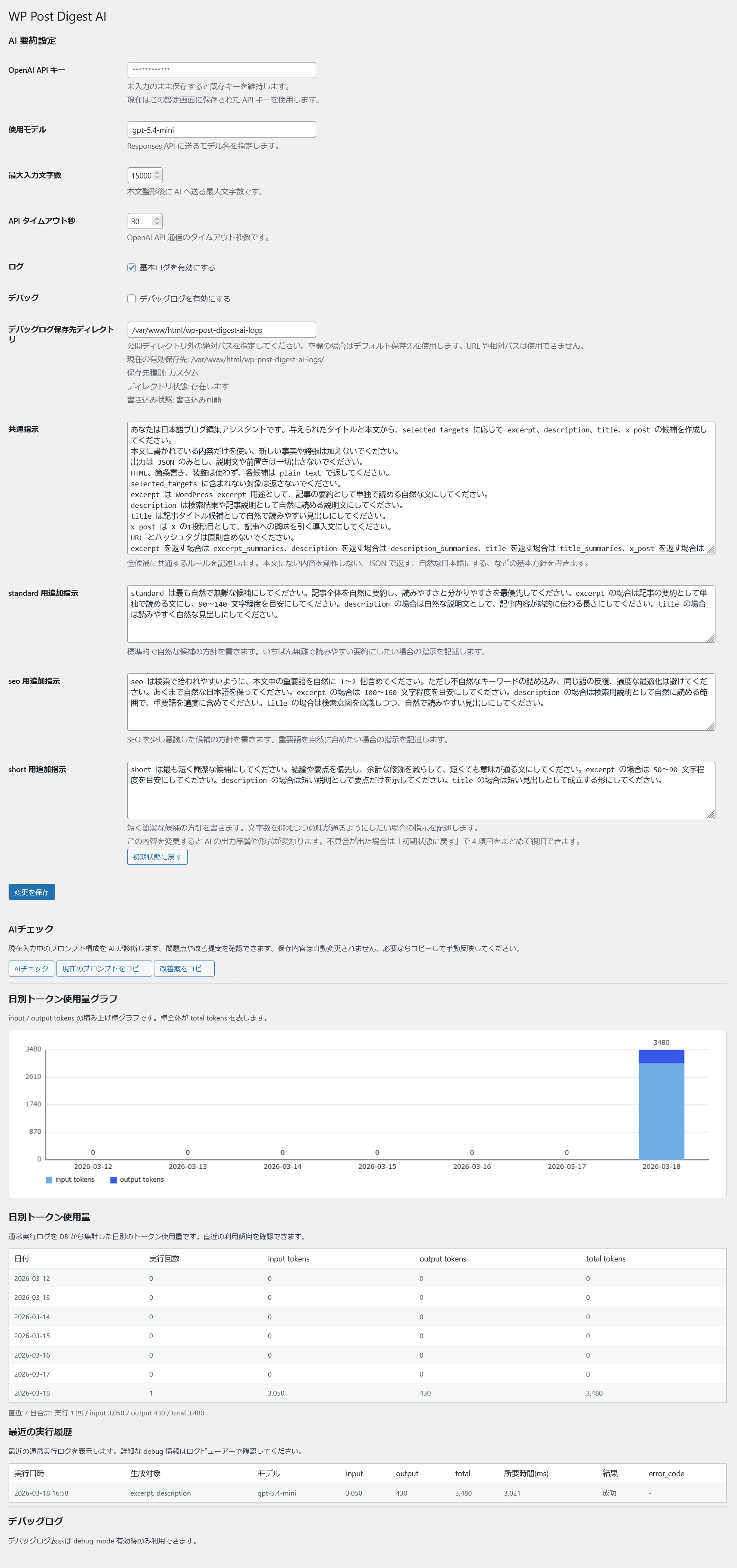
<p>設定画面では、ただ API キーを入れるだけでなく、いくつか便利な機能を用意しています。</p>


<div class="wp-block-image">
<figure class="aligncenter size-full"><img decoding="async" width="1709" height="3637" src="https://www.u-1.net/wp-content/uploads/2026/03/WP-Post-Digest-AI_admin.png" alt="" class="wp-image-6255" srcset="https://www.u-1.net/wp-content/uploads/2026/03/WP-Post-Digest-AI_admin.png 1709w, https://www.u-1.net/wp-content/uploads/2026/03/WP-Post-Digest-AI_admin-768x1634.png 768w, https://www.u-1.net/wp-content/uploads/2026/03/WP-Post-Digest-AI_admin-722x1536.png 722w, https://www.u-1.net/wp-content/uploads/2026/03/WP-Post-Digest-AI_admin-962x2048.png 962w" sizes="(max-width: 1709px) 100vw, 1709px" /><figcaption class="wp-element-caption">プラグイン管理画面</figcaption></figure>
</div>


<h3 class="wp-block-heading">使用モデル選択</h3>


<p>ChatGPT が提供している各種APIの名前を入力してください。<br>高性能なモデルほどコストがかかりますので、miniやnanoのモデルで十分かと思います。</p>


<p>現在は手動入力の必要がありますので、OpenAI のサイトを確認して適切に選択してください。</p>


<div class="swell-block-postLink">			<div class="p-blogCard -external" data-type="type2" data-onclick="clickLink">
				<div class="p-blogCard__inner">
					<span class="p-blogCard__caption">あわせて読みたい</span>
					<div class="p-blogCard__thumb c-postThumb"><figure class="c-postThumb__figure"><img decoding="async" src="https://developers.openai.com/og/api/docs/models.png" alt="" class="c-postThumb__img u-obf-cover" width="320" height="180"></figure></div>					<div class="p-blogCard__body">
						<a class="p-blogCard__title" href="https://developers.openai.com/api/docs/models" target="_blank" rel="noopener noreferrer">Models | OpenAI API</a>
						<span class="p-blogCard__excerpt">Explore all available models on the OpenAI Platform.</span>					</div>
				</div>
			</div>
		</div>


<h3 class="wp-block-heading">生成プロンプトの調整</h3>


<p>プロンプトは以下のように分けて調整できます。</p>


<ul class="wp-block-list">
<li>共通指示</li>


<li>standard 用追加指示</li>


<li>seo 用追加指示</li>


<li>short 用追加指示</li>
</ul>


<p>この構成にしてあるので、全体の文体は共通指示で、個別の傾向は各追加指示で調整できます。</p>


<h3 class="wp-block-heading">AIチェック</h3>


<p>設定したプロンプトに対して、AI でチェックをかけることもできます。</p>


<ul class="wp-block-list">
<li>指示の重複</li>


<li>役割の曖昧さ</li>


<li>JSON 返却前提が崩れていないか</li>


<li> 改善の提案</li>
</ul>


<p>などを見てもらえるので、プロンプト調整時の補助として使えます。</p>


<h3 class="wp-block-heading">トークン使用量の確認</h3>


<p>管理画面では、日別トークン使用量も確認できます。</p>


<ul class="wp-block-list">
<li>日別の数値テーブル</li>


<li>積み上げ棒グラフ</li>
</ul>


<p>両方で見られるので、使いすぎていないか、どのくらいのペースで消費しているかをざっくり把握できます。</p>


<h3 class="wp-block-heading">最近の実行履歴</h3>


<p>最近の実行履歴も見られます。</p>


<ul class="wp-block-list">
<li>いつ実行したか</li>


<li>何を生成したか</li>


<li>どのモデルを使ったか</li>


<li>どれくらいトークンを使ったか</li>


<li>成功したかどうか</li>
</ul>


<p>といった情報を確認できるので、動作確認にも便利です。</p>


<h3 class="wp-block-heading">最大入力文字数の設定</h3>


<p>AIモデルへのデータ送信、受信の際に上限として設定する数値です。テスト時は8000で安定していましたが実環境に投入するとエラーとなったため、現在は15000としています。利用環境により数値は変化しますので、何回か利用して過不足ない数値を設定してください。</p>


<p>エラー発生時はデバッグログで受信が正常にできたかどうかの確認ができます。</p>


<h3 class="wp-block-heading">デバッグログ保存ディレクトリの変更</h3>


<p>デバッグログは通常プラグインディレクトリ内に作成されます。直接アクセスされると閲覧可能となるため、適切にアクセス制限を行う必要があります。<span class="swl-marker mark_orange">Apacheの場合は .htaccess による制限</span>、<span class="swl-marker mark_orange">nginxは locationディレクティブの使用</span>などで対策を行ってください。</p>


<p>また、自前で管理しているサーバーの場合は、ドキュメントルート外に保存ディレクトリを設置することができますので、その場合はディレクトリを作成し、<code>デバッグログ保存先ディレクトリ</code>を指定してください。</p>


<h2 class="wp-block-heading">このプラグインが向いている人</h2>


<p>使ってみた感覚としては、こんな人に向いています。</p>


<ul class="wp-block-list">
<li>個人ブログを更新している人</li>


<li>公開前の仕上げを少し楽にしたい人</li>


<li>AIに全部任せるのではなく、候補を見て自分で選びたい人</li>


<li>Gutenberg の投稿画面内で完結したい人</li>
</ul>


<h2 class="wp-block-heading">まとめ</h2>


<p><span class="swl-marker mark_green">WP Post Digest AI</span> は、WordPress 投稿画面で</p>


<ul class="wp-block-list">
<li>要約文</li>


<li>description</li>


<li>タイトル</li>


<li>Xポスト文</li>
</ul>


<p>をまとめて生成できる、個人ブログ向けの AI 支援プラグインです。</p>


<p>自分の用途に合わせて作ったものですが、同じようにブログ更新の仕上げを少し楽にしたい人には、けっこう便利に使えると思います。</p>


<p>必要なものだけ生成する構成なので、無駄なトークン消費を抑えやすいのも気に入っているポイントです。</p>


<p>興味がある方は、よければ試してみてください。</p>


<h2 class="wp-block-heading">ダウンロード</h2>


<a  data-e-Disable-Page-Transition="true" class="download-link filetype-icon filetype-zip" title="" href="https://www.u-1.net/download/6248/?tmstv=1780142869" rel="nofollow" id="download-link-6248" data-redirect="false" >
	wp-post-digest-ai-0.1.0.zip	(68 ダウンロード	)
</a>


]]></content>
		
					<link rel="replies" type="text/html" href="https://www.u-1.net/2026/03/18/6247/#comments" thr:count="0" />
			<link rel="replies" type="application/atom+xml" href="https://www.u-1.net/2026/03/18/6247/feed/atom/" thr:count="0" />
			<thr:total>0</thr:total>
			</entry>
		<entry>
		<author>
			<name>ゆーいち</name>
							<uri>http://www.u-1.net/</uri>
						</author>

		<title type="html"><![CDATA[トラブル対応：MacBook Air M5 で外部ストレージが表示されない現象に遭遇した件]]></title>
		<link rel="alternate" type="text/html" href="https://www.u-1.net/2026/03/17/6236/" />

		<id>https://www.u-1.net/?p=6236</id>
		<updated>2026-03-17T10:44:03Z</updated>
		<published>2026-03-17T11:00:00Z</published>
		<category scheme="https://www.u-1.net" term="コンピュータ" /><category scheme="https://www.u-1.net" term="セキュリティ" /><category scheme="https://www.u-1.net" term="Apple" /><category scheme="https://www.u-1.net" term="MacbookAir" /><category scheme="https://www.u-1.net" term="ESET" />
		<summary type="html"><![CDATA[<p><img src="https://www.u-1.net/wp-content/uploads/2026/03/essential.jpg" class="webfeedsFeaturedVisual" /></p>MacBook Air M5でTime Machine用の外付けHDDやSDカードが表示されず、Tahoeのバグを疑ったが、ログからESETが外部デバイスを延々ブロックしていると判明。デバイスコントロールの設定でバックアップ用HDDを例外にして復旧、バックアップ速度も向上した。]]></summary>

					<content type="html" xml:base="https://www.u-1.net/2026/03/17/6236/"><![CDATA[<p><img src="https://www.u-1.net/wp-content/uploads/2026/03/essential.jpg" class="webfeedsFeaturedVisual" /></p>
<h1 class="wp-block-heading">あれ、TimeMachine用のディスクが見えなくなってね？</h1>


<h2 class="wp-block-heading">なぜかバックアップ用の HDD が MacBook Air で認識されていない</h2>


<p><a href="https://www.u-1.net/2026/03/16/6220/" data-type="post" data-id="6220">先日購入</a>して、環境移行も終わり通常運行に乗せる段になって気付いた現象。</p>


<img src="https://www.u-1.net/wp-content/uploads/tegaki-cache/e312cbf95588d0a4a190e6272c1055e9a3c7c364a8877f32e2e2c9e8494dca48.png" alt="外付けメディアが見えていない……？" class="wp-tegaki-image" loading="lazy" decoding="async" width="632" height="57" />


<p>ドック（Caldigit TS3 Plus）経由ですが、これまで使用していた M2 モデルでは問題なく認識していた外付けの USB HDD のアイコンがデスクトップに表示されていません。<br>ドックとの相性かなと本体と直結してみても認識せず、すわ 初期不良か？ OSの不具合か？ とややテンパりつつ解決策を探しました。</p>


<figure class="wp-block-embed is-type-rich is-provider-twitter wp-block-embed-twitter"><div class="wp-block-embed__wrapper">
<div class="embed-twitter"><blockquote class="twitter-tweet" data-width="500" data-dnt="true"><p lang="ja" dir="ltr">細かくいうとシステム情報やディスクユーティリティ上ではデバイス情報は取れる。だがマウントされない。<br>軽く検索するとこんな情報が<a href="https://t.co/W2AyKV64M2">https://t.co/W2AyKV64M2</a><br>OSのバグの可能性が高いが、これは困ったぞ。</p>&mdash; ゆーいち (@yuuichi) <a href="https://twitter.com/yuuichi/status/2033003187976941958?ref_src=twsrc%5Etfw">March 15, 2026</a></blockquote><script async src="https://platform.twitter.com/widgets.js" charset="utf-8"></script></div>
</div></figure>


<h2 class="wp-block-heading">最近更新された OS のバージョンによって発生するエラーがある？</h2>


<p>まず検索して引っかかったのが、Tahoe 26.3 で発生するゴーストドライブバグと呼ばれている現象。</p>


<div class="swell-block-postLink">			<div class="p-blogCard -external" data-type="type2" data-onclick="clickLink">
				<div class="p-blogCard__inner">
					<span class="p-blogCard__caption">macOS Tahoe</span>
					<div class="p-blogCard__thumb c-postThumb"><figure class="c-postThumb__figure"><img decoding="async" src="https://macos-tahoe.com/images/blog/macos-tahoe-26-3-external-drive-ghost-drive-bug-fix-guide-2026/hero.webp" alt="" class="c-postThumb__img u-obf-cover" width="320" height="180"></figure></div>					<div class="p-blogCard__body">
						<a class="p-blogCard__title" href="https://macos-tahoe.com/ja/blog/macos-tahoe-26-3-external-drive-ghost-drive-bug-fix-guide-2026/" target="_blank" rel="noopener noreferrer">macOS Tahoe 26.3 外部ドライブがマウントできない：ゴーストドライブバグの完全修正ガイド</a>
						<span class="p-blogCard__excerpt">macOS Tahoe 26.3のゴーストドライブバグを修正します。USB-C、USB-A、Thunderboltドライブがマウントできない問題をdiskutil、暗号化修正、回避策を使って段階的に解決し&#8230;</span>					</div>
				</div>
			</div>
		</div>


<p>確かに、ここに書かれているように、ディスクユーティリティではドライブの情報が取れているのに、マウントを失敗する状況でした。<br>しかし、解決手順を試してみても、マウントを成功しません。HDD だけでなく SDカードでも試してみましたがどちらも同じ状況。</p>


<p>もう少し検索するとRedditで以下の情報を見つけました。</p>


<h2 class="wp-block-heading">ウィルし対策ソフトの設定……だと？</h2>


<figure class="wp-block-embed is-type-rich is-provider-twitter wp-block-embed-twitter"><div class="wp-block-embed__wrapper">
<div class="embed-twitter"><blockquote class="twitter-tweet" data-width="500" data-dnt="true"><p lang="ja" dir="ltr">外付けディスクを認識しない問題、さらに検索したらこんな情報にあたり、ESETの設定をチェックしたらビンゴ！<a href="https://t.co/vSa4BA2mjQ">https://t.co/vSa4BA2mjQ</a></p>&mdash; ゆーいち (@yuuichi) <a href="https://twitter.com/yuuichi/status/2033037041806750196?ref_src=twsrc%5Etfw">March 15, 2026</a></blockquote><script async src="https://platform.twitter.com/widgets.js" charset="utf-8"></script></div>
</div></figure>


<p>文脈的には OS アップデート後ということで、Tahoe 26.3 が悪さしているという雰囲気のスレですが、ESETの設定見直しで改善したという情報があって、ピンと来た……来てしまったのです。</p>


<figure class="wp-block-embed is-type-rich is-provider-twitter wp-block-embed-twitter"><div class="wp-block-embed__wrapper">
<div class="embed-twitter"><blockquote class="twitter-tweet" data-width="500" data-dnt="true"><p lang="ja" dir="ltr">デバイスコントロールを無効にして再起動するとディスク見えるようになった。そしてデフォルトでは外部メディアは全部無効にするらしい。マジで！？<br>個別に有効にするのは後回しにして、まずは外部メディアのブロックを無効にして解決。 <a href="https://t.co/ioFMsseitZ">pic.twitter.com/ioFMsseitZ</a></p>&mdash; ゆーいち (@yuuichi) <a href="https://twitter.com/yuuichi/status/2033037051638198647?ref_src=twsrc%5Etfw">March 15, 2026</a></blockquote><script async src="https://platform.twitter.com/widgets.js" charset="utf-8"></script></div>
</div></figure>


<p>ESET のデバイスコントロールの設定を確認すると、デフォルトでは外部デバイスの接続はブロックする状態。そして、ログファイルを見ると延々とブロックしている履歴が残ってました。これかい……。</p>


<p>確かにアプリを移行せず、再インストールしたわけで、ここの設定が初期化されてしまったということなのでしょうが、この設定をいじった記憶ないんですよねえ……。</p>


<p>「ESET デバイスコントロール」で検索するとそれっぽい情報ヒットしますね。割と既知の問題だったのか。</p>


<div class="swell-block-postLink">			<div class="p-blogCard -external -noimg" data-type="type2" data-onclick="clickLink">
				<div class="p-blogCard__inner">
					<span class="p-blogCard__caption">あわせて読みたい</span>
										<div class="p-blogCard__body">
						<a class="p-blogCard__title" href="https://support.eset.com/jp/kb8856-eset-endpoint-security-for-macos" target="_blank" rel="noopener noreferrer">[KB8856] ESET Endpoint Security for macOSのデバイスコントロール</a>
						<span class="p-blogCard__excerpt"></span>					</div>
				</div>
			</div>
		</div>

<div class="swell-block-postLink">			<div class="p-blogCard -external -noimg" data-type="type2" data-onclick="clickLink">
				<div class="p-blogCard__inner">
					<span class="p-blogCard__caption">あわせて読みたい</span>
										<div class="p-blogCard__body">
						<a class="p-blogCard__title" href="https://help.media.hiroshima-u.ac.jp/index.php?action=faq&#038;cat=25&#038;id=226&#038;artlang=ja" target="_blank" rel="noopener noreferrer">よくある質問と答え（FAQs） &#8211; [ウイルス対策] ESET9をインストールしたら，外部メディアがマウントできな&#8230;</a>
						<span class="p-blogCard__excerpt"> ESETの「デバイスコントロール」が有効になっていると，外部メディアがマウントできません。デバイスコントロールを無効にするか，有効のままルールを設定することで解決&#8230;</span>					</div>
				</div>
			</div>
		</div>


<h2 class="wp-block-heading">その後は快適に利用できています</h2>


<p>ということでデバイスコントロールを無効にするのも、それはそれでシャクなので特定のデバイス（バックアップ用 HDD ）については無効化しないように新しいルールを設定して改善させました。</p>


<p>おかげでバックアップについては問題なくできるようになり、さらにマシンパワーが上がったせいか、環境が綺麗になったせいかバックアップ速度も大幅にアップして快適度が増した印象です。</p>


<p>セキュリティソフトの問題というよりは使い方の問題だったので誰も悪くない……というよりユーザーの問題というオチでありました。おかしいと思ったらシステムに近い部分のソフトウェアからチェックしていく、基本ではありますが自戒を込めて記録に残しておきます。</p>
]]></content>
		
					<link rel="replies" type="text/html" href="https://www.u-1.net/2026/03/17/6236/#comments" thr:count="0" />
			<link rel="replies" type="application/atom+xml" href="https://www.u-1.net/2026/03/17/6236/feed/atom/" thr:count="0" />
			<thr:total>0</thr:total>
			</entry>
		<entry>
		<author>
			<name>ゆーいち</name>
							<uri>http://www.u-1.net/</uri>
						</author>

		<title type="html"><![CDATA[M5 チップ搭載の 2026年 MacBook Air 13 インチモデルを購入しました]]></title>
		<link rel="alternate" type="text/html" href="https://www.u-1.net/2026/03/16/6220/" />

		<id>https://www.u-1.net/?p=6220</id>
		<updated>2026-03-16T07:43:41Z</updated>
		<published>2026-03-16T07:00:00Z</published>
		<category scheme="https://www.u-1.net" term="コンピュータ" /><category scheme="https://www.u-1.net" term="散財" /><category scheme="https://www.u-1.net" term="Apple" /><category scheme="https://www.u-1.net" term="MacbookAir" />
		<summary type="html"><![CDATA[<p><img src="https://www.u-1.net/wp-content/uploads/2026/03/MacBookAir-2026-eyecatch.jpg" class="webfeedsFeaturedVisual" /></p>3月3日発表のMacBook Air M5を購入。13インチ・スカイブルー・32GBメモリ・512GB SSD構成で、M2モデルからの買い替え理由、到着、セットアップ、体感速度をレビュー。]]></summary>

					<content type="html" xml:base="https://www.u-1.net/2026/03/16/6220/"><![CDATA[<p><img src="https://www.u-1.net/wp-content/uploads/2026/03/MacBookAir-2026-eyecatch.jpg" class="webfeedsFeaturedVisual" /></p>
<p class="has-text-align-center"><img src="https://www.u-1.net/wp-content/uploads/tegaki-cache/b40a99a7479b9daedbd55257a695cd5cdc5166f425f1c0df4902ec035b138df1.png" alt="……買っちった" class="wp-tegaki-image" loading="lazy" decoding="async" width="468" height="85" /></p>


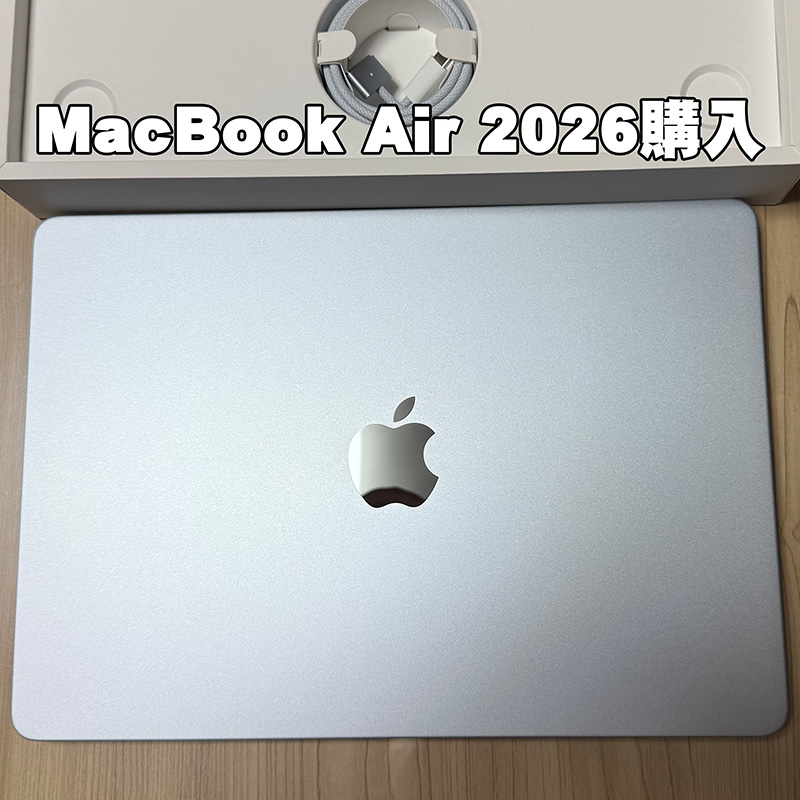
<p>3月3日に発表された、MacBook Air M5チップ搭載の新モデルについて、勢いに任せて購入しました。</p>


<div class="swell-block-postLink">			<div class="p-blogCard -external" data-type="type2" data-onclick="clickLink">
				<div class="p-blogCard__inner">
					<span class="p-blogCard__caption">Apple（日本）</span>
					<div class="p-blogCard__thumb c-postThumb"><figure class="c-postThumb__figure"><img decoding="async" src="https://www.apple.com/jp/macbook-air/images/meta/macbook_air_mx__ez5y0k5yy7au_og.png?202603270231" alt="" class="c-postThumb__img u-obf-cover" width="320" height="180"></figure></div>					<div class="p-blogCard__body">
						<a class="p-blogCard__title" href="https://www.apple.com/jp/macbook-air/" target="_blank" rel="noopener noreferrer">13インチMacBook Airと15インチMacBook Air</a>
						<span class="p-blogCard__excerpt">超高速のM5チップを搭載したMacBook Airノートブック。軽いボディに、一日中使えるバッテリーを内蔵。AIとApple Intelligenceのために設計。</span>					</div>
				</div>
			</div>
		</div>


<p>今までは MacBook Air M2 モデルを使用していたので4年振りくらいの更新となります。</p>


<p>M2 モデルでも特に不満はなかったので、発表まではノートPCの更新はよほどの事がなければ当面はしないだろうなあと思っていました。<br>しかしながら、M2モデルを割と好条件で譲り受けてくれる人が現れたので、その金額を考慮するとだいぶ値頃になったため思い切って購入しました。</p>


<figure class="wp-block-embed is-type-rich is-provider-twitter wp-block-embed-twitter"><div class="wp-block-embed__wrapper">
<div class="embed-twitter"><blockquote class="twitter-tweet" data-width="500" data-dnt="true"><p lang="ja" dir="ltr">うは、買ったったw<br>メモリだけ32GBに盛った。 <a href="https://t.co/bPUygFDsv4">pic.twitter.com/bPUygFDsv4</a></p>&mdash; ゆーいち (@yuuichi) <a href="https://twitter.com/yuuichi/status/2029801959210024989?ref_src=twsrc%5Etfw">March 6, 2026</a></blockquote><script async src="https://platform.twitter.com/widgets.js" charset="utf-8"></script></div>
</div></figure>


<figure class="wp-block-embed is-type-rich is-provider-twitter wp-block-embed-twitter"><div class="wp-block-embed__wrapper">
<div class="embed-twitter"><blockquote class="twitter-tweet" data-width="500" data-dnt="true"><p lang="ja" dir="ltr">今使ってるM2 Macbook Air は10万円で譲れたので、かなりおトクにアップグレードできた</p>&mdash; ゆーいち (@yuuichi) <a href="https://twitter.com/yuuichi/status/2029804359283077379?ref_src=twsrc%5Etfw">March 6, 2026</a></blockquote><script async src="https://platform.twitter.com/widgets.js" charset="utf-8"></script></div>
</div></figure>


<h2 class="wp-block-heading">購入したモデル</h2>


<p>購入モデルは13インチのスカイブルー。主なスペックは</p>


<ul class="wp-block-list">
<li>CPU：10コア／GPU：10コア</li>


<li>メモリ：32GB</li>


<li>SSD：512GB</li>
</ul>


<p>と、M5 チップとメモリ容量だけ盛ってカスタマイズしました。<br>ここ最近はプログラム開発で Docke rやらもよく使うようになったため、24GB ではだいぶメモリ利用率が高くなったため、今後の安心を買うという意味で最大限まで追加。<br>ストレージについては今まで使っていた M2 モデルも 512GB に増設したモデルを使用していましたが利用率でいうと50%前後だったため、そこから過剰に使用することはないだろうという前提で、標準容量にしました。</p>


<div id="rinkerid6218" class="yyi-rinker-contents  yyi-rinker-tagid-1444 yyi-rinker-postid-6218 yyi-rinker-img-m yyi-rinker-catid-10 ">
	<div class="yyi-rinker-box">
		<div class="yyi-rinker-image">
							<a href="https://www.amazon.co.jp/dp/B0GR1LGT2H/?tag=moments-22&#038;linkCode=as1&#038;creative=6339" rel="nofollow" class="yyi-rinker-tracking"  data-click-tracking="amazon_img 6218 Apple 2026 MacBook Air 13インチ スカイブルー" data-vars-click-id="amazon_img 6218 Apple 2026 MacBook Air 13インチ スカイブルー"><img decoding="async" src="https://m.media-amazon.com/images/I/71kKQjKzW1L._AC_SL1500_.jpg"  class="yyi-rinker-main-img" style="border: none;"></a>					</div>
		<div class="yyi-rinker-info">
			<div class="yyi-rinker-title">
									<a href="https://www.amazon.co.jp/dp/B0GR1LGT2H/?tag=moments-22&#038;linkCode=as1&#038;creative=6339" rel="nofollow" class="yyi-rinker-tracking" data-click-tracking="amazon_title 6218 Apple 2026 MacBook Air 13インチ スカイブルー" data-vars-amp-click-id="amazon_title 6218 Apple 2026 MacBook Air 13インチ スカイブルー" >Apple 2026 MacBook Air 13インチ スカイブルー</a>							</div>
			<div class="yyi-rinker-detail">
							<div class="credit-box">created by&nbsp;<a href="https://oyakosodate.com/rinker/" rel="nofollow noopener" target="_blank" >Rinker</a></div>
										<div class="price-box">
							</div>
						</div>
						<ul class="yyi-rinker-links">
																                    <li class="amazonlink">
						<a href="https://www.amazon.co.jp/dp/B0GR1LGT2H/?tag=moments-22&amp;linkCode=as1&amp;creative=6339" rel="nofollow" class="yyi-rinker-link yyi-rinker-tracking"  data-click-tracking="amazon 6218 Apple 2026 MacBook Air 13インチ スカイブルー"  data-vars-amp-click-id="amazon 6218 Apple 2026 MacBook Air 13インチ スカイブルー">Amazon</a>					</li>
													<li class="rakutenlink">
						<a href="https://hb.afl.rakuten.co.jp/hgc/16d3383e.205eee66.16d3383f.60445da4/Rinker_o_20260315215314?pc=https%3A%2F%2Fsearch.rakuten.co.jp%2Fsearch%2Fmall%2FApple%2B2026%2BMacBook%2BAir%2B13%25E3%2582%25A4%25E3%2583%25B3%25E3%2583%2581%2B%25E3%2582%25B9%25E3%2582%25AB%25E3%2582%25A4%25E3%2583%2596%25E3%2583%25AB%25E3%2583%25BC%2F%3Ff%3D1%26grp%3Dproduct&amp;m=https%3A%2F%2Fsearch.rakuten.co.jp%2Fsearch%2Fmall%2FApple%2B2026%2BMacBook%2BAir%2B13%25E3%2582%25A4%25E3%2583%25B3%25E3%2583%2581%2B%25E3%2582%25B9%25E3%2582%25AB%25E3%2582%25A4%25E3%2583%2596%25E3%2583%25AB%25E3%2583%25BC%2F%3Ff%3D1%26grp%3Dproduct" rel="nofollow" class="yyi-rinker-link yyi-rinker-tracking"  data-click-tracking="rakuten 6218 Apple 2026 MacBook Air 13インチ スカイブルー"  data-vars-amp-click-id="rakuten 6218 Apple 2026 MacBook Air 13インチ スカイブルー">楽天市場</a>					</li>
													<li class="yahoolink">
						<a href="https://shopping.yahoo.co.jp/search?p=Apple+2026+MacBook+Air+13%E3%82%A4%E3%83%B3%E3%83%81+%E3%82%B9%E3%82%AB%E3%82%A4%E3%83%96%E3%83%AB%E3%83%BC" rel="nofollow" class="yyi-rinker-link yyi-rinker-tracking"  data-click-tracking="yahoo 6218 Apple 2026 MacBook Air 13インチ スカイブルー"  data-vars-amp-click-id="yahoo 6218 Apple 2026 MacBook Air 13インチ スカイブルー">Yahooショッピング</a>					</li>
				                                    <li class="mercarilink">
                        <a href="https://jp.mercari.com/search?keyword=Apple%202026%20MacBook%20Air%2013%E3%82%A4%E3%83%B3%E3%83%81%20%E3%82%B9%E3%82%AB%E3%82%A4%E3%83%96%E3%83%AB%E3%83%BC&amp;utm_source=Rinker&amp;afid=5749409602" rel="nofollow" class="yyi-rinker-link yyi-rinker-tracking"  data-click-tracking="mercari 6218 Apple 2026 MacBook Air 13インチ スカイブルー"  data-vars-amp-click-id="mercari 6218 Apple 2026 MacBook Air 13インチ スカイブルー">メルカリ</a>                    </li>
                											</ul>
					</div>
	</div>
</div>


<h2 class="wp-block-heading">到着まで</h2>


<figure class="wp-block-embed is-type-rich is-provider-twitter wp-block-embed-twitter"><div class="wp-block-embed__wrapper">
<div class="embed-twitter"><blockquote class="twitter-tweet" data-width="500" data-dnt="true"><p lang="ja" dir="ltr">MacBook Air M5出荷された。でも、海外からの配送なので到着は遅いのね。 <a href="https://t.co/IGwX8U2YeF">pic.twitter.com/IGwX8U2YeF</a></p>&mdash; ゆーいち (@yuuichi) <a href="https://twitter.com/yuuichi/status/2031275493509779493?ref_src=twsrc%5Etfw">March 10, 2026</a></blockquote><script async src="https://platform.twitter.com/widgets.js" charset="utf-8"></script></div>
</div></figure>


<p>注文は、予約開始が始まった直後に終わらせたのですが、カスタマイズ商品は13日到着の案内となっていました。</p>


<figure class="wp-block-embed is-type-rich is-provider-twitter wp-block-embed-twitter"><div class="wp-block-embed__wrapper">
<div class="embed-twitter"><blockquote class="twitter-tweet" data-width="500" data-dnt="true"><p lang="ja" dir="ltr">MacBook Airは予定通り国内に到着した模様。明日の受け取りはほぼ確定だな。仕事なので夜の時間指定配達に変更した。 <a href="https://t.co/L7vLkbJQ9t">pic.twitter.com/L7vLkbJQ9t</a></p>&mdash; ゆーいち (@yuuichi) <a href="https://twitter.com/yuuichi/status/2032001123381625197?ref_src=twsrc%5Etfw">March 12, 2026</a></blockquote><script async src="https://platform.twitter.com/widgets.js" charset="utf-8"></script></div>
</div></figure>


<p>ということで発送の通知は早かったのですが、実際には上海からの出荷となったため荷物受付になって国内に着くまで少し待たされた感じです。<br>でも、出荷通知が来てから3日で到着するのは普通に早いですよね。</p>


<h2 class="wp-block-heading">ねんがんの 新モデルを てにいれた！</h2>


<p>ということで13日の夜配達で無事に受領。まぁ、私は帰宅したのは夜10時くらいだったのですが。</p>


<figure class="wp-block-embed is-type-rich is-provider-twitter wp-block-embed-twitter"><div class="wp-block-embed__wrapper">
<div class="embed-twitter"><blockquote class="twitter-tweet" data-width="500" data-dnt="true"><p lang="ja" dir="ltr">my new gear…!<br>本日届きました。セットアップするぞー。 <a href="https://t.co/FuBoOaPicA">pic.twitter.com/FuBoOaPicA</a></p>&mdash; ゆーいち (@yuuichi) <a href="https://twitter.com/yuuichi/status/2032445594086822060?ref_src=twsrc%5Etfw">March 13, 2026</a></blockquote><script async src="https://platform.twitter.com/widgets.js" charset="utf-8"></script></div>
</div></figure>


<figure class="wp-block-embed is-type-rich is-provider-twitter wp-block-embed-twitter"><div class="wp-block-embed__wrapper">
<div class="embed-twitter"><blockquote class="twitter-tweet" data-width="500" data-dnt="true"><p lang="ja" dir="ltr">データだけ転送して、アプリとか設定はイチからやり直す。明日は休みだから時間使えますゆえ。 <a href="https://t.co/ok2D0d9sQZ">pic.twitter.com/ok2D0d9sQZ</a></p>&mdash; ゆーいち (@yuuichi) <a href="https://twitter.com/yuuichi/status/2032453007393321436?ref_src=twsrc%5Etfw">March 13, 2026</a></blockquote><script async src="https://platform.twitter.com/widgets.js" charset="utf-8"></script></div>
</div></figure>


<p>そしてそのまま勢いに任せてセットアップを実施。データ転送はThunderboltケーブル経由で行ったので、30分かからなかったかな。</p>


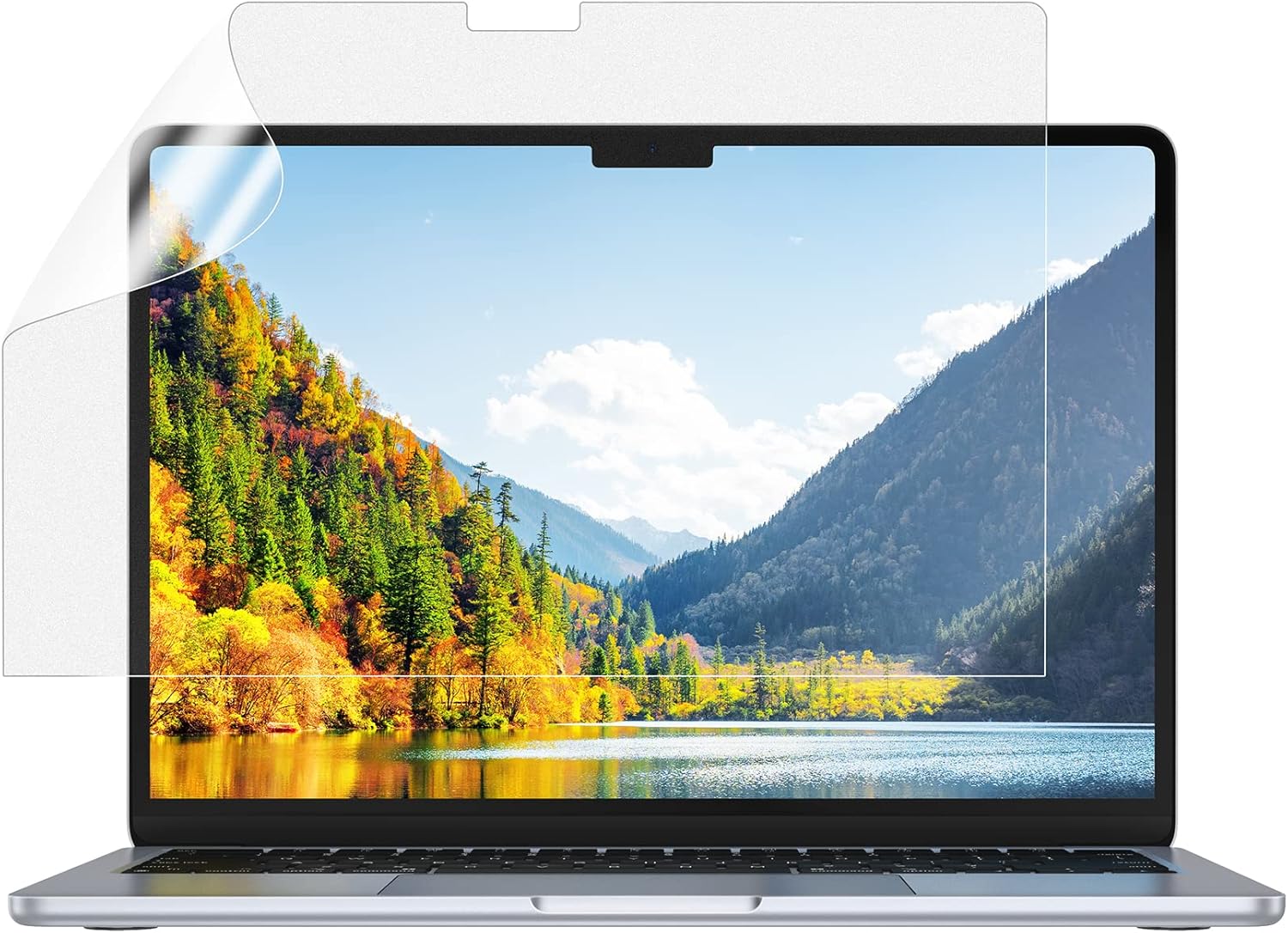
<p>事前に購入していた保護フィルムを貼ったら大変な気泡祭りとなって諦めて再注文したりと細かい失敗はありましたが移行完了です。</p>


<h3 class="wp-block-heading">事前に購入していたアクセサリー</h3>


<p>今は比較的安価で品質も良い商品が色々ありますので、事前に評価の良かった商品を注文しておきました。<br>アンチグレアの保護フィルムは説明書通りに貼らないと気泡が至る所にできてしまい、リカバリできず再購入となってしいました。</p>


<div id="rinkerid6213" class="yyi-rinker-contents  yyi-rinker-tagid-1429 yyi-rinker-postid-6213 yyi-rinker-img-m yyi-rinker-catid-10 ">
	<div class="yyi-rinker-box">
		<div class="yyi-rinker-image">
							<a href="https://www.amazon.co.jp/dp/B0B156S4DF?tag=moments-22&#038;linkCode=as1&#038;creative=6339" rel="nofollow" class="yyi-rinker-tracking"  data-click-tracking="amazon_img 6213 MOFT【公式直営店】ノートパソコンスタンド ノートPCスタンド AirFlow (クールグレー)" data-vars-click-id="amazon_img 6213 MOFT【公式直営店】ノートパソコンスタンド ノートPCスタンド AirFlow (クールグレー)"><img decoding="async" src="https://m.media-amazon.com/images/I/61jjJF4WN0L._AC_SL1500_.jpg"  class="yyi-rinker-main-img" style="border: none;"></a>					</div>
		<div class="yyi-rinker-info">
			<div class="yyi-rinker-title">
									<a href="https://www.amazon.co.jp/dp/B0B156S4DF?tag=moments-22&#038;linkCode=as1&#038;creative=6339" rel="nofollow" class="yyi-rinker-tracking" data-click-tracking="amazon_title 6213 MOFT【公式直営店】ノートパソコンスタンド ノートPCスタンド AirFlow (クールグレー)" data-vars-amp-click-id="amazon_title 6213 MOFT【公式直営店】ノートパソコンスタンド ノートPCスタンド AirFlow (クールグレー)" >MOFT【公式直営店】ノートパソコンスタンド ノートPCスタンド AirFlow (クールグレー)</a>							</div>
			<div class="yyi-rinker-detail">
							<div class="credit-box">created by&nbsp;<a href="https://oyakosodate.com/rinker/" rel="nofollow noopener" target="_blank" >Rinker</a></div>
										<div class="price-box">
							</div>
						</div>
						<ul class="yyi-rinker-links">
																                    <li class="amazonlink">
						<a href="https://www.amazon.co.jp/dp/B0B156S4DF?tag=moments-22&amp;linkCode=as1&amp;creative=6339" rel="nofollow" class="yyi-rinker-link yyi-rinker-tracking"  data-click-tracking="amazon 6213 MOFT【公式直営店】ノートパソコンスタンド ノートPCスタンド AirFlow (クールグレー)"  data-vars-amp-click-id="amazon 6213 MOFT【公式直営店】ノートパソコンスタンド ノートPCスタンド AirFlow (クールグレー)">Amazon</a>					</li>
													<li class="rakutenlink">
						<a href="https://hb.afl.rakuten.co.jp/hgc/16d3383e.205eee66.16d3383f.60445da4/Rinker_o_20260315214034?pc=https%3A%2F%2Fsearch.rakuten.co.jp%2Fsearch%2Fmall%2FMOFT%2B%25E3%2583%258E%25E3%2583%25BC%25E3%2583%2588%25E3%2583%2591%25E3%2582%25BD%25E3%2582%25B3%25E3%2583%25B3%25E3%2582%25B9%25E3%2582%25BF%25E3%2583%25B3%25E3%2583%2589%2B%25E3%2583%258E%25E3%2583%25BC%25E3%2583%2588PC%25E3%2582%25B9%25E3%2582%25BF%25E3%2583%25B3%25E3%2583%2589%2BAirFlow%2F%3Ff%3D1%26grp%3Dproduct&amp;m=https%3A%2F%2Fsearch.rakuten.co.jp%2Fsearch%2Fmall%2FMOFT%2B%25E3%2583%258E%25E3%2583%25BC%25E3%2583%2588%25E3%2583%2591%25E3%2582%25BD%25E3%2582%25B3%25E3%2583%25B3%25E3%2582%25B9%25E3%2582%25BF%25E3%2583%25B3%25E3%2583%2589%2B%25E3%2583%258E%25E3%2583%25BC%25E3%2583%2588PC%25E3%2582%25B9%25E3%2582%25BF%25E3%2583%25B3%25E3%2583%2589%2BAirFlow%2F%3Ff%3D1%26grp%3Dproduct" rel="nofollow" class="yyi-rinker-link yyi-rinker-tracking"  data-click-tracking="rakuten 6213 MOFT【公式直営店】ノートパソコンスタンド ノートPCスタンド AirFlow (クールグレー)"  data-vars-amp-click-id="rakuten 6213 MOFT【公式直営店】ノートパソコンスタンド ノートPCスタンド AirFlow (クールグレー)">楽天市場</a>					</li>
													<li class="yahoolink">
						<a href="https://shopping.yahoo.co.jp/search?p=MOFT+%E3%83%8E%E3%83%BC%E3%83%88%E3%83%91%E3%82%BD%E3%82%B3%E3%83%B3%E3%82%B9%E3%82%BF%E3%83%B3%E3%83%89+%E3%83%8E%E3%83%BC%E3%83%88PC%E3%82%B9%E3%82%BF%E3%83%B3%E3%83%89+AirFlow" rel="nofollow" class="yyi-rinker-link yyi-rinker-tracking"  data-click-tracking="yahoo 6213 MOFT【公式直営店】ノートパソコンスタンド ノートPCスタンド AirFlow (クールグレー)"  data-vars-amp-click-id="yahoo 6213 MOFT【公式直営店】ノートパソコンスタンド ノートPCスタンド AirFlow (クールグレー)">Yahooショッピング</a>					</li>
				                                    <li class="mercarilink">
                        <a href="https://jp.mercari.com/search?keyword=MOFT%20%E3%83%8E%E3%83%BC%E3%83%88%E3%83%91%E3%82%BD%E3%82%B3%E3%83%B3%E3%82%B9%E3%82%BF%E3%83%B3%E3%83%89%20%E3%83%8E%E3%83%BC%E3%83%88PC%E3%82%B9%E3%82%BF%E3%83%B3%E3%83%89%20AirFlow&amp;utm_source=Rinker&amp;afid=5749409602" rel="nofollow" class="yyi-rinker-link yyi-rinker-tracking"  data-click-tracking="mercari 6213 MOFT【公式直営店】ノートパソコンスタンド ノートPCスタンド AirFlow (クールグレー)"  data-vars-amp-click-id="mercari 6213 MOFT【公式直営店】ノートパソコンスタンド ノートPCスタンド AirFlow (クールグレー)">メルカリ</a>                    </li>
                											</ul>
					</div>
	</div>
</div>


<div id="rinkerid6211" class="yyi-rinker-contents  yyi-rinker-tagid-1429 yyi-rinker-postid-6211 yyi-rinker-img-m yyi-rinker-catid-10 ">
	<div class="yyi-rinker-box">
		<div class="yyi-rinker-image">
							<a href="https://www.amazon.co.jp/dp/B0B58RGBG4?tag=moments-22&#038;linkCode=as1&#038;creative=6339" rel="nofollow" class="yyi-rinker-tracking"  data-click-tracking="amazon_img 6211 NIMASO アンチグレア フィルム MacBook Air 13.6インチ 2026 M5/2025 M4/2024 M3/2022 M2 チップ 対応" data-vars-click-id="amazon_img 6211 NIMASO アンチグレア フィルム MacBook Air 13.6インチ 2026 M5/2025 M4/2024 M3/2022 M2 チップ 対応"><img decoding="async" src="https://m.media-amazon.com/images/I/818e2Kh4cGL._AC_SL1500_.jpg"  class="yyi-rinker-main-img" style="border: none;"></a>					</div>
		<div class="yyi-rinker-info">
			<div class="yyi-rinker-title">
									<a href="https://www.amazon.co.jp/dp/B0B58RGBG4?tag=moments-22&#038;linkCode=as1&#038;creative=6339" rel="nofollow" class="yyi-rinker-tracking" data-click-tracking="amazon_title 6211 NIMASO アンチグレア フィルム MacBook Air 13.6インチ 2026 M5/2025 M4/2024 M3/2022 M2 チップ 対応" data-vars-amp-click-id="amazon_title 6211 NIMASO アンチグレア フィルム MacBook Air 13.6インチ 2026 M5/2025 M4/2024 M3/2022 M2 チップ 対応" >NIMASO アンチグレア フィルム MacBook Air 13.6インチ 2026 M5/2025 M4/2024 M3/2022 M2 チップ 対応</a>							</div>
			<div class="yyi-rinker-detail">
							<div class="credit-box">created by&nbsp;<a href="https://oyakosodate.com/rinker/" rel="nofollow noopener" target="_blank" >Rinker</a></div>
										<div class="price-box">
							</div>
						</div>
						<ul class="yyi-rinker-links">
																                    <li class="amazonlink">
						<a href="https://www.amazon.co.jp/dp/B0B58RGBG4?tag=moments-22&amp;linkCode=as1&amp;creative=6339" rel="nofollow" class="yyi-rinker-link yyi-rinker-tracking"  data-click-tracking="amazon 6211 NIMASO アンチグレア フィルム MacBook Air 13.6インチ 2026 M5/2025 M4/2024 M3/2022 M2 チップ 対応"  data-vars-amp-click-id="amazon 6211 NIMASO アンチグレア フィルム MacBook Air 13.6インチ 2026 M5/2025 M4/2024 M3/2022 M2 チップ 対応">Amazon</a>					</li>
													<li class="rakutenlink">
						<a href="https://hb.afl.rakuten.co.jp/hgc/16d3383e.205eee66.16d3383f.60445da4/Rinker_o_20260315213828?pc=https%3A%2F%2Fsearch.rakuten.co.jp%2Fsearch%2Fmall%2FNIMASO%2B%25E3%2582%25A2%25E3%2583%25B3%25E3%2583%2581%25E3%2582%25B0%25E3%2583%25AC%25E3%2582%25A2%2B%25E3%2583%2595%25E3%2582%25A3%25E3%2583%25AB%25E3%2583%25A0%2B%25E5%258F%258D%25E5%25B0%2584%25E4%25BD%258E%25E6%25B8%259B%2B%25E6%258C%2587%25E7%25B4%258B%25E9%2598%25B2%25E6%25AD%25A2%2BNNB22F485%2F%3Ff%3D1%26grp%3Dproduct&amp;m=https%3A%2F%2Fsearch.rakuten.co.jp%2Fsearch%2Fmall%2FNIMASO%2B%25E3%2582%25A2%25E3%2583%25B3%25E3%2583%2581%25E3%2582%25B0%25E3%2583%25AC%25E3%2582%25A2%2B%25E3%2583%2595%25E3%2582%25A3%25E3%2583%25AB%25E3%2583%25A0%2B%25E5%258F%258D%25E5%25B0%2584%25E4%25BD%258E%25E6%25B8%259B%2B%25E6%258C%2587%25E7%25B4%258B%25E9%2598%25B2%25E6%25AD%25A2%2BNNB22F485%2F%3Ff%3D1%26grp%3Dproduct" rel="nofollow" class="yyi-rinker-link yyi-rinker-tracking"  data-click-tracking="rakuten 6211 NIMASO アンチグレア フィルム MacBook Air 13.6インチ 2026 M5/2025 M4/2024 M3/2022 M2 チップ 対応"  data-vars-amp-click-id="rakuten 6211 NIMASO アンチグレア フィルム MacBook Air 13.6インチ 2026 M5/2025 M4/2024 M3/2022 M2 チップ 対応">楽天市場</a>					</li>
													<li class="yahoolink">
						<a href="https://shopping.yahoo.co.jp/search?p=NIMASO+%E3%82%A2%E3%83%B3%E3%83%81%E3%82%B0%E3%83%AC%E3%82%A2+%E3%83%95%E3%82%A3%E3%83%AB%E3%83%A0+%E5%8F%8D%E5%B0%84%E4%BD%8E%E6%B8%9B+%E6%8C%87%E7%B4%8B%E9%98%B2%E6%AD%A2+NNB22F485" rel="nofollow" class="yyi-rinker-link yyi-rinker-tracking"  data-click-tracking="yahoo 6211 NIMASO アンチグレア フィルム MacBook Air 13.6インチ 2026 M5/2025 M4/2024 M3/2022 M2 チップ 対応"  data-vars-amp-click-id="yahoo 6211 NIMASO アンチグレア フィルム MacBook Air 13.6インチ 2026 M5/2025 M4/2024 M3/2022 M2 チップ 対応">Yahooショッピング</a>					</li>
				                                    <li class="mercarilink">
                        <a href="https://jp.mercari.com/search?keyword=NIMASO%20%E3%82%A2%E3%83%B3%E3%83%81%E3%82%B0%E3%83%AC%E3%82%A2%20%E3%83%95%E3%82%A3%E3%83%AB%E3%83%A0%20%E5%8F%8D%E5%B0%84%E4%BD%8E%E6%B8%9B%20%E6%8C%87%E7%B4%8B%E9%98%B2%E6%AD%A2%20NNB22F485&amp;utm_source=Rinker&amp;afid=5749409602" rel="nofollow" class="yyi-rinker-link yyi-rinker-tracking"  data-click-tracking="mercari 6211 NIMASO アンチグレア フィルム MacBook Air 13.6インチ 2026 M5/2025 M4/2024 M3/2022 M2 チップ 対応"  data-vars-amp-click-id="mercari 6211 NIMASO アンチグレア フィルム MacBook Air 13.6インチ 2026 M5/2025 M4/2024 M3/2022 M2 チップ 対応">メルカリ</a>                    </li>
                											</ul>
					</div>
	</div>
</div>


<div id="rinkerid6219" class="yyi-rinker-contents  yyi-rinker-postid-6219 yyi-rinker-img-m yyi-rinker-catid-10 ">
	<div class="yyi-rinker-box">
		<div class="yyi-rinker-image">
							<a href="https://www.amazon.co.jp/dp/B0D2KZ19Q7?tag=moments-22&#038;linkCode=as1&#038;creative=6339" rel="nofollow" class="yyi-rinker-tracking"  data-click-tracking="amazon_img 6219 NIMASO MacBook Air 13.6インチ トラックパッド 保護フィルム M5 2026" data-vars-click-id="amazon_img 6219 NIMASO MacBook Air 13.6インチ トラックパッド 保護フィルム M5 2026"><img decoding="async" src="https://m.media-amazon.com/images/I/61hMm3htilL._AC_SL1500_.jpg"  class="yyi-rinker-main-img" style="border: none;"></a>					</div>
		<div class="yyi-rinker-info">
			<div class="yyi-rinker-title">
									<a href="https://www.amazon.co.jp/dp/B0D2KZ19Q7?tag=moments-22&#038;linkCode=as1&#038;creative=6339" rel="nofollow" class="yyi-rinker-tracking" data-click-tracking="amazon_title 6219 NIMASO MacBook Air 13.6インチ トラックパッド 保護フィルム M5 2026" data-vars-amp-click-id="amazon_title 6219 NIMASO MacBook Air 13.6インチ トラックパッド 保護フィルム M5 2026" >NIMASO MacBook Air 13.6インチ トラックパッド 保護フィルム M5 2026</a>							</div>
			<div class="yyi-rinker-detail">
							<div class="credit-box">created by&nbsp;<a href="https://oyakosodate.com/rinker/" rel="nofollow noopener" target="_blank" >Rinker</a></div>
										<div class="price-box">
							</div>
						</div>
						<ul class="yyi-rinker-links">
																                    <li class="amazonlink">
						<a href="https://www.amazon.co.jp/dp/B0D2KZ19Q7?tag=moments-22&amp;linkCode=as1&amp;creative=6339" rel="nofollow" class="yyi-rinker-link yyi-rinker-tracking"  data-click-tracking="amazon 6219 NIMASO MacBook Air 13.6インチ トラックパッド 保護フィルム M5 2026"  data-vars-amp-click-id="amazon 6219 NIMASO MacBook Air 13.6インチ トラックパッド 保護フィルム M5 2026">Amazon</a>					</li>
													<li class="rakutenlink">
						<a href="https://hb.afl.rakuten.co.jp/hgc/16d3383e.205eee66.16d3383f.60445da4/Rinker_o_20260315215634?pc=https%3A%2F%2Fsearch.rakuten.co.jp%2Fsearch%2Fmall%2FNIMASO%2BMacBook%2BAir%2B13.6%25E3%2582%25A4%25E3%2583%25B3%25E3%2583%2581%2B%25E3%2583%2588%25E3%2583%25A9%25E3%2583%2583%25E3%2582%25AF%25E3%2583%2591%25E3%2583%2583%25E3%2583%2589%2B%25E4%25BF%259D%25E8%25AD%25B7%25E3%2583%2595%25E3%2582%25A3%25E3%2583%25AB%25E3%2583%25A0%2BM5%2B2026%2BNNB24D1214%2F%3Ff%3D1%26grp%3Dproduct&amp;m=https%3A%2F%2Fsearch.rakuten.co.jp%2Fsearch%2Fmall%2FNIMASO%2BMacBook%2BAir%2B13.6%25E3%2582%25A4%25E3%2583%25B3%25E3%2583%2581%2B%25E3%2583%2588%25E3%2583%25A9%25E3%2583%2583%25E3%2582%25AF%25E3%2583%2591%25E3%2583%2583%25E3%2583%2589%2B%25E4%25BF%259D%25E8%25AD%25B7%25E3%2583%2595%25E3%2582%25A3%25E3%2583%25AB%25E3%2583%25A0%2BM5%2B2026%2BNNB24D1214%2F%3Ff%3D1%26grp%3Dproduct" rel="nofollow" class="yyi-rinker-link yyi-rinker-tracking"  data-click-tracking="rakuten 6219 NIMASO MacBook Air 13.6インチ トラックパッド 保護フィルム M5 2026"  data-vars-amp-click-id="rakuten 6219 NIMASO MacBook Air 13.6インチ トラックパッド 保護フィルム M5 2026">楽天市場</a>					</li>
													<li class="yahoolink">
						<a href="https://shopping.yahoo.co.jp/search?p=NIMASO+MacBook+Air+13.6%E3%82%A4%E3%83%B3%E3%83%81+%E3%83%88%E3%83%A9%E3%83%83%E3%82%AF%E3%83%91%E3%83%83%E3%83%89+%E4%BF%9D%E8%AD%B7%E3%83%95%E3%82%A3%E3%83%AB%E3%83%A0+M5+2026+NNB24D1214" rel="nofollow" class="yyi-rinker-link yyi-rinker-tracking"  data-click-tracking="yahoo 6219 NIMASO MacBook Air 13.6インチ トラックパッド 保護フィルム M5 2026"  data-vars-amp-click-id="yahoo 6219 NIMASO MacBook Air 13.6インチ トラックパッド 保護フィルム M5 2026">Yahooショッピング</a>					</li>
				                                    <li class="mercarilink">
                        <a href="https://jp.mercari.com/search?keyword=NIMASO%20MacBook%20Air%2013.6%E3%82%A4%E3%83%B3%E3%83%81%20%E3%83%88%E3%83%A9%E3%83%83%E3%82%AF%E3%83%91%E3%83%83%E3%83%89%20%E4%BF%9D%E8%AD%B7%E3%83%95%E3%82%A3%E3%83%AB%E3%83%A0%20M5%202026%20NNB24D1214&amp;utm_source=Rinker&amp;afid=5749409602" rel="nofollow" class="yyi-rinker-link yyi-rinker-tracking"  data-click-tracking="mercari 6219 NIMASO MacBook Air 13.6インチ トラックパッド 保護フィルム M5 2026"  data-vars-amp-click-id="mercari 6219 NIMASO MacBook Air 13.6インチ トラックパッド 保護フィルム M5 2026">メルカリ</a>                    </li>
                											</ul>
					</div>
	</div>
</div>


<div id="rinkerid6212" class="yyi-rinker-contents  yyi-rinker-tagid-1429 yyi-rinker-postid-6212 yyi-rinker-img-m yyi-rinker-catid-10 ">
	<div class="yyi-rinker-box">
		<div class="yyi-rinker-image">
							<a href="https://www.amazon.co.jp/dp/B0FLK28VHN?tag=moments-22&#038;linkCode=as1&#038;creative=6339" rel="nofollow" class="yyi-rinker-tracking"  data-click-tracking="amazon_img 6212 Macbook Air 13/15(2026)/Pro 14/16(2026)/Neo(2026) 專用 キーボードカバー 日本語JIS配列 対応(2021-2026) M5/M4/M3/M2" data-vars-click-id="amazon_img 6212 Macbook Air 13/15(2026)/Pro 14/16(2026)/Neo(2026) 專用 キーボードカバー 日本語JIS配列 対応(2021-2026) M5/M4/M3/M2"><img decoding="async" src="https://m.media-amazon.com/images/I/714jX6DN59L._AC_SL1500_.jpg"  class="yyi-rinker-main-img" style="border: none;"></a>					</div>
		<div class="yyi-rinker-info">
			<div class="yyi-rinker-title">
									<a href="https://www.amazon.co.jp/dp/B0FLK28VHN?tag=moments-22&#038;linkCode=as1&#038;creative=6339" rel="nofollow" class="yyi-rinker-tracking" data-click-tracking="amazon_title 6212 Macbook Air 13/15(2026)/Pro 14/16(2026)/Neo(2026) 專用 キーボードカバー 日本語JIS配列 対応(2021-2026) M5/M4/M3/M2" data-vars-amp-click-id="amazon_title 6212 Macbook Air 13/15(2026)/Pro 14/16(2026)/Neo(2026) 專用 キーボードカバー 日本語JIS配列 対応(2021-2026) M5/M4/M3/M2" >Macbook Air 13/15(2026)/Pro 14/16(2026)/Neo(2026) 專用 キーボードカバー 日本語JIS配列 対応(2021-2026) M5/M4/M3/M2</a>							</div>
			<div class="yyi-rinker-detail">
							<div class="credit-box">created by&nbsp;<a href="https://oyakosodate.com/rinker/" rel="nofollow noopener" target="_blank" >Rinker</a></div>
										<div class="price-box">
							</div>
						</div>
						<ul class="yyi-rinker-links">
																                    <li class="amazonlink">
						<a href="https://www.amazon.co.jp/dp/B0FLK28VHN?tag=moments-22&amp;linkCode=as1&amp;creative=6339" rel="nofollow" class="yyi-rinker-link yyi-rinker-tracking"  data-click-tracking="amazon 6212 Macbook Air 13/15(2026)/Pro 14/16(2026)/Neo(2026) 專用 キーボードカバー 日本語JIS配列 対応(2021-2026) M5/M4/M3/M2"  data-vars-amp-click-id="amazon 6212 Macbook Air 13/15(2026)/Pro 14/16(2026)/Neo(2026) 專用 キーボードカバー 日本語JIS配列 対応(2021-2026) M5/M4/M3/M2">Amazon</a>					</li>
													<li class="rakutenlink">
						<a href="https://hb.afl.rakuten.co.jp/hgc/16d3383e.205eee66.16d3383f.60445da4/Rinker_o_20260315213925?pc=https%3A%2F%2Fsearch.rakuten.co.jp%2Fsearch%2Fmall%2FMacbook%2BAir%2B13%252F15%25282026%2529%252FPro%2B14%252F16%25282026%2529%252FNeo%25282026%2529%2B%25E5%25B0%2588%25E7%2594%25A8%2B%25E3%2582%25AD%25E3%2583%25BC%25E3%2583%259C%25E3%2583%25BC%25E3%2583%2589%25E3%2582%25AB%25E3%2583%2590%25E3%2583%25BC%2F%3Ff%3D1%26grp%3Dproduct&amp;m=https%3A%2F%2Fsearch.rakuten.co.jp%2Fsearch%2Fmall%2FMacbook%2BAir%2B13%252F15%25282026%2529%252FPro%2B14%252F16%25282026%2529%252FNeo%25282026%2529%2B%25E5%25B0%2588%25E7%2594%25A8%2B%25E3%2582%25AD%25E3%2583%25BC%25E3%2583%259C%25E3%2583%25BC%25E3%2583%2589%25E3%2582%25AB%25E3%2583%2590%25E3%2583%25BC%2F%3Ff%3D1%26grp%3Dproduct" rel="nofollow" class="yyi-rinker-link yyi-rinker-tracking"  data-click-tracking="rakuten 6212 Macbook Air 13/15(2026)/Pro 14/16(2026)/Neo(2026) 專用 キーボードカバー 日本語JIS配列 対応(2021-2026) M5/M4/M3/M2"  data-vars-amp-click-id="rakuten 6212 Macbook Air 13/15(2026)/Pro 14/16(2026)/Neo(2026) 專用 キーボードカバー 日本語JIS配列 対応(2021-2026) M5/M4/M3/M2">楽天市場</a>					</li>
													<li class="yahoolink">
						<a href="https://shopping.yahoo.co.jp/search?p=Macbook+Air+13%2F15%282026%29%2FPro+14%2F16%282026%29%2FNeo%282026%29+%E5%B0%88%E7%94%A8+%E3%82%AD%E3%83%BC%E3%83%9C%E3%83%BC%E3%83%89%E3%82%AB%E3%83%90%E3%83%BC" rel="nofollow" class="yyi-rinker-link yyi-rinker-tracking"  data-click-tracking="yahoo 6212 Macbook Air 13/15(2026)/Pro 14/16(2026)/Neo(2026) 專用 キーボードカバー 日本語JIS配列 対応(2021-2026) M5/M4/M3/M2"  data-vars-amp-click-id="yahoo 6212 Macbook Air 13/15(2026)/Pro 14/16(2026)/Neo(2026) 專用 キーボードカバー 日本語JIS配列 対応(2021-2026) M5/M4/M3/M2">Yahooショッピング</a>					</li>
				                                    <li class="mercarilink">
                        <a href="https://jp.mercari.com/search?keyword=Macbook%20Air%2013%2F15%282026%29%2FPro%2014%2F16%282026%29%2FNeo%282026%29%20%E5%B0%88%E7%94%A8%20%E3%82%AD%E3%83%BC%E3%83%9C%E3%83%BC%E3%83%89%E3%82%AB%E3%83%90%E3%83%BC&amp;utm_source=Rinker&amp;afid=5749409602" rel="nofollow" class="yyi-rinker-link yyi-rinker-tracking"  data-click-tracking="mercari 6212 Macbook Air 13/15(2026)/Pro 14/16(2026)/Neo(2026) 專用 キーボードカバー 日本語JIS配列 対応(2021-2026) M5/M4/M3/M2"  data-vars-amp-click-id="mercari 6212 Macbook Air 13/15(2026)/Pro 14/16(2026)/Neo(2026) 專用 キーボードカバー 日本語JIS配列 対応(2021-2026) M5/M4/M3/M2">メルカリ</a>                    </li>
                											</ul>
					</div>
	</div>
</div>


<h2 class="wp-block-heading">見た目は変わらないけれども確実に進化を感じるマシンパワー</h2>


<p>体感的な部分では、まず起動がめちゃくちゃ速いです。M2 モデルだと起動にそれなりに待たされた感じだったのですが、それに比べて引っかかりなく起動する感触です。まずこの時点で体感速度が違います。<br>そして Touch ID 自体も触れてから認証されるまでのタイムラグがほぼなくなり、これまたスムーズに使用できます。</p>


<p>そもそもメモリ速度やディスクの速度が大幅に向上しているモデルだったので、スペックアップの恩恵が基本的な部分にも如実に表れていると感じました。</p>


<p>日常使いとして細かく待たされる部分がなくなったため、非常に快適に使用できるというのが第一印象です。</p>


<p>使用するアプリも整理したり新しく試すアプリに切り替えたりでイチからインストールしていったので、ひさびさに環境構築を楽しんでできました。</p>


<figure class="wp-block-embed is-type-rich is-provider-twitter wp-block-embed-twitter"><div class="wp-block-embed__wrapper">
<div class="embed-twitter"><blockquote class="twitter-tweet" data-width="500" data-dnt="true"><p lang="ja" dir="ltr">一番大きな変更はAlfredからRaycastに替えてみたこと。<br>無料の範囲内でできることの幅が広くて試し甲斐がある。</p>&mdash; ゆーいち (@yuuichi) <a href="https://twitter.com/yuuichi/status/2032774725328670929?ref_src=twsrc%5Etfw">March 14, 2026</a></blockquote><script async src="https://platform.twitter.com/widgets.js" charset="utf-8"></script></div>
</div></figure>


<p>Raycast 思ったよりだいぶ便利そうで、私の使い方だとクリップボード管理アプリはこれに任せられそうです。スニペット登録もできるので使い方をしっかり学ばねば。</p>


<p>開発環境も事前に準備していたので、大きなトラブルもなく移行できました。Docker 上で利用している wp-env だけはデータベースやアップロードしたファイル群を旧環境から引っ越してくる手間はありましたが、ここは ChatGPT に手順書を作らせてスムーズに完了しました。</p>


<figure class="wp-block-embed is-type-rich is-provider-twitter wp-block-embed-twitter"><div class="wp-block-embed__wrapper">
<div class="embed-twitter"><blockquote class="twitter-tweet" data-width="500" data-dnt="true"><p lang="ja" dir="ltr">dockerで動かしてたwp-envのデータ移行だけ手動で行ったけど他は移行ツールのおかげでほぼ問題なく設定できた。少しアプリも統合して使ってなかったものはインストールしないでおく。これで使える状態になったかな。</p>&mdash; ゆーいち (@yuuichi) <a href="https://twitter.com/yuuichi/status/2032774325988897167?ref_src=twsrc%5Etfw">March 14, 2026</a></blockquote><script async src="https://platform.twitter.com/widgets.js" charset="utf-8"></script></div>
</div></figure>


<h2 class="wp-block-heading">新しい環境ではプログラミングも楽しみたい</h2>


<p>最近は Codex を利用しながら、会社でも自分用の細かいツールを作ったりして時短に励んでいますが、CPU やメモリにさらに余裕ができたので、快適に作業ができそうな気がします。</p>


<p>そのためにThunderboltドックや、REALFORCEも新調しちゃったので、しっかり元を取らないといけないですね(笑)</p>


<div id="rinkerid6215" class="yyi-rinker-contents  yyi-rinker-tagid-1444 yyi-rinker-postid-6215 yyi-rinker-img-m yyi-rinker-catid-10 ">
	<div class="yyi-rinker-box">
		<div class="yyi-rinker-image">
							<a href="https://hb.afl.rakuten.co.jp/hgc/g00tywq6.bzrcu2ad.g00tywq6.bzrcv069/Rinker_i_20260315214245?pc=https%3A%2F%2Fitem.rakuten.co.jp%2Fajimura4861%2Fb07czpv8df%2F&#038;m=http%3A%2F%2Fm.rakuten.co.jp%2Fajimura4861%2Fi%2F11880872%2F&#038;rafcid=wsc_i_is_1073372935229951304" rel="nofollow" class="yyi-rinker-tracking"  data-click-tracking="rakuten_img 6215 【中古】【未使用・未開封品】CalDigit TS3 Plus Thunderbolt 3 ドック &#8211; 85W充電、7X USB 3.1、USB-C Gen 2、DisplayPort、UHS-II SDカードスロット、LAN、光出力、2016+ Mac" data-vars-click-id="rakuten_img 6215 【中古】【未使用・未開封品】CalDigit TS3 Plus Thunderbolt 3 ドック &#8211; 85W充電、7X USB 3.1、USB-C Gen 2、DisplayPort、UHS-II SDカードスロット、LAN、光出力、2016+ Mac"><img decoding="async" src="https://thumbnail.image.rakuten.co.jp/@0_mall/ajimura4861/cabinet/1037-5/b07czpv8df.jpg?_ex=128x128"  width="128" height="128" class="yyi-rinker-main-img" style="border: none;"></a>					</div>
		<div class="yyi-rinker-info">
			<div class="yyi-rinker-title">
									<a href="https://hb.afl.rakuten.co.jp/hgc/g00tywq6.bzrcu2ad.g00tywq6.bzrcv069/Rinker_t_20260315214245?pc=https%3A%2F%2Fitem.rakuten.co.jp%2Fajimura4861%2Fb07czpv8df%2F&#038;m=http%3A%2F%2Fm.rakuten.co.jp%2Fajimura4861%2Fi%2F11880872%2F&#038;rafcid=wsc_i_is_1073372935229951304" rel="nofollow" class="yyi-rinker-tracking" data-click-tracking="rakuten_title 6215 【中古】【未使用・未開封品】CalDigit TS3 Plus Thunderbolt 3 ドック &#8211; 85W充電、7X USB 3.1、USB-C Gen 2、DisplayPort、UHS-II SDカードスロット、LAN、光出力、2016+ Mac" data-vars-amp-click-id="rakuten_title 6215 【中古】【未使用・未開封品】CalDigit TS3 Plus Thunderbolt 3 ドック &#8211; 85W充電、7X USB 3.1、USB-C Gen 2、DisplayPort、UHS-II SDカードスロット、LAN、光出力、2016+ Mac" >【中古】【未使用・未開封品】CalDigit TS3 Plus Thunderbolt 3 ドック &#8211; 85W充電、7X USB 3.1、USB-C Gen 2、DisplayPort、UHS-II SDカードスロット、LAN、光出力、2016+ Mac</a>							</div>
			<div class="yyi-rinker-detail">
							<div class="credit-box">created by&nbsp;<a href="https://oyakosodate.com/rinker/" rel="nofollow noopener" target="_blank" >Rinker</a></div>
										<div class="price-box">
							</div>
						</div>
						<ul class="yyi-rinker-links">
																                    <li class="amazonlink">
						<a href="https://www.amazon.co.jp/gp/search?ie=UTF8&amp;keywords=Caldigit+TS3+Plus&amp;tag=moments-22&amp;index=blended&amp;linkCode=ure&amp;creative=6339" rel="nofollow" class="yyi-rinker-link yyi-rinker-tracking"  data-click-tracking="amazon 6215 【中古】【未使用・未開封品】CalDigit TS3 Plus Thunderbolt 3 ドック &#8211; 85W充電、7X USB 3.1、USB-C Gen 2、DisplayPort、UHS-II SDカードスロット、LAN、光出力、2016+ Mac"  data-vars-amp-click-id="amazon 6215 【中古】【未使用・未開封品】CalDigit TS3 Plus Thunderbolt 3 ドック &#8211; 85W充電、7X USB 3.1、USB-C Gen 2、DisplayPort、UHS-II SDカードスロット、LAN、光出力、2016+ Mac">Amazon</a>					</li>
													<li class="rakutenlink">
						<a href="https://hb.afl.rakuten.co.jp/hgc/16d3383e.205eee66.16d3383f.60445da4/Rinker_o_20260315214245?pc=https%3A%2F%2Fsearch.rakuten.co.jp%2Fsearch%2Fmall%2FCaldigit%2BTS3%2BPlus%2F%3Ff%3D1%26grp%3Dproduct&amp;m=https%3A%2F%2Fsearch.rakuten.co.jp%2Fsearch%2Fmall%2FCaldigit%2BTS3%2BPlus%2F%3Ff%3D1%26grp%3Dproduct" rel="nofollow" class="yyi-rinker-link yyi-rinker-tracking"  data-click-tracking="rakuten 6215 【中古】【未使用・未開封品】CalDigit TS3 Plus Thunderbolt 3 ドック &#8211; 85W充電、7X USB 3.1、USB-C Gen 2、DisplayPort、UHS-II SDカードスロット、LAN、光出力、2016+ Mac"  data-vars-amp-click-id="rakuten 6215 【中古】【未使用・未開封品】CalDigit TS3 Plus Thunderbolt 3 ドック &#8211; 85W充電、7X USB 3.1、USB-C Gen 2、DisplayPort、UHS-II SDカードスロット、LAN、光出力、2016+ Mac">楽天市場</a>					</li>
													<li class="yahoolink">
						<a href="https://shopping.yahoo.co.jp/search?p=Caldigit+TS3+Plus" rel="nofollow" class="yyi-rinker-link yyi-rinker-tracking"  data-click-tracking="yahoo 6215 【中古】【未使用・未開封品】CalDigit TS3 Plus Thunderbolt 3 ドック &#8211; 85W充電、7X USB 3.1、USB-C Gen 2、DisplayPort、UHS-II SDカードスロット、LAN、光出力、2016+ Mac"  data-vars-amp-click-id="yahoo 6215 【中古】【未使用・未開封品】CalDigit TS3 Plus Thunderbolt 3 ドック &#8211; 85W充電、7X USB 3.1、USB-C Gen 2、DisplayPort、UHS-II SDカードスロット、LAN、光出力、2016+ Mac">Yahooショッピング</a>					</li>
				                                    <li class="mercarilink">
                        <a href="https://jp.mercari.com/search?keyword=Caldigit%20TS3%20Plus&amp;utm_source=Rinker&amp;afid=5749409602" rel="nofollow" class="yyi-rinker-link yyi-rinker-tracking"  data-click-tracking="mercari 6215 【中古】【未使用・未開封品】CalDigit TS3 Plus Thunderbolt 3 ドック &#8211; 85W充電、7X USB 3.1、USB-C Gen 2、DisplayPort、UHS-II SDカードスロット、LAN、光出力、2016+ Mac"  data-vars-amp-click-id="mercari 6215 【中古】【未使用・未開封品】CalDigit TS3 Plus Thunderbolt 3 ドック &#8211; 85W充電、7X USB 3.1、USB-C Gen 2、DisplayPort、UHS-II SDカードスロット、LAN、光出力、2016+ Mac">メルカリ</a>                    </li>
                											</ul>
					</div>
	</div>
</div>


<div id="rinkerid6230" class="yyi-rinker-contents  yyi-rinker-tagid-1444 yyi-rinker-postid-6230 yyi-rinker-img-m yyi-rinker-catid-10 ">
	<div class="yyi-rinker-box">
		<div class="yyi-rinker-image">
							<a href="https://www.amazon.co.jp/dp/B09GJRPQPW/?tag=moments-22&#038;linkCode=as1&#038;creative=6339" rel="nofollow" class="yyi-rinker-tracking"  data-click-tracking="amazon_img 6230 CalDigit TS4/ Thunderbolt Station 4-0.8m Thunderbolt 4ケーブル付き [TS4-JP-AMZ]" data-vars-click-id="amazon_img 6230 CalDigit TS4/ Thunderbolt Station 4-0.8m Thunderbolt 4ケーブル付き [TS4-JP-AMZ]"><img decoding="async" src="https://m.media-amazon.com/images/I/61RBOqHLI0L._AC_SL1500_.jpg"  class="yyi-rinker-main-img" style="border: none;"></a>					</div>
		<div class="yyi-rinker-info">
			<div class="yyi-rinker-title">
									<a href="https://www.amazon.co.jp/dp/B09GJRPQPW/?tag=moments-22&#038;linkCode=as1&#038;creative=6339" rel="nofollow" class="yyi-rinker-tracking" data-click-tracking="amazon_title 6230 CalDigit TS4/ Thunderbolt Station 4-0.8m Thunderbolt 4ケーブル付き [TS4-JP-AMZ]" data-vars-amp-click-id="amazon_title 6230 CalDigit TS4/ Thunderbolt Station 4-0.8m Thunderbolt 4ケーブル付き [TS4-JP-AMZ]" >CalDigit TS4/ Thunderbolt Station 4-0.8m Thunderbolt 4ケーブル付き [TS4-JP-AMZ]</a>							</div>
			<div class="yyi-rinker-detail">
							<div class="credit-box">created by&nbsp;<a href="https://oyakosodate.com/rinker/" rel="nofollow noopener" target="_blank" >Rinker</a></div>
										<div class="price-box">
							</div>
						</div>
						<ul class="yyi-rinker-links">
																                    <li class="amazonlink">
						<a href="https://www.amazon.co.jp/dp/B09GJRPQPW/?tag=moments-22&amp;linkCode=as1&amp;creative=6339" rel="nofollow" class="yyi-rinker-link yyi-rinker-tracking"  data-click-tracking="amazon 6230 CalDigit TS4/ Thunderbolt Station 4-0.8m Thunderbolt 4ケーブル付き [TS4-JP-AMZ]"  data-vars-amp-click-id="amazon 6230 CalDigit TS4/ Thunderbolt Station 4-0.8m Thunderbolt 4ケーブル付き [TS4-JP-AMZ]">Amazon</a>					</li>
													<li class="rakutenlink">
						<a href="https://hb.afl.rakuten.co.jp/hgc/16d3383e.205eee66.16d3383f.60445da4/Rinker_o_20260315225040?pc=https%3A%2F%2Fsearch.rakuten.co.jp%2Fsearch%2Fmall%2FCalDigit%2BTS4%2F%3Ff%3D1%26grp%3Dproduct&amp;m=https%3A%2F%2Fsearch.rakuten.co.jp%2Fsearch%2Fmall%2FCalDigit%2BTS4%2F%3Ff%3D1%26grp%3Dproduct" rel="nofollow" class="yyi-rinker-link yyi-rinker-tracking"  data-click-tracking="rakuten 6230 CalDigit TS4/ Thunderbolt Station 4-0.8m Thunderbolt 4ケーブル付き [TS4-JP-AMZ]"  data-vars-amp-click-id="rakuten 6230 CalDigit TS4/ Thunderbolt Station 4-0.8m Thunderbolt 4ケーブル付き [TS4-JP-AMZ]">楽天市場</a>					</li>
													<li class="yahoolink">
						<a href="https://shopping.yahoo.co.jp/search?p=CalDigit+TS4" rel="nofollow" class="yyi-rinker-link yyi-rinker-tracking"  data-click-tracking="yahoo 6230 CalDigit TS4/ Thunderbolt Station 4-0.8m Thunderbolt 4ケーブル付き [TS4-JP-AMZ]"  data-vars-amp-click-id="yahoo 6230 CalDigit TS4/ Thunderbolt Station 4-0.8m Thunderbolt 4ケーブル付き [TS4-JP-AMZ]">Yahooショッピング</a>					</li>
				                                    <li class="mercarilink">
                        <a href="https://jp.mercari.com/search?keyword=CalDigit%20TS4&amp;utm_source=Rinker&amp;afid=5749409602" rel="nofollow" class="yyi-rinker-link yyi-rinker-tracking"  data-click-tracking="mercari 6230 CalDigit TS4/ Thunderbolt Station 4-0.8m Thunderbolt 4ケーブル付き [TS4-JP-AMZ]"  data-vars-amp-click-id="mercari 6230 CalDigit TS4/ Thunderbolt Station 4-0.8m Thunderbolt 4ケーブル付き [TS4-JP-AMZ]">メルカリ</a>                    </li>
                											</ul>
					</div>
	</div>
</div>


<p>Caldigit の Thunderbolt ドックは TS4、TS5まで出ていますが、中古の TS3が1万円台で買えるのでモニター出力をメインで考えているならお買い得だと思います。Thunderbolt 3 止まりなのでケーブルの長さなど細かい制限はありますが、TS4 の中古と比べても 2～3万円異なるのでオススメかと思います。新品コンディションはもう Caldigit の整備品くらいでしか見かけないので、中古やフリマアプリで状態の良さそうなのを探して見つけました。</p>


<div id="rinkerid6221" class="yyi-rinker-contents  yyi-rinker-tagid-1444 yyi-rinker-postid-6221 yyi-rinker-img-m yyi-rinker-catid-10 ">
	<div class="yyi-rinker-box">
		<div class="yyi-rinker-image">
							<a href="https://www.amazon.co.jp/dp/B0DQSG5MXY/?tag=moments-22&#038;linkCode=as1&#038;creative=6339" rel="nofollow" class="yyi-rinker-tracking"  data-click-tracking="amazon_img 6221 REALFORCE RC1 キーボード 70% ホワイト 日本語配列 キー荷重 45g" data-vars-click-id="amazon_img 6221 REALFORCE RC1 キーボード 70% ホワイト 日本語配列 キー荷重 45g"><img decoding="async" src="https://m.media-amazon.com/images/I/61scO7n02IL._AC_SL1200_.jpg"  class="yyi-rinker-main-img" style="border: none;"></a>					</div>
		<div class="yyi-rinker-info">
			<div class="yyi-rinker-title">
									<a href="https://www.amazon.co.jp/dp/B0DQSG5MXY/?tag=moments-22&#038;linkCode=as1&#038;creative=6339" rel="nofollow" class="yyi-rinker-tracking" data-click-tracking="amazon_title 6221 REALFORCE RC1 キーボード 70% ホワイト 日本語配列 キー荷重 45g" data-vars-amp-click-id="amazon_title 6221 REALFORCE RC1 キーボード 70% ホワイト 日本語配列 キー荷重 45g" >REALFORCE RC1 キーボード 70% ホワイト 日本語配列 キー荷重 45g</a>							</div>
			<div class="yyi-rinker-detail">
							<div class="credit-box">created by&nbsp;<a href="https://oyakosodate.com/rinker/" rel="nofollow noopener" target="_blank" >Rinker</a></div>
										<div class="price-box">
							</div>
						</div>
						<ul class="yyi-rinker-links">
																                    <li class="amazonlink">
						<a href="https://www.amazon.co.jp/dp/B0DQSG5MXY/?tag=moments-22&amp;linkCode=as1&amp;creative=6339" rel="nofollow" class="yyi-rinker-link yyi-rinker-tracking"  data-click-tracking="amazon 6221 REALFORCE RC1 キーボード 70% ホワイト 日本語配列 キー荷重 45g"  data-vars-amp-click-id="amazon 6221 REALFORCE RC1 キーボード 70% ホワイト 日本語配列 キー荷重 45g">Amazon</a>					</li>
													<li class="rakutenlink">
						<a href="https://hb.afl.rakuten.co.jp/hgc/16d3383e.205eee66.16d3383f.60445da4/Rinker_o_20260315223637?pc=https%3A%2F%2Fsearch.rakuten.co.jp%2Fsearch%2Fmall%2FREALFORCE%2BRC1%2B%25E3%2582%25AD%25E3%2583%25BC%25E3%2583%259C%25E3%2583%25BC%25E3%2583%2589%2B70%2525%2B%25E3%2583%259B%25E3%2583%25AF%25E3%2582%25A4%25E3%2583%2588%2B%25E6%2597%25A5%25E6%259C%25AC%25E8%25AA%259E%25E9%2585%258D%25E5%2588%2597%2BC1HJ21%2F%3Ff%3D1%26grp%3Dproduct&amp;m=https%3A%2F%2Fsearch.rakuten.co.jp%2Fsearch%2Fmall%2FREALFORCE%2BRC1%2B%25E3%2582%25AD%25E3%2583%25BC%25E3%2583%259C%25E3%2583%25BC%25E3%2583%2589%2B70%2525%2B%25E3%2583%259B%25E3%2583%25AF%25E3%2582%25A4%25E3%2583%2588%2B%25E6%2597%25A5%25E6%259C%25AC%25E8%25AA%259E%25E9%2585%258D%25E5%2588%2597%2BC1HJ21%2F%3Ff%3D1%26grp%3Dproduct" rel="nofollow" class="yyi-rinker-link yyi-rinker-tracking"  data-click-tracking="rakuten 6221 REALFORCE RC1 キーボード 70% ホワイト 日本語配列 キー荷重 45g"  data-vars-amp-click-id="rakuten 6221 REALFORCE RC1 キーボード 70% ホワイト 日本語配列 キー荷重 45g">楽天市場</a>					</li>
													<li class="yahoolink">
						<a href="https://shopping.yahoo.co.jp/search?p=REALFORCE+RC1+%E3%82%AD%E3%83%BC%E3%83%9C%E3%83%BC%E3%83%89+70%25+%E3%83%9B%E3%83%AF%E3%82%A4%E3%83%88+%E6%97%A5%E6%9C%AC%E8%AA%9E%E9%85%8D%E5%88%97+C1HJ21" rel="nofollow" class="yyi-rinker-link yyi-rinker-tracking"  data-click-tracking="yahoo 6221 REALFORCE RC1 キーボード 70% ホワイト 日本語配列 キー荷重 45g"  data-vars-amp-click-id="yahoo 6221 REALFORCE RC1 キーボード 70% ホワイト 日本語配列 キー荷重 45g">Yahooショッピング</a>					</li>
				                                    <li class="mercarilink">
                        <a href="https://jp.mercari.com/search?keyword=REALFORCE%20RC1%20%E3%82%AD%E3%83%BC%E3%83%9C%E3%83%BC%E3%83%89%2070%25%20%E3%83%9B%E3%83%AF%E3%82%A4%E3%83%88%20%E6%97%A5%E6%9C%AC%E8%AA%9E%E9%85%8D%E5%88%97%20C1HJ21&amp;utm_source=Rinker&amp;afid=5749409602" rel="nofollow" class="yyi-rinker-link yyi-rinker-tracking"  data-click-tracking="mercari 6221 REALFORCE RC1 キーボード 70% ホワイト 日本語配列 キー荷重 45g"  data-vars-amp-click-id="mercari 6221 REALFORCE RC1 キーボード 70% ホワイト 日本語配列 キー荷重 45g">メルカリ</a>                    </li>
                											</ul>
					</div>
	</div>
</div>


<p>Bluetooth接続の高級小型キーボードです。MacBook 本体の配列と同じで日本語キーボードです。US配列は慣れないんですよね……。</p>


<p>という感じで、キャッシュバックなどで浮いたお金で機材を買ったので、それなりに出費はかさみましたが、自分対比で快適度はかなり増したので、活用していきたいと思います。</p>
]]></content>
		
					<link rel="replies" type="text/html" href="https://www.u-1.net/2026/03/16/6220/#comments" thr:count="0" />
			<link rel="replies" type="application/atom+xml" href="https://www.u-1.net/2026/03/16/6220/feed/atom/" thr:count="0" />
			<thr:total>0</thr:total>
			</entry>
		<entry>
		<author>
			<name>ゆーいち</name>
							<uri>http://www.u-1.net/</uri>
						</author>

		<title type="html"><![CDATA[抗がん剤治療中の冬。鼻と喉を守るために、もう一度加湿器を買った理由]]></title>
		<link rel="alternate" type="text/html" href="https://www.u-1.net/2026/01/03/6195/" />

		<id>https://www.u-1.net/?p=6195</id>
		<updated>2026-01-03T11:36:21Z</updated>
		<published>2026-01-03T12:00:00Z</published>
		<category scheme="https://www.u-1.net" term="日記" /><category scheme="https://www.u-1.net" term="闘病" /><category scheme="https://www.u-1.net" term="加湿機" />
		<summary type="html"><![CDATA[<p><img src="https://www.u-1.net/wp-content/uploads/2026/01/humidifier_eyecatch.jpg" class="webfeedsFeaturedVisual" /></p>冬に抗がん剤治療を受けている著者が、鼻と喉の乾燥対策として新たに加湿器を購入することを決めた。抗がん剤の副作用で鼻血や喉の痛みが続き、湿度を調査した結果、適切な湿度を改善する必要を感じたためである。]]></summary>

					<content type="html" xml:base="https://www.u-1.net/2026/01/03/6195/"><![CDATA[<p><img src="https://www.u-1.net/wp-content/uploads/2026/01/humidifier_eyecatch.jpg" class="webfeedsFeaturedVisual" /></p>
<div class="wp-block-cover"><img decoding="async" width="1376" height="768" class="wp-block-cover__image-background wp-image-6196 size-full" alt="" src="https://www.u-1.net/wp-content/uploads/2026/01/humidifier_header_image.jpg" data-object-fit="cover" srcset="https://www.u-1.net/wp-content/uploads/2026/01/humidifier_header_image.jpg 1376w, https://www.u-1.net/wp-content/uploads/2026/01/humidifier_header_image-768x429.jpg 768w" sizes="(max-width: 1376px) 100vw, 1376px" /><span aria-hidden="true" class="wp-block-cover__background has-background-dim" style="background-color:#825a36"></span><div class="wp-block-cover__inner-container is-layout-constrained wp-block-cover-is-layout-constrained">
<p class="has-text-align-center has-large-font-size"><strong><span class="swl-inline-color has-white-color"><span class="swl-fz u-fz-xl">抗がん剤治療中の冬。</span><br><span class="swl-fz u-fz-xl">鼻と喉を守るために、</span><br><span class="swl-fz u-fz-xl">もう一度“加湿器”を買った理由</span></span></strong></p>
</div></div>


<h1 class="wp-block-heading">あまり気にしていなかった乾燥対策に乗り出した冬</h1>


<p>冬になるとよく目にする加湿機についての話題。個人的には縁遠い「面倒な家電」だと思ってました。</p>


<p>実際、昔は話題性に興味を持って何シーズンか使ったけど気が付いたらお蔵入りになってたり。</p>


<p>でも、秋頃から抗がん剤の影響で鼻血が出やすくなってなかなか改善しないこと、朝起きたときの喉の痛みが気になってきたりと、以前だったら気にも留めなかった要素が、今は日常生活の問題点と感じるようになってきました。</p>


<p>そんな感じで、少し悩みはしましたが、生活環境の改善ができるかもしれないと期待を込めて加湿機を改めて導入しました。</p>


<h2 class="wp-block-heading">まずは自室の環境を調べてみると湿度40%台前半</h2>


<p>とはいえいきなりそれなりの金額を払って加湿器を購入する前に、本当に自分の部屋が乾燥しているのかを調べることに。</p>


<p>手頃な湿度計を購入して1週間くらい自室の湿度がどれくらいなのかを調査してみました。</p>


<p>買ったのは安価だけどAmazonレビュー数20,000を超えて4.3の評価を得ていたタニタの温湿度計。小型でマグネット付きなので、ちょうど壁面に上手いこと貼り付けができてナイスな一品でした。</p>


<div id="rinkerid6193" class="yyi-rinker-contents  yyi-rinker-tagid-1444 yyi-rinker-postid-6193 yyi-rinker-img-m yyi-rinker-catid-1 ">
	<div class="yyi-rinker-box">
		<div class="yyi-rinker-image">
							<a href="https://amzn.to/4stg7rq?tag=moments-22&#038;linkCode=as1&#038;creative=6339" rel="nofollow" class="yyi-rinker-tracking"  data-click-tracking="amazon_img 6193 タニタ Tanita 温湿度計 TT-559 GY" data-vars-click-id="amazon_img 6193 タニタ Tanita 温湿度計 TT-559 GY"><img decoding="async" src="https://m.media-amazon.com/images/I/61cu318k0UL._AC_SL1500_.jpg"  class="yyi-rinker-main-img" style="border: none;"></a>					</div>
		<div class="yyi-rinker-info">
			<div class="yyi-rinker-title">
									<a href="https://amzn.to/4stg7rq?tag=moments-22&#038;linkCode=as1&#038;creative=6339" rel="nofollow" class="yyi-rinker-tracking" data-click-tracking="amazon_title 6193 タニタ Tanita 温湿度計 TT-559 GY" data-vars-amp-click-id="amazon_title 6193 タニタ Tanita 温湿度計 TT-559 GY" >タニタ Tanita 温湿度計 TT-559 GY</a>							</div>
			<div class="yyi-rinker-detail">
							<div class="credit-box">created by&nbsp;<a href="https://oyakosodate.com/rinker/" rel="nofollow noopener" target="_blank" >Rinker</a></div>
										<div class="price-box">
							</div>
						</div>
						<ul class="yyi-rinker-links">
																                    <li class="amazonlink">
						<a href="https://amzn.to/4stg7rq?tag=moments-22&amp;linkCode=as1&amp;creative=6339" rel="nofollow" class="yyi-rinker-link yyi-rinker-tracking"  data-click-tracking="amazon 6193 タニタ Tanita 温湿度計 TT-559 GY"  data-vars-amp-click-id="amazon 6193 タニタ Tanita 温湿度計 TT-559 GY">Amazon</a>					</li>
													<li class="rakutenlink">
						<a href="https://hb.afl.rakuten.co.jp/hgc/16d3383e.205eee66.16d3383f.60445da4/Rinker_o_20260103191716?pc=https%3A%2F%2Fsearch.rakuten.co.jp%2Fsearch%2Fmall%2FTT-559%2BGY%2B%25E3%2582%25BF%25E3%2583%258B%25E3%2582%25BF%2F%3Ff%3D1%26grp%3Dproduct&amp;m=https%3A%2F%2Fsearch.rakuten.co.jp%2Fsearch%2Fmall%2FTT-559%2BGY%2B%25E3%2582%25BF%25E3%2583%258B%25E3%2582%25BF%2F%3Ff%3D1%26grp%3Dproduct" rel="nofollow" class="yyi-rinker-link yyi-rinker-tracking"  data-click-tracking="rakuten 6193 タニタ Tanita 温湿度計 TT-559 GY"  data-vars-amp-click-id="rakuten 6193 タニタ Tanita 温湿度計 TT-559 GY">楽天市場</a>					</li>
													<li class="yahoolink">
						<a href="https://shopping.yahoo.co.jp/search?p=TT-559+GY+%E3%82%BF%E3%83%8B%E3%82%BF" rel="nofollow" class="yyi-rinker-link yyi-rinker-tracking"  data-click-tracking="yahoo 6193 タニタ Tanita 温湿度計 TT-559 GY"  data-vars-amp-click-id="yahoo 6193 タニタ Tanita 温湿度計 TT-559 GY">Yahooショッピング</a>					</li>
				                                    <li class="mercarilink">
                        <a href="https://jp.mercari.com/search?keyword=TT-559%20GY%20%E3%82%BF%E3%83%8B%E3%82%BF&amp;utm_source=Rinker&amp;afid=5749409602" rel="nofollow" class="yyi-rinker-link yyi-rinker-tracking"  data-click-tracking="mercari 6193 タニタ Tanita 温湿度計 TT-559 GY"  data-vars-amp-click-id="mercari 6193 タニタ Tanita 温湿度計 TT-559 GY">メルカリ</a>                    </li>
                											</ul>
					</div>
	</div>
</div>


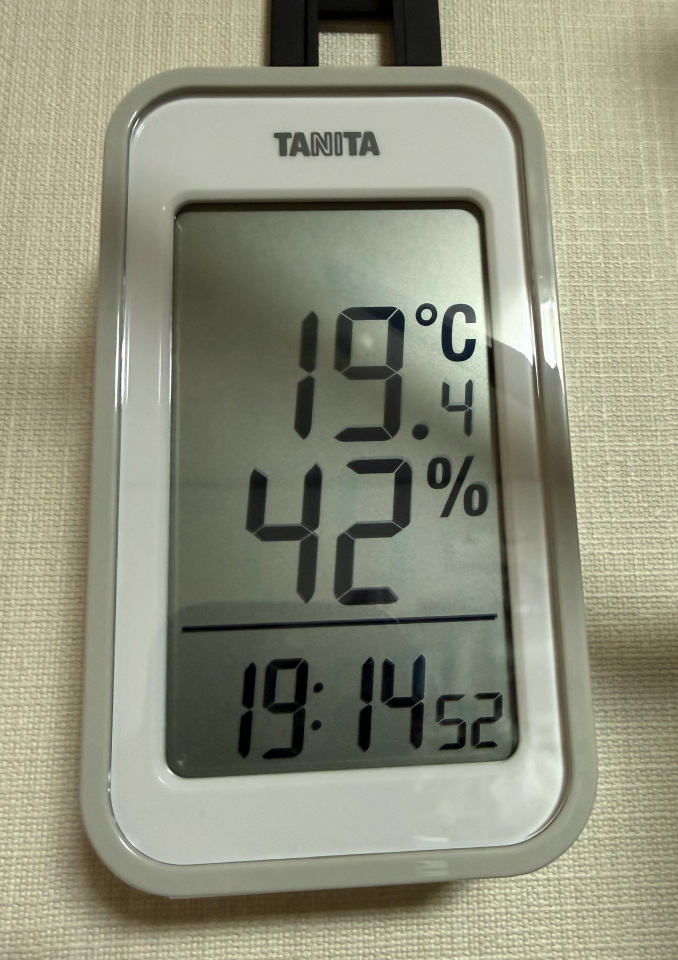
<p>調査の結果、夜間エアコンを使っている状態だと、だいたいの日で40%台前半を維持。</p>


<div class="wp-block-image">
<figure class="aligncenter size-full"><img decoding="async" width="678" height="960" src="https://www.u-1.net/wp-content/uploads/2026/01/room_humidity.jpg" alt="" class="wp-image-6199"/><figcaption class="wp-element-caption">冬季、エアコン使用時の室内の湿度</figcaption></figure>
</div>


<p>冬場の湿度としては40%～60%が適切という情報が多く、それに照らせば許容範囲内。ただし、これは一般的な湿度計が表示する相対湿度という基準による範囲とのこと。</p>


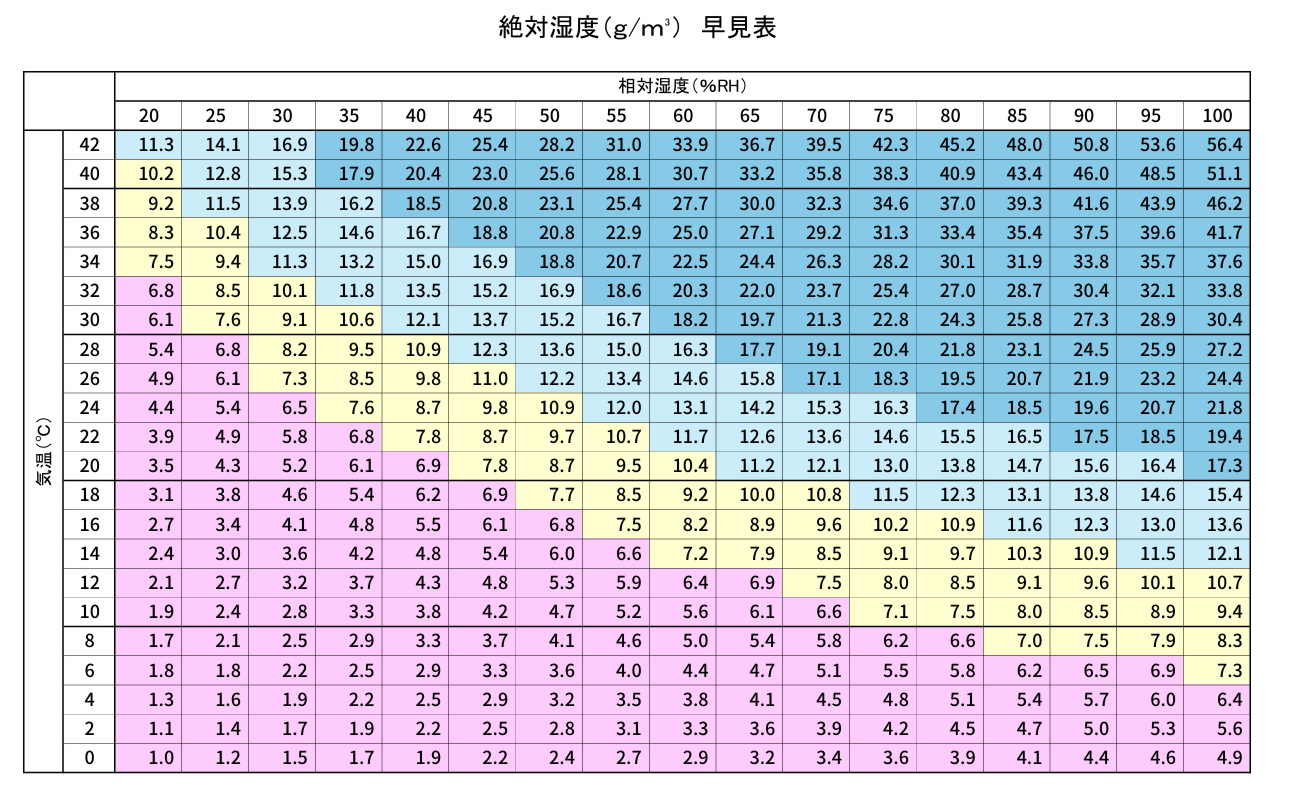
<p>一方で絶対湿度という指標に照らすと冬場で気温が低めだと、相対湿度換算では60%～65%くらいは必要そうな図表が出てきます。</p>


<div class="swell-block-postLink">			<div class="p-blogCard -external -noimg" data-type="type2" data-onclick="clickLink">
				<div class="p-blogCard__inner">
					<span class="p-blogCard__caption">田辺木材ホーム |</span>
										<div class="p-blogCard__body">
						<a class="p-blogCard__title" href="https://www.tanabe-home.co.jp/blog/absolute-humidity/" target="_blank" rel="noopener noreferrer">絶対湿度をご存じですか | 田辺木材ホーム</a>
						<span class="p-blogCard__excerpt">こんにちは！コーディネーターの染野です。 年が明けてもう１か月が過ぎましたね。昨年、新型コロナウイルス感染症の</span>					</div>
				</div>
			</div>
		</div>

<div class="wp-block-image">
<figure class="aligncenter size-full"><img decoding="async" width="1294" height="798" src="https://www.u-1.net/wp-content/uploads/2026/01/absolute-humidity.jpg" alt="" class="wp-image-6200" srcset="https://www.u-1.net/wp-content/uploads/2026/01/absolute-humidity.jpg 1294w, https://www.u-1.net/wp-content/uploads/2026/01/absolute-humidity-768x474.jpg 768w" sizes="(max-width: 1294px) 100vw, 1294px" /><figcaption class="wp-element-caption">絶対湿度早見表<br><a href="https://lab.a-hikari.com/">https://lab.a-hikari.com/</a> より<br><a href="https://lab.a-hikari.com/wp-content/uploads/2025/06/%E7%B5%B6%E5%AF%BE%E6%B9%BF%E5%BA%A6%E6%97%A9%E8%A6%8B%E8%A1%A8.pdf">https://lab.a-hikari.com/wp-content/uploads/2025/06/%E7%B5%B6%E5%AF%BE%E6%B9%BF%E5%BA%A6%E6%97%A9%E8%A6%8B%E8%A1%A8.pdf</a></figcaption></figure>
</div>


<p>ピンクや黄色の領域はインフルエンザの流行の危険性が高まる範囲ということなので、できれば薄い水色の領域まで持って行けた方が安心感はあります。</p>


<p>今冬については、インフルエンザの予防接種は済ませたり対策はしていますが、もう少し気を遣うなら湿度についても改善の余地はありそうです。</p>


<h2 class="wp-block-heading">割としんどい抗がん剤の副作用</h2>


<p>2025年の3月から抗がん剤を再開して、薬の種類が変わった影響で、副作用も以前とは違った形で身体に現れるようになっています。</p>


<p>具体的には夏の終わり頃から、鼻水が止まらなくなり、鼻をかむ回数が激増。日中はともかく夕方になると鼻の血管がもろくなっているのか鼻血が混じるようになって、それが眠るまで続くというサイクルに陥っていました。</p>


<p>鼻洗浄をしたり、副作用を抑える錠剤を追加で処方してもらったりと対策をしてはいるのですが、症状が気になり始めてから数ヶ月経った現時点（2026年1月）でも、完全には解決できていません。</p>


<p>いわゆるドライノーズという症状なので、冬場の乾燥の影響も多少なりともあるのは間違いなさそうです。</p>


<p>実際、12月くらいから起床時の乾燥は気になるレベルになってきています。体感でも変化を感じるくらいだとすると、対策しておいた方が良さそうだなというのも、加湿器の再導入を決断した理由の一つです。</p>


<h2 class="wp-block-heading">ということでコスパ重視でハイブリッド式の加湿器を購入</h2>


<p>事前にYouTubeとかで加湿器のおすすめを調べると、だいたいが象印のスチーム式加湿器が鉄板だという評価でした。メンテナンス性に優れて面倒はなさそうなのですが、その仕組み上、どうしても電気代が高くなってしまうというのがネック。</p>


<div id="rinkerid6201" class="yyi-rinker-contents  yyi-rinker-postid-6201 yyi-rinker-img-m yyi-rinker-catid-1 ">
	<div class="yyi-rinker-box">
		<div class="yyi-rinker-image">
							<a href="https://amzn.to/49m4lq8?tag=moments-22&#038;linkCode=as1&#038;creative=6339" rel="nofollow" class="yyi-rinker-tracking"  data-click-tracking="amazon_img 6201 象印マホービン 加湿器 スチーム式 4.0L グレー EE-DF50-HA" data-vars-click-id="amazon_img 6201 象印マホービン 加湿器 スチーム式 4.0L グレー EE-DF50-HA"><img decoding="async" src="https://m.media-amazon.com/images/I/71H8y-UTwiL._AC_SL1500_.jpg"  class="yyi-rinker-main-img" style="border: none;"></a>					</div>
		<div class="yyi-rinker-info">
			<div class="yyi-rinker-title">
									<a href="https://amzn.to/49m4lq8?tag=moments-22&#038;linkCode=as1&#038;creative=6339" rel="nofollow" class="yyi-rinker-tracking" data-click-tracking="amazon_title 6201 象印マホービン 加湿器 スチーム式 4.0L グレー EE-DF50-HA" data-vars-amp-click-id="amazon_title 6201 象印マホービン 加湿器 スチーム式 4.0L グレー EE-DF50-HA" >象印マホービン 加湿器 スチーム式 4.0L グレー EE-DF50-HA</a>							</div>
			<div class="yyi-rinker-detail">
							<div class="credit-box">created by&nbsp;<a href="https://oyakosodate.com/rinker/" rel="nofollow noopener" target="_blank" >Rinker</a></div>
										<div class="price-box">
							</div>
						</div>
						<ul class="yyi-rinker-links">
																                    <li class="amazonlink">
						<a href="https://amzn.to/49m4lq8?tag=moments-22&amp;linkCode=as1&amp;creative=6339" rel="nofollow" class="yyi-rinker-link yyi-rinker-tracking"  data-click-tracking="amazon 6201 象印マホービン 加湿器 スチーム式 4.0L グレー EE-DF50-HA"  data-vars-amp-click-id="amazon 6201 象印マホービン 加湿器 スチーム式 4.0L グレー EE-DF50-HA">Amazon</a>					</li>
													<li class="rakutenlink">
						<a href="https://hb.afl.rakuten.co.jp/hgc/16d3383e.205eee66.16d3383f.60445da4/Rinker_o_20260103202357?pc=https%3A%2F%2Fsearch.rakuten.co.jp%2Fsearch%2Fmall%2F%25E8%25B1%25A1%25E5%258D%25B0%2B%25E5%258A%25A0%25E6%25B9%25BF%25E5%2599%25A8%2B%25E3%2582%25B9%25E3%2583%2581%25E3%2583%25BC%25E3%2583%25A0%25E5%25BC%258F%2B%2F%3Ff%3D1%26grp%3Dproduct&amp;m=https%3A%2F%2Fsearch.rakuten.co.jp%2Fsearch%2Fmall%2F%25E8%25B1%25A1%25E5%258D%25B0%2B%25E5%258A%25A0%25E6%25B9%25BF%25E5%2599%25A8%2B%25E3%2582%25B9%25E3%2583%2581%25E3%2583%25BC%25E3%2583%25A0%25E5%25BC%258F%2B%2F%3Ff%3D1%26grp%3Dproduct" rel="nofollow" class="yyi-rinker-link yyi-rinker-tracking"  data-click-tracking="rakuten 6201 象印マホービン 加湿器 スチーム式 4.0L グレー EE-DF50-HA"  data-vars-amp-click-id="rakuten 6201 象印マホービン 加湿器 スチーム式 4.0L グレー EE-DF50-HA">楽天市場</a>					</li>
													<li class="yahoolink">
						<a href="https://shopping.yahoo.co.jp/search?p=%E8%B1%A1%E5%8D%B0+%E5%8A%A0%E6%B9%BF%E5%99%A8+%E3%82%B9%E3%83%81%E3%83%BC%E3%83%A0%E5%BC%8F+" rel="nofollow" class="yyi-rinker-link yyi-rinker-tracking"  data-click-tracking="yahoo 6201 象印マホービン 加湿器 スチーム式 4.0L グレー EE-DF50-HA"  data-vars-amp-click-id="yahoo 6201 象印マホービン 加湿器 スチーム式 4.0L グレー EE-DF50-HA">Yahooショッピング</a>					</li>
				                                    <li class="mercarilink">
                        <a href="https://jp.mercari.com/search?keyword=%E8%B1%A1%E5%8D%B0%20%E5%8A%A0%E6%B9%BF%E5%99%A8%20%E3%82%B9%E3%83%81%E3%83%BC%E3%83%A0%E5%BC%8F%20&amp;utm_source=Rinker&amp;afid=5749409602" rel="nofollow" class="yyi-rinker-link yyi-rinker-tracking"  data-click-tracking="mercari 6201 象印マホービン 加湿器 スチーム式 4.0L グレー EE-DF50-HA"  data-vars-amp-click-id="mercari 6201 象印マホービン 加湿器 スチーム式 4.0L グレー EE-DF50-HA">メルカリ</a>                    </li>
                											</ul>
					</div>
	</div>
</div>


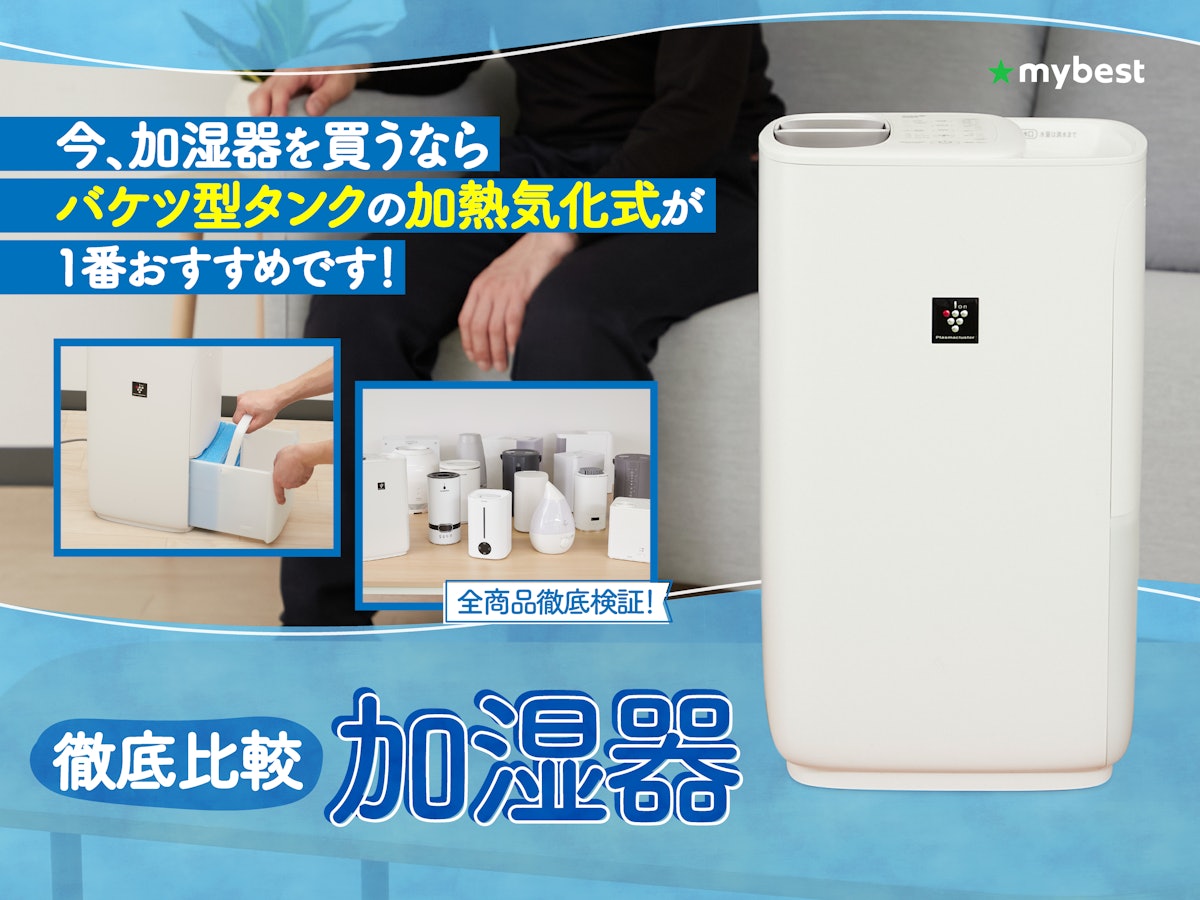
<p>それ以外にもWebの特集などを見ながら、購入するならバランスの取れたハイブリッド式の加湿器が良いなということで、あとは家電店に行って値段を見て決めることに。</p>


<p>参考にしたページは以下である程度評価上位のメーカーを頭に入れて販売店で価格を比較してみました。</p>


<div class="swell-block-postLink">			<div class="p-blogCard -external" data-type="type2" data-onclick="clickLink">
				<div class="p-blogCard__inner">
					<span class="p-blogCard__caption">マイベスト</span>
					<div class="p-blogCard__thumb c-postThumb"><figure class="c-postThumb__figure"><img decoding="async" src="https://img.my-best.com/contents/a8a09977cc77ed6c6d56e2109480c076.jpeg?ixlib=rails-4.3.1&#038;q=70&#038;lossless=0&#038;w=1200&#038;h=900&#038;fit=crop&#038;s=30b14dbf65ba85b4d8b0fe915ddb4f44" alt="" class="c-postThumb__img u-obf-cover" width="320" height="180"></figure></div>					<div class="p-blogCard__body">
						<a class="p-blogCard__title" href="https://my-best.com/108" target="_blank" rel="noopener noreferrer">加湿器のおすすめ人気ランキング【衛生的でカビにくかったのは？2026年4月徹底比較】</a>
						<span class="p-blogCard__excerpt">冬の時期、肌・喉・髪の乾燥が気になる人におすすめの加湿器。シャープ・象印・パナソニック・ダイニチなどの電機メーカーや、無印良品・ニトリ・アイリスオーヤマなどの生&#8230;</span>					</div>
				</div>
			</div>
		</div>


<h2 class="wp-block-heading">ダイニチのハイブリッド式加湿器のミドルクラスを購入</h2>


<p>ちょうど正月の初売りセール中だったのか、ダイニチの加湿器が特価になっていて、さらにクーポン割引で3,000円以上値引きされ、18,000円程度で購入できました。ネット通販に比べても安価に購入できたのでタイミングとしては良かったですね。</p>


<div id="rinkerid6194" class="yyi-rinker-contents  yyi-rinker-tagid-1444 yyi-rinker-postid-6194 yyi-rinker-img-m yyi-rinker-catid-1 ">
	<div class="yyi-rinker-box">
		<div class="yyi-rinker-image">
							<a href="https://amzn.to/49HQgDF?tag=moments-22&#038;linkCode=as1&#038;creative=6339" rel="nofollow" class="yyi-rinker-tracking"  data-click-tracking="amazon_img 6194 ダイニチ (Dainichi) 加湿器 ハイブリッド式 ショコラブラウン HD-RXC500C-T" data-vars-click-id="amazon_img 6194 ダイニチ (Dainichi) 加湿器 ハイブリッド式 ショコラブラウン HD-RXC500C-T"><img decoding="async" src="https://m.media-amazon.com/images/I/71wIRxvLvNL._AC_SL1500_.jpg"  class="yyi-rinker-main-img" style="border: none;"></a>					</div>
		<div class="yyi-rinker-info">
			<div class="yyi-rinker-title">
									<a href="https://amzn.to/49HQgDF?tag=moments-22&#038;linkCode=as1&#038;creative=6339" rel="nofollow" class="yyi-rinker-tracking" data-click-tracking="amazon_title 6194 ダイニチ (Dainichi) 加湿器 ハイブリッド式 ショコラブラウン HD-RXC500C-T" data-vars-amp-click-id="amazon_title 6194 ダイニチ (Dainichi) 加湿器 ハイブリッド式 ショコラブラウン HD-RXC500C-T" >ダイニチ (Dainichi) 加湿器 ハイブリッド式 ショコラブラウン HD-RXC500C-T</a>							</div>
			<div class="yyi-rinker-detail">
							<div class="credit-box">created by&nbsp;<a href="https://oyakosodate.com/rinker/" rel="nofollow noopener" target="_blank" >Rinker</a></div>
										<div class="price-box">
							</div>
						</div>
						<ul class="yyi-rinker-links">
																                    <li class="amazonlink">
						<a href="https://amzn.to/49HQgDF?tag=moments-22&amp;linkCode=as1&amp;creative=6339" rel="nofollow" class="yyi-rinker-link yyi-rinker-tracking"  data-click-tracking="amazon 6194 ダイニチ (Dainichi) 加湿器 ハイブリッド式 ショコラブラウン HD-RXC500C-T"  data-vars-amp-click-id="amazon 6194 ダイニチ (Dainichi) 加湿器 ハイブリッド式 ショコラブラウン HD-RXC500C-T">Amazon</a>					</li>
													<li class="rakutenlink">
						<a href="https://hb.afl.rakuten.co.jp/hgc/16d3383e.205eee66.16d3383f.60445da4/Rinker_o_20260103192108?pc=https%3A%2F%2Fsearch.rakuten.co.jp%2Fsearch%2Fmall%2F%25E3%2583%2580%25E3%2582%25A4%25E3%2583%258B%25E3%2583%2581%2B%25E3%2582%25B7%25E3%2583%25A7%25E3%2582%25B3%25E3%2583%25A9%25E3%2583%2596%25E3%2583%25A9%25E3%2582%25A6%25E3%2583%25B3%2BHD-RXC500C-T%2F%3Ff%3D1%26grp%3Dproduct&amp;m=https%3A%2F%2Fsearch.rakuten.co.jp%2Fsearch%2Fmall%2F%25E3%2583%2580%25E3%2582%25A4%25E3%2583%258B%25E3%2583%2581%2B%25E3%2582%25B7%25E3%2583%25A7%25E3%2582%25B3%25E3%2583%25A9%25E3%2583%2596%25E3%2583%25A9%25E3%2582%25A6%25E3%2583%25B3%2BHD-RXC500C-T%2F%3Ff%3D1%26grp%3Dproduct" rel="nofollow" class="yyi-rinker-link yyi-rinker-tracking"  data-click-tracking="rakuten 6194 ダイニチ (Dainichi) 加湿器 ハイブリッド式 ショコラブラウン HD-RXC500C-T"  data-vars-amp-click-id="rakuten 6194 ダイニチ (Dainichi) 加湿器 ハイブリッド式 ショコラブラウン HD-RXC500C-T">楽天市場</a>					</li>
													<li class="yahoolink">
						<a href="https://shopping.yahoo.co.jp/search?p=%E3%83%80%E3%82%A4%E3%83%8B%E3%83%81+%E3%82%B7%E3%83%A7%E3%82%B3%E3%83%A9%E3%83%96%E3%83%A9%E3%82%A6%E3%83%B3+HD-RXC500C-T" rel="nofollow" class="yyi-rinker-link yyi-rinker-tracking"  data-click-tracking="yahoo 6194 ダイニチ (Dainichi) 加湿器 ハイブリッド式 ショコラブラウン HD-RXC500C-T"  data-vars-amp-click-id="yahoo 6194 ダイニチ (Dainichi) 加湿器 ハイブリッド式 ショコラブラウン HD-RXC500C-T">Yahooショッピング</a>					</li>
				                                    <li class="mercarilink">
                        <a href="https://jp.mercari.com/search?keyword=%E3%83%80%E3%82%A4%E3%83%8B%E3%83%81%20%E3%82%B7%E3%83%A7%E3%82%B3%E3%83%A9%E3%83%96%E3%83%A9%E3%82%A6%E3%83%B3%20HD-RXC500C-T&amp;utm_source=Rinker&amp;afid=5749409602" rel="nofollow" class="yyi-rinker-link yyi-rinker-tracking"  data-click-tracking="mercari 6194 ダイニチ (Dainichi) 加湿器 ハイブリッド式 ショコラブラウン HD-RXC500C-T"  data-vars-amp-click-id="mercari 6194 ダイニチ (Dainichi) 加湿器 ハイブリッド式 ショコラブラウン HD-RXC500C-T">メルカリ</a>                    </li>
                											</ul>
					</div>
	</div>
</div>


<h2 class="wp-block-heading">果たして効果はあるのか？</h2>


<p>購入したその日に書いているエントリなので、実際に効果があったかどうかはまだ未知数です。</p>


<p>前回購入したときはメンテナンスが面倒に思って使わなくなってしまったのですが、今回は割と健康問題に直結する状況ではあるので、さすがにサボったりはしないはず(笑)</p>


<p>春まで使ってみて感想などをまたまとめて見ようかと思います。<s>乾燥対策なだけに</s></p>


]]></content>
		
					<link rel="replies" type="text/html" href="https://www.u-1.net/2026/01/03/6195/#comments" thr:count="0" />
			<link rel="replies" type="application/atom+xml" href="https://www.u-1.net/2026/01/03/6195/feed/atom/" thr:count="0" />
			<thr:total>0</thr:total>
			</entry>
		<entry>
		<author>
			<name>ゆーいち</name>
							<uri>http://www.u-1.net/</uri>
						</author>

		<title type="html"><![CDATA[ホンダ N-WGN が納車されたので交通安全のお祓いに行ってきた]]></title>
		<link rel="alternate" type="text/html" href="https://www.u-1.net/2025/12/13/6165/" />

		<id>https://www.u-1.net/?p=6165</id>
		<updated>2025-12-13T11:32:38Z</updated>
		<published>2025-12-13T11:32:34Z</published>
		<category scheme="https://www.u-1.net" term="日記" /><category scheme="https://www.u-1.net" term="自動車" /><category scheme="https://www.u-1.net" term="N-WGN" /><category scheme="https://www.u-1.net" term="交通安全" /><category scheme="https://www.u-1.net" term="ドライブレコーダー" /><category scheme="https://www.u-1.net" term="ディスプレイオーディオ" /><category scheme="https://www.u-1.net" term="CarPlay" />
		<summary type="html"><![CDATA[<p><img src="https://www.u-1.net/wp-content/uploads/2025/12/N-WGN.jpg" class="webfeedsFeaturedVisual" /></p>自動車を乗り換えることになったので験担ぎをしてきました 本日2025年12月13日に新車が納車されたので、地元の神社で交通安全のお祓いを受けてきました。先代の自動車も同じくお祓いしてもらい、13年間無事故、ほぼノートラブ [&#8230;]]]></summary>

					<content type="html" xml:base="https://www.u-1.net/2025/12/13/6165/"><![CDATA[<p><img src="https://www.u-1.net/wp-content/uploads/2025/12/N-WGN.jpg" class="webfeedsFeaturedVisual" /></p>
<div class="wp-block-cover"><span aria-hidden="true" class="wp-block-cover__background has-background-dim" style="background-color:#827869"></span><img decoding="async" width="1280" height="960" src="https://www.u-1.net/wp-content/uploads/2025/12/N-WGN.jpg" class="wp-block-cover__image-background wp-post-image" alt="" data-object-fit="cover" srcset="https://www.u-1.net/wp-content/uploads/2025/12/N-WGN.jpg 1280w, https://www.u-1.net/wp-content/uploads/2025/12/N-WGN-768x576.jpg 768w" sizes="(max-width: 1280px) 100vw, 1280px" /><div class="wp-block-cover__inner-container is-layout-constrained wp-block-cover-is-layout-constrained">
<p class="has-text-align-center has-large-font-size"><span class="swl-marker mark_green"><strong><span class="swl-fz u-fz-xl">ホンダ N-WGN が納車されたので</span></strong><br><strong><span class="swl-fz u-fz-xl">交通安全のお祓いに行ってきた</span></strong></span></p>
</div></div>


<h1 class="wp-block-heading">自動車を乗り換えることになったので験担ぎをしてきました</h1>


<p>本日2025年12月13日に新車が納車されたので、地元の神社で交通安全のお祓いを受けてきました。先代の自動車も同じくお祓いしてもらい、13年間無事故、ほぼノートラブルで引退まで走ってくれました。そのため今回も験を担ごうと神社へお祓いに行ってきました。</p>


<h2 class="wp-block-heading">長らく乗り込んだ ホンダ フィットがお役御免で引退</h2>


<p>去る2025年10月の上旬頃、所有していたホンダ フィットがいきなり不調になりディーラー点検へ。</p>


<p>最初は高速道路走行中に突然変速が不調になり、エンジンが停止する状況で、割と洒落にならない症状。何とかエンジン再起動で騙し騙し下道を走行して帰還したのですが、その間も数回同じ症状が出てしまい、こりゃいかんと点検に出すことに。</p>


<p>該当の自動車は購入から13年、走行距離も間もなく29万キロに達しようかという、ほぼ乗り潰したような状態ではありましたが、それまで大きな不調も抱えず長い間走ってくれました。</p>


<p>その後、点検の結果、修理だけでも数十万はかかるだろうという見積もりで、それだったらいっそ乗り換えも選択肢に入れて検討した結果、ちょうど9月にモデルチェンジした N-WGN が比較的早く納車できるだろうということで、軽自動車を選択することにしました。</p>


<h2 class="wp-block-heading">N-WGN 選択のポイント</h2>


<p>用途としては、自分の体調を考えると、プライベートの旅行などで自動車を使うことは今後はないだろうという点と、基本的には自宅と会社の通勤をメインで使うという日常乗りで、高速走行は行っても短距離で走行性能を重視する必要はなかったため、軽自動車で良いだろうという結論を出しました。</p>


<div class="swell-block-postLink">			<a href="https://www.honda.co.jp/N-WGN/" class="c-blogLink -external" data-style="slim" target="_blank" rel="noopener noreferrer">
				<!-- <i class="c-blogLink__icon icon-link" role="presentation"></i> -->
				<span class="c-blogLink__icon">
					<svg xmlns="http://www.w3.org/2000/svg" class="swl-svg-externalLink __svg" width="1em" height="1em" viewBox="0 0 48 48" role="img" aria-hidden="true" focusable="false"><path d="M44 2H30c-1.1 0-2 .9-2 2s.9 2 2 2h9.2L24 21.2c-.8.8-.8 2 0 2.8s2 .8 2.8 0L42 8.8V18c0 1.1.9 2 2 2s2-.9 2-2V4c0-1.1-.9-2-2-2z" /><path d="M41 27c-1.1 0-2 .9-2 2v10c0 1.1-.9 2-2 2H9c-1.1 0-2-.9-2-2V11c0-1.1.9-2 2-2h10c1.1 0 2-.9 2-2s-.9-2-2-2H9c-3.3 0-6 2.7-6 6v28c0 3.3 2.7 6 6 6h28c3.3 0 6-2.7 6-6V29c0-1.1-.9-2-2-2z" /></svg>				</span>
				<span class="c-blogLink__text">N-WGN｜軽自動車｜Honda公式サイト</span>
			</a>
		</div>


<p>代車で借りたのも前のモデルではありますがN-WGNだったため、運転のフィーリングとか特に不満も感じなかったので、そのまま決めた感じですね。</p>


<p>軽自動車の維持費がコンパクトカーに比べても安価になるのもポイントでしたね。自動車税の面でも1/3になるのは結構大きいです。</p>


<h3 class="wp-block-heading">付けたオプション1：ディスプレイオーディオ</h3>


<p>モデルはスタンダードなものを選択しつつ、通勤時間をある程度は快適なものにするため、ちょっとだけオプションを追加。</p>


<p>カーナビはもはやスマホの方が性能的には優れているだろうし、データ更新などの打ち切りによる陳腐化も考慮してナビ機能のないディスプレイオーディオを選択。CarPlayに対応していればナビ機能は問題ないし、音楽も今やスマホでまかなっているので、これでいいだろうと。リアカメラを表示するディスプレイは必要と思っていたので、<a href="https://www.honda.co.jp/navi/audio/n-wgn/">VX-240ZFE</a>を選択しました。</p>


<div class="swell-block-postLink">			<a href="https://www.honda.co.jp/navi/audio/n-wgn/" class="c-blogLink -external" data-style="slim" target="_blank" rel="noopener noreferrer">
				<!-- <i class="c-blogLink__icon icon-link" role="presentation"></i> -->
				<span class="c-blogLink__icon">
					<svg xmlns="http://www.w3.org/2000/svg" class="swl-svg-externalLink __svg" width="1em" height="1em" viewBox="0 0 48 48" role="img" aria-hidden="true" focusable="false"><path d="M44 2H30c-1.1 0-2 .9-2 2s.9 2 2 2h9.2L24 21.2c-.8.8-.8 2 0 2.8s2 .8 2.8 0L42 8.8V18c0 1.1.9 2 2 2s2-.9 2-2V4c0-1.1-.9-2-2-2z" /><path d="M41 27c-1.1 0-2 .9-2 2v10c0 1.1-.9 2-2 2H9c-1.1 0-2-.9-2-2V11c0-1.1.9-2 2-2h10c1.1 0 2-.9 2-2s-.9-2-2-2H9c-3.3 0-6 2.7-6 6v28c0 3.3 2.7 6 6 6h28c3.3 0 6-2.7 6-6V29c0-1.1-.9-2-2-2z" /></svg>				</span>
				<span class="c-blogLink__text">N-WGN｜オーディオ｜ナビゲーション＆オーディオ｜Honda Access｜Honda公式サイト</span>
			</a>
		</div>


<p>ついでに画面保護フィルムも買っておきました。</p>


<div id="rinkerid6168" class="yyi-rinker-contents  yyi-rinker-tagid-1437 yyi-rinker-postid-6168 yyi-rinker-img-m yyi-rinker-catid-1 ">
	<div class="yyi-rinker-box">
		<div class="yyi-rinker-image">
							<a href="https://amzn.to/3KIRypo?tag=moments-22&#038;linkCode=as1&#038;creative=6339" rel="nofollow" class="yyi-rinker-tracking"  data-click-tracking="amazon_img 6168 VX-240ZFE 画面保護フィルム" data-vars-click-id="amazon_img 6168 VX-240ZFE 画面保護フィルム"><img decoding="async" src="https://m.media-amazon.com/images/I/71KEi2yJsOL._AC_SL1500_.jpg"  class="yyi-rinker-main-img" style="border: none;"></a>					</div>
		<div class="yyi-rinker-info">
			<div class="yyi-rinker-title">
									<a href="https://amzn.to/3KIRypo?tag=moments-22&#038;linkCode=as1&#038;creative=6339" rel="nofollow" class="yyi-rinker-tracking" data-click-tracking="amazon_title 6168 VX-240ZFE 画面保護フィルム" data-vars-amp-click-id="amazon_title 6168 VX-240ZFE 画面保護フィルム" >VX-240ZFE 画面保護フィルム</a>							</div>
			<div class="yyi-rinker-detail">
							<div class="credit-box">created by&nbsp;<a href="https://oyakosodate.com/rinker/" rel="nofollow noopener" target="_blank" >Rinker</a></div>
										<div class="price-box">
							</div>
						</div>
						<ul class="yyi-rinker-links">
																                    <li class="amazonlink">
						<a href="https://amzn.to/3KIRypo?tag=moments-22&amp;linkCode=as1&amp;creative=6339" rel="nofollow" class="yyi-rinker-link yyi-rinker-tracking"  data-click-tracking="amazon 6168 VX-240ZFE 画面保護フィルム"  data-vars-amp-click-id="amazon 6168 VX-240ZFE 画面保護フィルム">Amazon</a>					</li>
													<li class="rakutenlink">
						<a href="https://hb.afl.rakuten.co.jp/hgc/16d3383e.205eee66.16d3383f.60445da4/Rinker_o_20251213200139?pc=https%3A%2F%2Fsearch.rakuten.co.jp%2Fsearch%2Fmall%2FVX-240ZFE%2B%25E4%25BF%259D%25E8%25AD%25B7%25E3%2583%2595%25E3%2582%25A3%25E3%2583%25AB%25E3%2583%25A0%2BN-WGN%2F%3Ff%3D1%26grp%3Dproduct&amp;m=https%3A%2F%2Fsearch.rakuten.co.jp%2Fsearch%2Fmall%2FVX-240ZFE%2B%25E4%25BF%259D%25E8%25AD%25B7%25E3%2583%2595%25E3%2582%25A3%25E3%2583%25AB%25E3%2583%25A0%2BN-WGN%2F%3Ff%3D1%26grp%3Dproduct" rel="nofollow" class="yyi-rinker-link yyi-rinker-tracking"  data-click-tracking="rakuten 6168 VX-240ZFE 画面保護フィルム"  data-vars-amp-click-id="rakuten 6168 VX-240ZFE 画面保護フィルム">楽天市場</a>					</li>
													<li class="yahoolink">
						<a href="https://shopping.yahoo.co.jp/search?p=VX-240ZFE+%E4%BF%9D%E8%AD%B7%E3%83%95%E3%82%A3%E3%83%AB%E3%83%A0+N-WGN" rel="nofollow" class="yyi-rinker-link yyi-rinker-tracking"  data-click-tracking="yahoo 6168 VX-240ZFE 画面保護フィルム"  data-vars-amp-click-id="yahoo 6168 VX-240ZFE 画面保護フィルム">Yahooショッピング</a>					</li>
				                                    <li class="mercarilink">
                        <a href="https://jp.mercari.com/search?keyword=VX-240ZFE%20%E4%BF%9D%E8%AD%B7%E3%83%95%E3%82%A3%E3%83%AB%E3%83%A0%20N-WGN&amp;utm_source=Rinker&amp;afid=5749409602" rel="nofollow" class="yyi-rinker-link yyi-rinker-tracking"  data-click-tracking="mercari 6168 VX-240ZFE 画面保護フィルム"  data-vars-amp-click-id="mercari 6168 VX-240ZFE 画面保護フィルム">メルカリ</a>                    </li>
                											</ul>
					</div>
	</div>
</div>


<h3 class="wp-block-heading">付けたオプション2：ドライブレコーダー</h3>


<p>先代のフィットにはドラレコ付けていなかったんですが、今どきは何があるか分からないのでドラレコはマストだろうと思い、こちらも導入しました。</p>


<p>ちょうどタイミング的にAmazonのブラックフライデーセールが開催されていて、コムテックのドラレコもかなり値引きされていたので、コムテックの<a href="https://www.e-comtec.co.jp/0_recorder/zdr055.html">ZDR055</a>を選択。事前に機材をディーラーに渡しておけば、実費で取り付けは行ってくれるということだったので、購入して持込取り付けをついでにお願いしました。</p>


<div id="rinkerid6166" class="yyi-rinker-contents  yyi-rinker-tagid-1437 yyi-rinker-postid-6166 yyi-rinker-img-m yyi-rinker-catid-1 ">
	<div class="yyi-rinker-box">
		<div class="yyi-rinker-image">
							<a href="https://amzn.to/48yugM0?tag=moments-22&#038;linkCode=as1&#038;creative=6339" rel="nofollow" class="yyi-rinker-tracking"  data-click-tracking="amazon_img 6166 コムテック ドライブレコーダー ZDR055" data-vars-click-id="amazon_img 6166 コムテック ドライブレコーダー ZDR055"><img decoding="async" src="https://m.media-amazon.com/images/I/71Uc6kXE5HL._AC_SL1500_.jpg"  class="yyi-rinker-main-img" style="border: none;"></a>					</div>
		<div class="yyi-rinker-info">
			<div class="yyi-rinker-title">
									<a href="https://amzn.to/48yugM0?tag=moments-22&#038;linkCode=as1&#038;creative=6339" rel="nofollow" class="yyi-rinker-tracking" data-click-tracking="amazon_title 6166 コムテック ドライブレコーダー ZDR055" data-vars-amp-click-id="amazon_title 6166 コムテック ドライブレコーダー ZDR055" >コムテック ドライブレコーダー ZDR055</a>							</div>
			<div class="yyi-rinker-detail">
							<div class="credit-box">created by&nbsp;<a href="https://oyakosodate.com/rinker/" rel="nofollow noopener" target="_blank" >Rinker</a></div>
										<div class="price-box">
							</div>
						</div>
						<ul class="yyi-rinker-links">
																                    <li class="amazonlink">
						<a href="https://amzn.to/48yugM0?tag=moments-22&amp;linkCode=as1&amp;creative=6339" rel="nofollow" class="yyi-rinker-link yyi-rinker-tracking"  data-click-tracking="amazon 6166 コムテック ドライブレコーダー ZDR055"  data-vars-amp-click-id="amazon 6166 コムテック ドライブレコーダー ZDR055">Amazon</a>					</li>
													<li class="rakutenlink">
						<a href="https://hb.afl.rakuten.co.jp/hgc/16d3383e.205eee66.16d3383f.60445da4/Rinker_o_20251213195655?pc=https%3A%2F%2Fsearch.rakuten.co.jp%2Fsearch%2Fmall%2F%25E3%2582%25B3%25E3%2583%25A0%25E3%2583%2586%25E3%2583%2583%25E3%2582%25AF%2B%25E3%2583%2589%25E3%2583%25A9%25E3%2582%25A4%25E3%2583%2596%25E3%2583%25AC%25E3%2582%25B3%25E3%2583%25BC%25E3%2583%2580%25E3%2583%25BC%2BZDR055%2F%3Ff%3D1%26grp%3Dproduct&amp;m=https%3A%2F%2Fsearch.rakuten.co.jp%2Fsearch%2Fmall%2F%25E3%2582%25B3%25E3%2583%25A0%25E3%2583%2586%25E3%2583%2583%25E3%2582%25AF%2B%25E3%2583%2589%25E3%2583%25A9%25E3%2582%25A4%25E3%2583%2596%25E3%2583%25AC%25E3%2582%25B3%25E3%2583%25BC%25E3%2583%2580%25E3%2583%25BC%2BZDR055%2F%3Ff%3D1%26grp%3Dproduct" rel="nofollow" class="yyi-rinker-link yyi-rinker-tracking"  data-click-tracking="rakuten 6166 コムテック ドライブレコーダー ZDR055"  data-vars-amp-click-id="rakuten 6166 コムテック ドライブレコーダー ZDR055">楽天市場</a>					</li>
													<li class="yahoolink">
						<a href="https://shopping.yahoo.co.jp/search?p=%E3%82%B3%E3%83%A0%E3%83%86%E3%83%83%E3%82%AF+%E3%83%89%E3%83%A9%E3%82%A4%E3%83%96%E3%83%AC%E3%82%B3%E3%83%BC%E3%83%80%E3%83%BC+ZDR055" rel="nofollow" class="yyi-rinker-link yyi-rinker-tracking"  data-click-tracking="yahoo 6166 コムテック ドライブレコーダー ZDR055"  data-vars-amp-click-id="yahoo 6166 コムテック ドライブレコーダー ZDR055">Yahooショッピング</a>					</li>
				                                    <li class="mercarilink">
                        <a href="https://jp.mercari.com/search?keyword=%E3%82%B3%E3%83%A0%E3%83%86%E3%83%83%E3%82%AF%20%E3%83%89%E3%83%A9%E3%82%A4%E3%83%96%E3%83%AC%E3%82%B3%E3%83%BC%E3%83%80%E3%83%BC%20ZDR055&amp;utm_source=Rinker&amp;afid=5749409602" rel="nofollow" class="yyi-rinker-link yyi-rinker-tracking"  data-click-tracking="mercari 6166 コムテック ドライブレコーダー ZDR055"  data-vars-amp-click-id="mercari 6166 コムテック ドライブレコーダー ZDR055">メルカリ</a>                    </li>
                											</ul>
					</div>
	</div>
</div>


<div id="rinkerid6167" class="yyi-rinker-contents  yyi-rinker-tagid-1437 yyi-rinker-postid-6167 yyi-rinker-img-m yyi-rinker-catid-1 ">
	<div class="yyi-rinker-box">
		<div class="yyi-rinker-image">
							<a href="https://amzn.to/4qbJIno?tag=moments-22&#038;linkCode=as1&#038;creative=6339" rel="nofollow" class="yyi-rinker-tracking"  data-click-tracking="amazon_img 6167 コムテック ドライブレコーダー用オプション 駐車監視用直接配線コード HDROP-14" data-vars-click-id="amazon_img 6167 コムテック ドライブレコーダー用オプション 駐車監視用直接配線コード HDROP-14"><img decoding="async" src="https://m.media-amazon.com/images/I/71gmAToi8jL._AC_SL1500_.jpg"  class="yyi-rinker-main-img" style="border: none;"></a>					</div>
		<div class="yyi-rinker-info">
			<div class="yyi-rinker-title">
									<a href="https://amzn.to/4qbJIno?tag=moments-22&#038;linkCode=as1&#038;creative=6339" rel="nofollow" class="yyi-rinker-tracking" data-click-tracking="amazon_title 6167 コムテック ドライブレコーダー用オプション 駐車監視用直接配線コード HDROP-14" data-vars-amp-click-id="amazon_title 6167 コムテック ドライブレコーダー用オプション 駐車監視用直接配線コード HDROP-14" >コムテック ドライブレコーダー用オプション 駐車監視用直接配線コード HDROP-14</a>							</div>
			<div class="yyi-rinker-detail">
							<div class="credit-box">created by&nbsp;<a href="https://oyakosodate.com/rinker/" rel="nofollow noopener" target="_blank" >Rinker</a></div>
										<div class="price-box">
							</div>
						</div>
						<ul class="yyi-rinker-links">
																                    <li class="amazonlink">
						<a href="https://amzn.to/4qbJIno?tag=moments-22&amp;linkCode=as1&amp;creative=6339" rel="nofollow" class="yyi-rinker-link yyi-rinker-tracking"  data-click-tracking="amazon 6167 コムテック ドライブレコーダー用オプション 駐車監視用直接配線コード HDROP-14"  data-vars-amp-click-id="amazon 6167 コムテック ドライブレコーダー用オプション 駐車監視用直接配線コード HDROP-14">Amazon</a>					</li>
													<li class="rakutenlink">
						<a href="https://hb.afl.rakuten.co.jp/hgc/16d3383e.205eee66.16d3383f.60445da4/Rinker_o_20251213195751?pc=https%3A%2F%2Fsearch.rakuten.co.jp%2Fsearch%2Fmall%2F%25E3%2582%25B3%25E3%2583%25A0%25E3%2583%2586%25E3%2583%2583%25E3%2582%25AF%2B%25E3%2583%2589%25E3%2583%25A9%25E3%2582%25A4%25E3%2583%2596%25E3%2583%25AC%25E3%2582%25B3%25E3%2583%25BC%25E3%2583%2580%25E3%2583%25BC%25E7%2594%25A8%25E3%2582%25AA%25E3%2583%2597%25E3%2582%25B7%25E3%2583%25A7%25E3%2583%25B3%2B%25E9%25A7%2590%25E8%25BB%258A%25E7%259B%25A3%25E8%25A6%2596%25E7%2594%25A8%25E7%259B%25B4%25E6%258E%25A5%25E9%2585%258D%25E7%25B7%259A%25E3%2582%25B3%25E3%2583%25BC%25E3%2583%2589%2BHDROP-14%2F%3Ff%3D1%26grp%3Dproduct&amp;m=https%3A%2F%2Fsearch.rakuten.co.jp%2Fsearch%2Fmall%2F%25E3%2582%25B3%25E3%2583%25A0%25E3%2583%2586%25E3%2583%2583%25E3%2582%25AF%2B%25E3%2583%2589%25E3%2583%25A9%25E3%2582%25A4%25E3%2583%2596%25E3%2583%25AC%25E3%2582%25B3%25E3%2583%25BC%25E3%2583%2580%25E3%2583%25BC%25E7%2594%25A8%25E3%2582%25AA%25E3%2583%2597%25E3%2582%25B7%25E3%2583%25A7%25E3%2583%25B3%2B%25E9%25A7%2590%25E8%25BB%258A%25E7%259B%25A3%25E8%25A6%2596%25E7%2594%25A8%25E7%259B%25B4%25E6%258E%25A5%25E9%2585%258D%25E7%25B7%259A%25E3%2582%25B3%25E3%2583%25BC%25E3%2583%2589%2BHDROP-14%2F%3Ff%3D1%26grp%3Dproduct" rel="nofollow" class="yyi-rinker-link yyi-rinker-tracking"  data-click-tracking="rakuten 6167 コムテック ドライブレコーダー用オプション 駐車監視用直接配線コード HDROP-14"  data-vars-amp-click-id="rakuten 6167 コムテック ドライブレコーダー用オプション 駐車監視用直接配線コード HDROP-14">楽天市場</a>					</li>
													<li class="yahoolink">
						<a href="https://shopping.yahoo.co.jp/search?p=%E3%82%B3%E3%83%A0%E3%83%86%E3%83%83%E3%82%AF+%E3%83%89%E3%83%A9%E3%82%A4%E3%83%96%E3%83%AC%E3%82%B3%E3%83%BC%E3%83%80%E3%83%BC%E7%94%A8%E3%82%AA%E3%83%97%E3%82%B7%E3%83%A7%E3%83%B3+%E9%A7%90%E8%BB%8A%E7%9B%A3%E8%A6%96%E7%94%A8%E7%9B%B4%E6%8E%A5%E9%85%8D%E7%B7%9A%E3%82%B3%E3%83%BC%E3%83%89+HDROP-14" rel="nofollow" class="yyi-rinker-link yyi-rinker-tracking"  data-click-tracking="yahoo 6167 コムテック ドライブレコーダー用オプション 駐車監視用直接配線コード HDROP-14"  data-vars-amp-click-id="yahoo 6167 コムテック ドライブレコーダー用オプション 駐車監視用直接配線コード HDROP-14">Yahooショッピング</a>					</li>
				                                    <li class="mercarilink">
                        <a href="https://jp.mercari.com/search?keyword=%E3%82%B3%E3%83%A0%E3%83%86%E3%83%83%E3%82%AF%20%E3%83%89%E3%83%A9%E3%82%A4%E3%83%96%E3%83%AC%E3%82%B3%E3%83%BC%E3%83%80%E3%83%BC%E7%94%A8%E3%82%AA%E3%83%97%E3%82%B7%E3%83%A7%E3%83%B3%20%E9%A7%90%E8%BB%8A%E7%9B%A3%E8%A6%96%E7%94%A8%E7%9B%B4%E6%8E%A5%E9%85%8D%E7%B7%9A%E3%82%B3%E3%83%BC%E3%83%89%20HDROP-14&amp;utm_source=Rinker&amp;afid=5749409602" rel="nofollow" class="yyi-rinker-link yyi-rinker-tracking"  data-click-tracking="mercari 6167 コムテック ドライブレコーダー用オプション 駐車監視用直接配線コード HDROP-14"  data-vars-amp-click-id="mercari 6167 コムテック ドライブレコーダー用オプション 駐車監視用直接配線コード HDROP-14">メルカリ</a>                    </li>
                											</ul>
					</div>
	</div>
</div>


<h2 class="wp-block-heading">納車されたのでお祓いに</h2>


<p>ということで色々準備をしながら待つこと約2ヶ月。本日2025年12月13日に無事納車となりました。</p>


<figure class="wp-block-embed is-type-rich is-provider-twitter wp-block-embed-twitter"><div class="wp-block-embed__wrapper">
<div class="embed-twitter"><blockquote class="twitter-tweet" data-width="500" data-dnt="true"><p lang="ja" dir="ltr">本日、納車です。晴れて良かった。</p>&mdash; ゆーいち (@yuuichi) <a href="https://twitter.com/yuuichi/status/1999634329765609482?ref_src=twsrc%5Etfw">December 13, 2025</a></blockquote><script async src="https://platform.twitter.com/widgets.js" charset="utf-8"></script></div>
</div></figure>


<p>地元の<a href="https://www.yahiko-jinjya.or.jp/">弥彦神社</a>で行っている<a href="https://www.yahiko-jinjya.or.jp/visit/gokitou/traffic.html">交通安全祈願</a>は、毎日予約なしでお願いできるという自由度の高い受付をしています。そのため、納車されて天気が良ければその足で行こうと思っていて、寒さは厳しいものの、晴れの天気となったためお祓いをしてもらってきました。</p>


<div class="swell-block-postLink">			<a href="https://www.yahiko-jinjya.or.jp/visit/gokitou/traffic.html" class="c-blogLink -external" data-style="slim" target="_blank" rel="noopener noreferrer">
				<!-- <i class="c-blogLink__icon icon-link" role="presentation"></i> -->
				<span class="c-blogLink__icon">
					<svg xmlns="http://www.w3.org/2000/svg" class="swl-svg-externalLink __svg" width="1em" height="1em" viewBox="0 0 48 48" role="img" aria-hidden="true" focusable="false"><path d="M44 2H30c-1.1 0-2 .9-2 2s.9 2 2 2h9.2L24 21.2c-.8.8-.8 2 0 2.8s2 .8 2.8 0L42 8.8V18c0 1.1.9 2 2 2s2-.9 2-2V4c0-1.1-.9-2-2-2z" /><path d="M41 27c-1.1 0-2 .9-2 2v10c0 1.1-.9 2-2 2H9c-1.1 0-2-.9-2-2V11c0-1.1.9-2 2-2h10c1.1 0 2-.9 2-2s-.9-2-2-2H9c-3.3 0-6 2.7-6 6v28c0 3.3 2.7 6 6 6h28c3.3 0 6-2.7 6-6V29c0-1.1-.9-2-2-2z" /></svg>				</span>
				<span class="c-blogLink__text">交通安全祈願</span>
			</a>
		</div>


<figure class="wp-block-image size-full"><img decoding="async" width="1280" height="831" src="https://www.u-1.net/wp-content/uploads/2025/12/yahiko-jinjya_gokitou_traffice.jpg" alt="" class="wp-image-6169" srcset="https://www.u-1.net/wp-content/uploads/2025/12/yahiko-jinjya_gokitou_traffice.jpg 1280w, https://www.u-1.net/wp-content/uploads/2025/12/yahiko-jinjya_gokitou_traffice-768x499.jpg 768w" sizes="(max-width: 1280px) 100vw, 1280px" /></figure>


<figure class="wp-block-image size-large"><img decoding="async" src="https://www.yahiko-jinjya.or.jp/img/visit/gokitou/pic_traffic02.jpg" alt=""/><figcaption class="wp-element-caption">引用：<a href="https://www.yahiko-jinjya.or.jp/visit/gokitou/traffic.html">https://www.yahiko-jinjya.or.jp/visit/gokitou/traffic.html</a></figcaption></figure>


<figure class="wp-block-image size-large"><img decoding="async" src="https://www.yahiko-jinjya.or.jp/img/visit/gokitou/pic_traffic01.jpg" alt=""/><figcaption class="wp-element-caption">引用：<a href="https://www.yahiko-jinjya.or.jp/visit/gokitou/traffic.html">https://www.yahiko-jinjya.or.jp/visit/gokitou/traffic.html</a></figcaption></figure>


<figure class="wp-block-image size-large"><img decoding="async" src="https://www.yahiko-jinjya.or.jp/img/visit/gokitou/img_traffic_map.png" alt=""/><figcaption class="wp-element-caption">引用：<a href="https://www.yahiko-jinjya.or.jp/visit/gokitou/traffic.html">https://www.yahiko-jinjya.or.jp/visit/gokitou/traffic.html</a></figcaption></figure>


<h3 class="wp-block-heading">受付してご祈祷をしていただきました</h3>


<p>年末に差し掛かり、冬の備えをしているタイミングでしたが、私が到着したときには、2組の方が参加していました。自動車を停車場に止めて、受付して戻ってきたら、ちょうど自分だけになっていて待ち時間なしでお祓いをしてもらいました。</p>


<p>特に事前に知識を仕入れておく必要はなく、脱帽し、指示に従って礼と拍手をすれば大丈夫です。</p>


<p>お祓い終了後は交通安全のお守りなどをもらって終了です。停車からお祓い完了までスムーズに進めば30分くらいの所要時間でしょうか。</p>


<p>ただ、時期によっては観光客が多いときもあるので、11月以降は人出が多く、運転に気を遣うシーンが多いかもしれません。交通安全のご祈祷に参加するために神社に行ったら、事故を起こしてしまった、というオチは悲しすぎるので、お祓いの時期は考えた方が良いかもしれないですね。私は、納車日にやることを前提に考えていたので、慎重な運転を心がけて無事乗り切りました。</p>


<figure class="wp-block-image size-full"><img decoding="async" width="1280" height="960" src="https://www.u-1.net/wp-content/uploads/2025/12/N-WGN.jpg" alt="" class="wp-image-6170" srcset="https://www.u-1.net/wp-content/uploads/2025/12/N-WGN.jpg 1280w, https://www.u-1.net/wp-content/uploads/2025/12/N-WGN-768x576.jpg 768w" sizes="(max-width: 1280px) 100vw, 1280px" /></figure>


<figure class="wp-block-image size-full"><img decoding="async" width="960" height="1280" src="https://www.u-1.net/wp-content/uploads/2025/12/yahiko-jinjya_gokitou_traffice_2.jpg" alt="" class="wp-image-6171" srcset="https://www.u-1.net/wp-content/uploads/2025/12/yahiko-jinjya_gokitou_traffice_2.jpg 960w, https://www.u-1.net/wp-content/uploads/2025/12/yahiko-jinjya_gokitou_traffice_2-768x1024.jpg 768w" sizes="(max-width: 960px) 100vw, 960px" /></figure>


<p>お守りやステッカーなどいただきました。お守りは自動車に付けておこうと思います。</p>


<h2 class="wp-block-heading">安全運転で行きましょう</h2>


<p>納車日にやろうと思っていたタスクは無事に完了。</p>


<p>お祓いをしてもらったから大丈夫というわけではなく、安全運転をするという意識を持ち続けることが大事なので、急がず焦らずの精神で運転していきたいですね。</p>
]]></content>
		
					<link rel="replies" type="text/html" href="https://www.u-1.net/2025/12/13/6165/#comments" thr:count="0" />
			<link rel="replies" type="application/atom+xml" href="https://www.u-1.net/2025/12/13/6165/feed/atom/" thr:count="0" />
			<thr:total>0</thr:total>
			</entry>
		<entry>
		<author>
			<name>ゆーいち</name>
							<uri>http://www.u-1.net/</uri>
						</author>

		<title type="html"><![CDATA[RTX-830 のメトリクスをSNMPv3で取得してGrafanaでグラフ化する]]></title>
		<link rel="alternate" type="text/html" href="https://www.u-1.net/2025/12/12/6161/" />

		<id>https://www.u-1.net/?p=6161</id>
		<updated>2025-12-15T04:13:25Z</updated>
		<published>2025-12-12T05:00:00Z</published>
		<category scheme="https://www.u-1.net" term="コンピュータ" /><category scheme="https://www.u-1.net" term="YAMAHA" /><category scheme="https://www.u-1.net" term="作業記録" /><category scheme="https://www.u-1.net" term="Prometheus" /><category scheme="https://www.u-1.net" term="Grafana" /><category scheme="https://www.u-1.net" term="snmp_exporter" />
		<summary type="html"><![CDATA[<p><img src="https://www.u-1.net/wp-content/uploads/2025/12/image-1.jpg" class="webfeedsFeaturedVisual" /></p>ルーターからのメトリクス取得にSNMPv3を使ってみる 先日はYAMAHAのRTX-1200のデータをsnmp_exporter・Prometheus経由でGrafanaに取り込みグラフ化まで行きました。 今回は、RTX [&#8230;]]]></summary>

					<content type="html" xml:base="https://www.u-1.net/2025/12/12/6161/"><![CDATA[<p><img src="https://www.u-1.net/wp-content/uploads/2025/12/image-1.jpg" class="webfeedsFeaturedVisual" /></p>
<div class="wp-block-cover"><span aria-hidden="true" class="wp-block-cover__background has-background-dim" style="background-color:#614242"></span><img decoding="async" width="1024" height="768" src="https://www.u-1.net/wp-content/uploads/2025/12/image-1.jpg" class="wp-block-cover__image-background wp-post-image" alt="" data-object-fit="cover" srcset="https://www.u-1.net/wp-content/uploads/2025/12/image-1.jpg 1024w, https://www.u-1.net/wp-content/uploads/2025/12/image-1-768x576.jpg 768w" sizes="(max-width: 1024px) 100vw, 1024px" /><div class="wp-block-cover__inner-container is-layout-constrained wp-block-cover-is-layout-constrained">
<p class="has-text-align-center has-large-font-size"><strong><span class="swl-fz u-fz-xl">YAMAHA RTX-830 のメトリクスを<br>SNMPv3で取得してGrafanaでグラフ化する</span></strong></p>
</div></div>


<h1 class="wp-block-heading">ルーターからのメトリクス取得にSNMPv3を使ってみる</h1>


<p>先日はYAMAHAのRTX-1200のデータをsnmp_exporter・Prometheus経由でGrafanaに取り込みグラフ化まで行きました。</p>


<p>今回は、RTX-830に対しても同様の作業を行いつつ、SNMPv3を使ってデータを取得することにチャレンジしてみました。ルーター側の制約もあったりで、結構苦労した部分もあるため作業メモとして残します。</p>


<p>以下、SNMPv3を使用した理由など。単純に、新しいバージョンでも試してみたいという理由もありますが。</p>


<ul class="wp-block-list">
<li>従来の SNMPv1/v2 は平文送信でセキュリティが弱い</li>


<li>RTX シリーズは SNMPv3（認証＋アクセス制御）に対応</li>


<li>Prometheus / Zabbix などの監視基盤との連携がしやすい</li>
</ul>


<h2 class="wp-block-heading">使用機材・環境・目的など</h2>


<ul class="wp-block-list">
<li>対象機種：YAMAHA RTX-830</li>


<li>監視側ツール：snmpwalk, snmp_exporter, Prometheus</li>


<li>SNMPv3 モード：authNoPriv（認証のみ / 暗号化なし）</li>


<li>目的：最低限必要な CPU / メモリ / トラフィック / uptime の取得</li>
</ul>


<h2 class="wp-block-heading">RTX830 の SNMPv3 設定（実際に動いた構成）</h2>


<p>今回もAIの助けを借りつつえっちらおっちらステップバイステップで作業。YAMAHAの機材はマニュアルしっかりしてるんですが、なかなか理解が難しくて試行錯誤の繰り返しでした。</p>


<p>SNMPv3周りの設定は以下を追加しました。</p>


<div class="wp-block-syntaxhighlighter-code "><pre class="brush: plain; title: ; notranslate">
snmpv3 usm user 1 &amp;lt;USERNAME&gt; group 1 sha &amp;lt;PASSWORD&gt;
snmpv3 host any user 1
snmpv3 vacm view 1 include 1.3.6.1
snmpv3 vacm access 1 read 1 write 1
snmpv3 trap host &amp;lt;トラップ送信先IPアドレス&gt; user 1
</pre></div>


<p>SNMPv3はVACM（ビューベースアクセス制御モデル）という仕組みでアクセス制御がされているので、これを設定しないと、データが何も返りません。</p>


<div class="swell-block-postLink">			<div class="p-blogCard -external -noimg" data-type="type2" data-onclick="clickLink">
				<div class="p-blogCard__inner">
					<span class="p-blogCard__caption">あわせて読みたい</span>
										<div class="p-blogCard__body">
						<a class="p-blogCard__title" href="https://www.rtpro.yamaha.co.jp/RT/manual/rt-common/snmp/snmp_chapter.html" target="_blank" rel="noopener noreferrer">SNMP の設定</a>
						<span class="p-blogCard__excerpt"></span>					</div>
				</div>
			</div>
		</div>


<p>snmpv3 usm user でユーザーを作成、今回は暗号化についてはRTX-830が使用できる形式（aes128-cfb）と、snmp_exporter側の対応している形式の齟齬があるため、使用を諦めました。対応させる形で再構築するという選択肢は今回は見送りです。基本的な情報の取得のみに使用するという今回の用途を考慮して、authNoPrivで設定を進めました。</p>


<p>というか、このあたりの情報は、しっかりと勉強していないと、理解が難しいですね。調べながら、なんとなくで分かったつもりになっていますが、資料をよく読んで身に付けないとですね。</p>


<p><code>snmpv3 vacm view</code>、<code>snmpv3 vacm access</code>、でアクセス可能なビューの範囲と読み書き権限を設定。これを設定しないとMIBビュー自体にアクセスできず、通信しているのに何もデータが返らないという悲しい結果に繋がります。</p>


<h2 class="wp-block-heading">動作テスト</h2>


<p>snmpwalkで基本的なデータが取れるかを試します。</p>


<div class="wp-block-syntaxhighlighter-code "><pre class="brush: bash; title: ; notranslate">
$  snmpwalk -v3 -l authNoPriv -u &lt;USERNAME&gt; -a SHA -A &lt;PASSWORD&gt; &lt;ルーターIPアドレス&gt; 1.3.6.1.2.1.1.5.0
SNMPv2-MIB::sysName.0 = STRING: RTX-830 #システム名
$  snmpwalk -v3 -l authNoPriv -u &lt;USERNAME&gt; -a SHA -A &lt;PASSWORD&gt; &lt;ルーターIPアドレス&gt; 1.3.6.1.4.1.1182.2.1.4
SNMPv2-SMI::enterprises.1182.2.1.4.0 = Gauge32: 33 #メモリ使用率
$  snmpwalk -v3 -l authNoPriv -u &lt;USERNAME&gt; -a SHA -A &lt;PASSWORD&gt; &lt;ルーターIPアドレス&gt; 1.3.6.1.4.1.1182.2.1.5
SNMPv2-SMI::enterprises.1182.2.1.5.0 = Gauge32: 0 #CPU使用率
</pre></div>


<p>VACMの設定が正しくされていないと、通信しているのに空っぽのデータが返ってきます。そんな時はルーター側の設定を見直す感じですね。</p>


<h2 class="wp-block-heading">snmp_exporter用設定ファイル生成</h2>


<p>generator用のgenerator.ymlはこちら</p>


<div class="wp-block-syntaxhighlighter-code "><pre class="brush: plain; title: ; notranslate">
auths:
  yamaha_rt830_v3_auth: # v3用の認証情報
    version: 3
    username: &amp;lt;USERNAME&gt;
    security_level: authNoPriv
    password: &amp;lt;PASSWORD&gt;
    auth_protocol: SHA

modules:
  rtx830:
    walk:
      - ifInOctets
      - ifOutOctets
      - yrhCpuUtil5sec
      - yrfUpTime
      - yrhMemoryUtil
      - sysUpTimeInstance
</pre></div>


<p>以下のコマンドで、snmp_exporter用の設定ファイルを生成。</p>


<div class="wp-block-syntaxhighlighter-code "><pre class="brush: bash; title: ; notranslate">
$ ./generator -m &quot;./yamaha-private-mib:/usr/share/snmp/mibs&quot; generate
$ cat snmp.yml
# WARNING: This file was auto-generated using snmp_exporter generator, manual changes will be lost.
auths:
  yamaha_rt830_v3_auth:
    community: public
    security_level: authNoPriv
    username: &lt;USERNAME&gt;
    password: &lt;PASSWORD&gt;
    auth_protocol: SHA
    priv_protocol: DES
    version: 3
modules:
  rtx830:
    walk:
    - 1.3.6.1.2.1.1.3.0
    - 1.3.6.1.2.1.2.2.1.10
    - 1.3.6.1.2.1.2.2.1.16
    get:
    - 1.3.6.1.4.1.1182.2.1.4.0
    - 1.3.6.1.4.1.1182.2.1.5.0
    - 1.3.6.1.4.1.1182.2.2.4.0
    metrics:
    - name: ifInOctets
      oid: 1.3.6.1.2.1.2.2.1.10
      type: counter
      help: The total number of octets received on the interface, including framing
        characters - 1.3.6.1.2.1.2.2.1.10
      indexes:
      - labelname: ifIndex
        type: gauge
    - name: ifOutOctets
      oid: 1.3.6.1.2.1.2.2.1.16
      type: counter
      help: The total number of octets transmitted out of the interface, including
        framing characters - 1.3.6.1.2.1.2.2.1.16
      indexes:
      - labelname: ifIndex
        type: gauge
    - name: yrhMemoryUtil
      oid: 1.3.6.1.4.1.1182.2.1.4
      type: gauge
      help: The utilization in percentage of main memory. - 1.3.6.1.4.1.1182.2.1.4
    - name: yrhCpuUtil5sec
      oid: 1.3.6.1.4.1.1182.2.1.5
      type: gauge
      help: The average utilization of CPU in 5 seconds. - 1.3.6.1.4.1.1182.2.1.5
    - name: yrfUpTime
      oid: 1.3.6.1.4.1.1182.2.2.4
      type: gauge
      help: The time (in hundredths of a second) since the network management portion
        of the system was last re-initialized - 1.3.6.1.4.1.1182.2.2.4
</pre></div>


<h2 class="wp-block-heading">Grafanaでグラフ化</h2>


<div class="wp-block-image">
<figure class="aligncenter size-full"><img decoding="async" width="1521" height="1221" src="https://www.u-1.net/wp-content/uploads/2025/12/Grafana_rtx830.jpg" alt="" class="wp-image-6162" srcset="https://www.u-1.net/wp-content/uploads/2025/12/Grafana_rtx830.jpg 1521w, https://www.u-1.net/wp-content/uploads/2025/12/Grafana_rtx830-768x617.jpg 768w" sizes="(max-width: 1521px) 100vw, 1521px" /></figure>
</div>


<p>RTX-1200用のダッシュボードを再インポートして、取り込むデータをそれぞれのビュー内のLabel filtersで設定してRTX-830のメトリクスだけを表示するようにしました。</p>


<p>最低限の情報監視を行えるようにしてみる段階なので、今回は</p>


<ul class="wp-block-list">
<li><code>sysUpTimeInstance</code>: 実質的な起動時間</li>


<li><code>yhrCpuUtil5sec</code>: CPU 使用率</li>


<li><code>yhrMemoryUtil</code>: メモリ使用率</li>


<li><code>ifInOctets</code> / <code>ifOutOctets</code>: トラフィック</li>
</ul>


<p>などのデータをグラフ化しています。</p>


<h2 class="wp-block-heading">SNMPでのデータ取得の基本を勉強しました</h2>


<p>ということで、SNMPv3を使ってデータ取得するまでの流れです。</p>


<p>基本的なデータを取りつつ、より複雑な監視に貼っていさせる準備ができたと思います。</p>


<p>今後は、どのような情報を見ていくべきかを検討して、改善していく予定です。</p>


<div id="rinkerid6179" class="yyi-rinker-contents  yyi-rinker-tagid-1429 yyi-rinker-postid-6179 yyi-rinker-img-m yyi-rinker-catid-10 ">
	<div class="yyi-rinker-box">
		<div class="yyi-rinker-image">
							<a href="https://amzn.to/3L2iq3E?tag=moments-22&#038;linkCode=as1&#038;creative=6339" rel="nofollow" class="yyi-rinker-tracking"  data-click-tracking="amazon_img 6179 ヤマハ USB ギガアクセスVPNルーター RTX830" data-vars-click-id="amazon_img 6179 ヤマハ USB ギガアクセスVPNルーター RTX830"><img decoding="async" src="https://m.media-amazon.com/images/I/610xya8nK4L._AC_SL1000_.jpg"  class="yyi-rinker-main-img" style="border: none;"></a>					</div>
		<div class="yyi-rinker-info">
			<div class="yyi-rinker-title">
									<a href="https://amzn.to/3L2iq3E?tag=moments-22&#038;linkCode=as1&#038;creative=6339" rel="nofollow" class="yyi-rinker-tracking" data-click-tracking="amazon_title 6179 ヤマハ USB ギガアクセスVPNルーター RTX830" data-vars-amp-click-id="amazon_title 6179 ヤマハ USB ギガアクセスVPNルーター RTX830" >ヤマハ USB ギガアクセスVPNルーター RTX830</a>							</div>
			<div class="yyi-rinker-detail">
							<div class="credit-box">created by&nbsp;<a href="https://oyakosodate.com/rinker/" rel="nofollow noopener" target="_blank" >Rinker</a></div>
										<div class="price-box">
							</div>
						</div>
						<ul class="yyi-rinker-links">
																                    <li class="amazonlink">
						<a href="https://amzn.to/3L2iq3E?tag=moments-22&amp;linkCode=as1&amp;creative=6339" rel="nofollow" class="yyi-rinker-link yyi-rinker-tracking"  data-click-tracking="amazon 6179 ヤマハ USB ギガアクセスVPNルーター RTX830"  data-vars-amp-click-id="amazon 6179 ヤマハ USB ギガアクセスVPNルーター RTX830">Amazon</a>					</li>
													<li class="rakutenlink">
						<a href="https://hb.afl.rakuten.co.jp/hgc/16d3383e.205eee66.16d3383f.60445da4/Rinker_o_20251215131104?pc=https%3A%2F%2Fsearch.rakuten.co.jp%2Fsearch%2Fmall%2F%25E3%2583%25A4%25E3%2583%259E%25E3%2583%258F%2BUSB%2B%25E3%2582%25AE%25E3%2582%25AC%25E3%2582%25A2%25E3%2582%25AF%25E3%2582%25BB%25E3%2582%25B9VPN%25E3%2583%25AB%25E3%2583%25BC%25E3%2582%25BF%25E3%2583%25BC%2BRTX830%2F%3Ff%3D1%26grp%3Dproduct&amp;m=https%3A%2F%2Fsearch.rakuten.co.jp%2Fsearch%2Fmall%2F%25E3%2583%25A4%25E3%2583%259E%25E3%2583%258F%2BUSB%2B%25E3%2582%25AE%25E3%2582%25AC%25E3%2582%25A2%25E3%2582%25AF%25E3%2582%25BB%25E3%2582%25B9VPN%25E3%2583%25AB%25E3%2583%25BC%25E3%2582%25BF%25E3%2583%25BC%2BRTX830%2F%3Ff%3D1%26grp%3Dproduct" rel="nofollow" class="yyi-rinker-link yyi-rinker-tracking"  data-click-tracking="rakuten 6179 ヤマハ USB ギガアクセスVPNルーター RTX830"  data-vars-amp-click-id="rakuten 6179 ヤマハ USB ギガアクセスVPNルーター RTX830">楽天市場</a>					</li>
													<li class="yahoolink">
						<a href="https://shopping.yahoo.co.jp/search?p=%E3%83%A4%E3%83%9E%E3%83%8F+USB+%E3%82%AE%E3%82%AC%E3%82%A2%E3%82%AF%E3%82%BB%E3%82%B9VPN%E3%83%AB%E3%83%BC%E3%82%BF%E3%83%BC+RTX830" rel="nofollow" class="yyi-rinker-link yyi-rinker-tracking"  data-click-tracking="yahoo 6179 ヤマハ USB ギガアクセスVPNルーター RTX830"  data-vars-amp-click-id="yahoo 6179 ヤマハ USB ギガアクセスVPNルーター RTX830">Yahooショッピング</a>					</li>
				                                    <li class="mercarilink">
                        <a href="https://jp.mercari.com/search?keyword=%E3%83%A4%E3%83%9E%E3%83%8F%20USB%20%E3%82%AE%E3%82%AC%E3%82%A2%E3%82%AF%E3%82%BB%E3%82%B9VPN%E3%83%AB%E3%83%BC%E3%82%BF%E3%83%BC%20RTX830&amp;utm_source=Rinker&amp;afid=5749409602" rel="nofollow" class="yyi-rinker-link yyi-rinker-tracking"  data-click-tracking="mercari 6179 ヤマハ USB ギガアクセスVPNルーター RTX830"  data-vars-amp-click-id="mercari 6179 ヤマハ USB ギガアクセスVPNルーター RTX830">メルカリ</a>                    </li>
                											</ul>
					</div>
	</div>
</div>
]]></content>
		
					<link rel="replies" type="text/html" href="https://www.u-1.net/2025/12/12/6161/#comments" thr:count="0" />
			<link rel="replies" type="application/atom+xml" href="https://www.u-1.net/2025/12/12/6161/feed/atom/" thr:count="0" />
			<thr:total>0</thr:total>
			</entry>
		<entry>
		<author>
			<name>ゆーいち</name>
							<uri>http://www.u-1.net/</uri>
						</author>

		<title type="html"><![CDATA[大腸がん・肺がんによる入院・手術を経て2年が経過したのでいろいろ思い出して書いてみる]]></title>
		<link rel="alternate" type="text/html" href="https://www.u-1.net/2025/12/11/6048/" />

		<id>https://www.u-1.net/?p=6048</id>
		<updated>2026-01-03T10:32:59Z</updated>
		<published>2025-12-11T03:00:00Z</published>
		<category scheme="https://www.u-1.net" term="日記" /><category scheme="https://www.u-1.net" term="大腸がん" /><category scheme="https://www.u-1.net" term="肺がん" /><category scheme="https://www.u-1.net" term="闘病" />
		<summary type="html"><![CDATA[<p><img src="https://www.u-1.net/wp-content/uploads/2025/12/medical_image.jpg" class="webfeedsFeaturedVisual" /></p>去年の年末に公開するつもりで書きかけになっていた記事を2024年分をちょこっと追加して公開します。ブログとしてあんまり書くネタもないのですが、とりあえず吐き出しのため思ってることとかを書いた内容になっています。自分の不摂 [&#8230;]]]></summary>

					<content type="html" xml:base="https://www.u-1.net/2025/12/11/6048/"><![CDATA[<p><img src="https://www.u-1.net/wp-content/uploads/2025/12/medical_image.jpg" class="webfeedsFeaturedVisual" /></p>
<div class="wp-block-cover is-light"><span aria-hidden="true" class="wp-block-cover__background has-background-dim" style="background-color:#afb9bf"></span><img decoding="async" width="1376" height="768" src="https://www.u-1.net/wp-content/uploads/2025/12/medical_image.jpg" class="wp-block-cover__image-background wp-post-image" alt="" data-object-fit="cover" srcset="https://www.u-1.net/wp-content/uploads/2025/12/medical_image.jpg 1376w, https://www.u-1.net/wp-content/uploads/2025/12/medical_image-768x429.jpg 768w" sizes="(max-width: 1376px) 100vw, 1376px" /><div class="wp-block-cover__inner-container is-layout-constrained wp-block-cover-is-layout-constrained">
<p class="has-text-align-center has-swl-pale-04-color has-text-color has-link-color has-large-font-size wp-elements-9387690c7d07e2dbfe65ec096d1899e7"><strong><span class="swl-marker mark_green"><span class="swl-inline-color has-swl-main-color"><span class="swl-fz u-fz-xl">大腸がん・肺がんによる入院・手術を経て</span><br><span class="swl-fz u-fz-xl">2年が経過したので</span><br><span class="swl-fz u-fz-xl">いろいろ思い出して書いてみる</span></span></span></strong></p>
</div></div>


<p class="is-style-sticky_box">去年の年末に公開するつもりで書きかけになっていた記事を2024年分をちょこっと追加して公開します。<br>ブログとしてあんまり書くネタもないのですが、とりあえず吐き出しのため思ってることとかを書いた内容になっています。<br>自分の不摂生が原因ではありますが、ある意味、反面教師としての注意喚起と、適切な治療を行えばステージIVの段階でも、比較的QOLを保った生活が送れる証左でもあります。<br>手術をしてから2年なんとか経過し、多少落ち着いてはいますが、いつまで現状維持ができるか分からないところもあるので、2年の振り返り的なことをやってみようと思います。</p>


<p class="is-style-icon_info">読んでて楽しいものではないかとは思います。基本ネガティブな内容にはならないとは思いますが、病気などに関する記述がメインなのでご了承ください。<br>またお約束ですが、治療については基本的に医師の提案をそのまま採用しています。特殊な治療等は行っておりません。いろいろ調べて統計的に結果の出ている標準治療から入るのがもっとも良いだろうという判断です。</p>


<div class="wp-block-image">
<figure class="aligncenter size-full"><img decoding="async" width="1905" height="535" src="https://www.u-1.net/wp-content/uploads/2025/12/standard_treatment.png" alt="" class="wp-image-6156" srcset="https://www.u-1.net/wp-content/uploads/2025/12/standard_treatment.png 1905w, https://www.u-1.net/wp-content/uploads/2025/12/standard_treatment-768x216.png 768w, https://www.u-1.net/wp-content/uploads/2025/12/standard_treatment-1536x431.png 1536w" sizes="(max-width: 1905px) 100vw, 1905px" /><figcaption class="wp-element-caption">がん情報サービス 標準治療の解説より<br><a href="https://ganjoho.jp/public/qa_links/dictionary/dic01/modal/hyojunchiryo.html">https://ganjoho.jp/public/qa_links/dictionary/dic01/modal/hyojunchiryo.html</a></figcaption></figure>
</div>


<h2 class="wp-block-heading">2023年は人生史上最悪の病気に見舞われた年でした</h2>


<p>SNSで適当に発信していたのでXやらインスタやらのフォローをしているごく少数の方は知ってる情報ですが、2023年の6月以降、思いっきり体調を崩し、いろいろ調べた結果、大腸がんステージ4、肺転移という診断を受け手術、退院、その後は3週1クールの投薬治療を続けています。</p>


<p>個人的には診断された内容に比べて、退院後は比較的以前と変わらないような生活ができているかと思います。</p>


<p>ただ、大腸がんステージ4の5年後生存率は統計上は17%程度という現実があります（<a href="https://ganjoho.jp/public/cancer/colon/patients.html">大腸がん（結腸がん・直腸がん）　患者数（がん統計）：[国立がん研究センター　がん情報サービス　一般の方へ] — </a>）。</p>


<p>短いかもしれないし、長いかもしれないという現状ですが、2023年の振り返りをこのポストではしてみたいと思います。</p>


<h3 class="wp-block-heading">2023年6月　体調に異常が見え始める</h3>


<p>思い返すとこの辺から体調が少しずつおかしくなっていました。</p>


<p>なんとなく変だなと思ったのは6/4の開催された<a href="https://www.sportsentry.ne.jp/event/t/90664">新潟シティライド2023</a>で、前年は何とか登れた序盤の坂にまったく歯が立たなかったり（34Tのスプロケを導入したにもかかわらず！）、その後のエイドステーションでの食事を完食できなかったりと、想像していたコンディションとかけ離れた結果になってしまったあたりからですかね。</p>


<p>それ以降は、食事をしても食べる量が減ったような気がしたり、外食をした後に腹の調子を崩してしまったりと、当時は食あたり的なものかと思って深く考えてはいなかったのですが、いろいろ影響は出ていたように思います。</p>


<h3 class="wp-block-heading">2023年7月　原因不明の吐き気が止まらなくなり仕事に影響が出始める</h3>


<p>7月になるといよいよ本格的に体調が悪化の一途を辿ります。</p>


<p>まず、熱などがないのに咳が止まらず仕事にも差し支えてくるようになったこと。<br>これについては呼吸器系の町医者にかかりレントゲンを撮ってもらったり薬を出してもらったりの対応。最初のレントゲンの段階で、診察に使ってるAIが怪しい影を指摘していたのですが、これについてはしばらく様子を見ることにしてしまったのが失敗ですね。このせいで、精密検査を行うのが1ヶ月以上遅れてしまった気がします。にしても、全然そんな風に見えないのに、指摘してくれる医療系AIすげーなと思いました。</p>


<p>また、この頃から以上吐き気と嘔吐が始まり、動けないくらいにきつい時間帯が不定期に訪れるようになります。<br>食欲がなくなるわ、食べても嘔吐してしまうわ、さらには下痢が続いて体重がみるみる落ちていきます。</p>


<p>この頃から毎週体重が2～5Kg落ちるようになり、6月から9月にかけて20Kg程度体重が減少したように思います。<br>もともと太っていたので、それでようやく、軽度肥満のBMIになったわけですが、明らかにおかしい痩せ方だったので、さすがに不審に思っていた頃です。</p>


<figure class="wp-block-embed is-type-rich is-provider-twitter wp-block-embed-twitter"><div class="wp-block-embed__wrapper">
<div class="embed-twitter"><blockquote class="twitter-tweet" data-width="500" data-dnt="true"><p lang="ja" dir="ltr">4月から見ると体重20キロくらい落ちてるし。いや、それでもまだ80キロ台ではあるのだけど<img src="https://s.w.org/images/core/emoji/17.0.2/72x72/1f4a6.png" alt="💦" class="wp-smiley" style="height: 1em; max-height: 1em;" /> 体力の衰えが予想以上ですわ。このまま70キロ台まで突入してくれと、無邪気には思えないわけで。</p>&mdash; ゆーいち (@yuuichi) <a href="https://twitter.com/yuuichi/status/1699133175581270416?ref_src=twsrc%5Etfw">September 5, 2023</a></blockquote><script async src="https://platform.twitter.com/widgets.js" charset="utf-8"></script></div>
</div></figure>


<h3 class="wp-block-heading">2023年8月　呼吸器科の診察の結果　肺の精密検査を勧められ生検を行う</h3>


<p>上旬、呼吸器系の町医者にかかって1ヶ月くらいして、咳はやや落ち着いてきたものの、再度レントゲン撮影を行った結果、怪しい影は残ったままだったので、精密検査を勧められ大きい病院への紹介状を出してもらいました。</p>


<p>中旬、<a href="https://nishiniigata.hosp.go.jp/">西新潟中央病院</a>にて血液検査等を行い、その結果を受けて、肺の内視鏡検査を行うことになりました。</p>


<p>下旬、肺の内視鏡検査を実施。いやもう、これが本当にしんどかったです。というか内視鏡と言われる系統の検査がこれが初めてだったのですが、おすすめできませんね、マジで。感覚的に窒息しそうなのに、空気がちゃんと送り込まれているから窒息しないので、安全に窒息体験ができます（したくない）。あと、肺の組織をごりごり削られるのが体内に響くので、まったく安心できないです。ついでに、そのときは、研修医なのか新人さんなのか、経験が浅くない人が最初処置をしてくれたのでしんどかったですね。その後、ベテランぽい方に変わったんですが、苦しさ変わりません。押さえつけられて涙は出るわ咳を我慢するのがキツイやらで、今後経験する一連の検査の中でも、二度と体験したくない検査と言ったらこれになりますね。</p>


<figure class="wp-block-embed is-type-rich is-provider-twitter wp-block-embed-twitter"><div class="wp-block-embed__wrapper">
<div class="embed-twitter"><blockquote class="twitter-tweet" data-width="500" data-dnt="true"><p lang="ja" dir="ltr">点滴中。あと2時間は何も飲めないのが何気にストレス。 <a href="https://t.co/L2RBFDO9BQ">pic.twitter.com/L2RBFDO9BQ</a></p>&mdash; ゆーいち (@yuuichi) <a href="https://twitter.com/yuuichi/status/1696394901544747324?ref_src=twsrc%5Etfw">August 29, 2023</a></blockquote><script async src="https://platform.twitter.com/widgets.js" charset="utf-8"></script></div>
</div><figcaption class="wp-element-caption">内視鏡検査後、麻酔が抜けるまで安静にさせられるの図</figcaption></figure>


<p>まぁ、これやらないと組織の検査もできないのでどうしようもないのですが。ぐったりしてたっぷり休まされてから帰りました。</p>


<h3 class="wp-block-heading">2023年9月　診察の結果、肺がんの疑いが高く、手術による切除を勧められる</h3>


<figure class="wp-block-embed is-type-rich is-provider-twitter wp-block-embed-twitter"><div class="wp-block-embed__wrapper">
<div class="embed-twitter"><blockquote class="twitter-tweet" data-width="500" data-dnt="true"><p lang="ja" dir="ltr">通院。先日の内視鏡検査結果の確認。待ち時間長え。</p>&mdash; ゆーいち (@yuuichi) <a href="https://twitter.com/yuuichi/status/1699575852625989828?ref_src=twsrc%5Etfw">September 7, 2023</a></blockquote><script async src="https://platform.twitter.com/widgets.js" charset="utf-8"></script></div>
</div></figure>


<figure class="wp-block-embed is-type-rich is-provider-twitter wp-block-embed-twitter"><div class="wp-block-embed__wrapper">
<div class="embed-twitter"><blockquote class="twitter-tweet" data-width="500" data-dnt="true"><p lang="ja" dir="ltr">来月、肺の手術決定</p>&mdash; ゆーいち (@yuuichi) <a href="https://twitter.com/yuuichi/status/1700028234602340487?ref_src=twsrc%5Etfw">September 8, 2023</a></blockquote><script async src="https://platform.twitter.com/widgets.js" charset="utf-8"></script></div>
</div></figure>


<p>はい、ということで、結果を聞きに行ったら手術を勧められました。</p>


<p>具体的には右肺の中葉部分に悪性と思しき腫瘍があるので、切除を推奨。実際にがんかどうかは現時点では判断できないが可能性が高いので取った方が良いと。</p>


<p>その後、実際に手術をいつにするかを悩んでいたら、スケジュールが1週間後ろ倒しになったりと上旬に話していたスケジュールからは少しずれて行きますが、10月に手術決定とあいなります。</p>


<p>並行して体調は絶不調で、止まらない吐き気と体重減少でかなりボロボロになっていました。検査結果が出るあたりから、会社にも入院の話をして休みの調整と仕事の引き継ぎを少しずつ進めていきました。</p>


<p>実際、車を運転して出社するのもしんどいタイミングがあったり、仕事中に嘔吐が止まらなくなって帰宅したりと、この時期は正直完全に戦力外でお荷物だったなあという感じです。在宅で仕事していても起き上がれない時間帯が多くて横になってメール処理したりと効率悪すぎでしたね。</p>


<p>9月後半はそんな感じで仕事を一時的に預ける準備と、入院の準備を並行して進めて、色々買い足したりしていました。</p>


<h3 class="wp-block-heading">2023年10月上旬～中旬　入院1回目　右肺の一部を切除する</h3>


<p>入院日は10/12に決まり、いろいろ手続きやら持っていくものの準備やらで上旬は費やされました。</p>


<p>おおよそ2週間の予定で、それだけ長期の入院自体、人生初ではあったので下調べを結構行いました。また、当時、病院ではコロナの影響で面会自体も基本的にはNGだったりしたので、親にLINEのビデオ通話の使い方を教えたりと、連絡を取る方法を確立したりと、この辺は昔と違ってるなあと思いました。</p>


<h4 class="wp-block-heading">入院初日の記録 結構バタバタしてます</h4>


<figure class="wp-block-embed is-type-rich is-provider-twitter wp-block-embed-twitter"><div class="wp-block-embed__wrapper">
<div class="embed-twitter"><blockquote class="twitter-tweet" data-width="500" data-dnt="true"><p lang="ja" dir="ltr">さて、今日から入院です。<br>PCR検査で異常が出なければだけれど。</p>&mdash; ゆーいち (@yuuichi) <a href="https://twitter.com/yuuichi/status/1712218468559540726?ref_src=twsrc%5Etfw">October 11, 2023</a></blockquote><script async src="https://platform.twitter.com/widgets.js" charset="utf-8"></script></div>
</div></figure>


<figure class="wp-block-embed is-type-rich is-provider-twitter wp-block-embed-twitter"><div class="wp-block-embed__wrapper">
<div class="embed-twitter"><blockquote class="twitter-tweet" data-width="500" data-dnt="true"><p lang="ja" dir="ltr">コロナ陰性でしたので安心して入院できます。<br>個室希望が通ったけど、まだ部屋が準備できてないようで別室で待機。落ち着かない…<img src="https://s.w.org/images/core/emoji/17.0.2/72x72/1f605.png" alt="😅" class="wp-smiley" style="height: 1em; max-height: 1em;" /></p>&mdash; ゆーいち (@yuuichi) <a href="https://twitter.com/yuuichi/status/1712283141497585666?ref_src=twsrc%5Etfw">October 12, 2023</a></blockquote><script async src="https://platform.twitter.com/widgets.js" charset="utf-8"></script></div>
</div></figure>


<figure class="wp-block-embed is-type-rich is-provider-twitter wp-block-embed-twitter"><div class="wp-block-embed__wrapper">
<div class="embed-twitter"><blockquote class="twitter-tweet" data-width="500" data-dnt="true"><p lang="ja" dir="ltr">いろいろ説明されることがありますね。<br>そして、手術に備えて買わなきゃならない備品的なものが急に増える。 <a href="https://t.co/mugK1Yd0SY">pic.twitter.com/mugK1Yd0SY</a></p>&mdash; ゆーいち (@yuuichi) <a href="https://twitter.com/yuuichi/status/1712385205930193180?ref_src=twsrc%5Etfw">October 12, 2023</a></blockquote><script async src="https://platform.twitter.com/widgets.js" charset="utf-8"></script></div>
</div></figure>


<figure class="wp-block-embed is-type-rich is-provider-twitter wp-block-embed-twitter"><div class="wp-block-embed__wrapper">
<div class="embed-twitter"><blockquote class="twitter-tweet" data-width="500" data-dnt="true"><p lang="ja" dir="ltr">入院1日目の昼食です。 <a href="https://t.co/1a4M2l9YZ1">pic.twitter.com/1a4M2l9YZ1</a></p>&mdash; ゆーいち (@yuuichi) <a href="https://twitter.com/yuuichi/status/1712303337146859570?ref_src=twsrc%5Etfw">October 12, 2023</a></blockquote><script async src="https://platform.twitter.com/widgets.js" charset="utf-8"></script></div>
</div></figure>


<figure class="wp-block-embed is-type-rich is-provider-twitter wp-block-embed-twitter"><div class="wp-block-embed__wrapper">
<div class="embed-twitter"><blockquote class="twitter-tweet" data-width="500" data-dnt="true"><p lang="ja" dir="ltr">病棟は9時消灯なので寝る準備。<br>個室なので電気消す程度で、眠くなるまではネトフリとかで時間潰すか。</p>&mdash; ゆーいち (@yuuichi) <a href="https://twitter.com/yuuichi/status/1712436052659700123?ref_src=twsrc%5Etfw">October 12, 2023</a></blockquote><script async src="https://platform.twitter.com/widgets.js" charset="utf-8"></script></div>
</div></figure>


<p>Xのポスト辿ると10月12日が入院初日だったようですね。この日は受け付けで手続きして、個室の病室に移る前に、なぜか集中治療室で1時間くらい待たされた気が。部屋の準備ができていないとそんな理由だった気がします。</p>


<p>今回個室を選択したのは、仕事の絡みもありました。1日あたりそれなりのコストがかかりますが、幸いにして医療保険の補助が受けられるので、大きな負担にはならないと判断。また長期間ではないため、個室の料金も10万までは行かないだろうと高をくくっていました。いや実際そうなんですが。退院時の精算額を見ると諸々含めてやっぱり高えってなりますね。</p>


<p>ここは高額医療制度のおかげで全体的に抑えられてはいますし、制度利用の申請も病院側がやってくれるというので、患者側が手続きをしないで済むというシームレスさは進歩を感じますね。てっきり自分で書類やらを持って行ったり来たりと想定していたのでやや肩透かし、とはいえ、便利さに感謝です。</p>


<h4 class="wp-block-heading">検査検査検査</h4>


<p>入院翌日からは検査やらで比較的忙しかった記憶があります。</p>


<p>手術の説明などもあわせて行い、その際は親も呼ばれて一緒に説明されました。この時は、肺がんのステージ3と書かれていたような気がします。実際の手術では右肺の中葉を前切除するということになりました。この部分は肺全体の機能ではそこまで大きな比率を占めているわけではないようで、術後もあまり影響がないかもということでした。実際、手術後の肺機能のテストではそこまで機能が落ちているわけではなく、平均的な状態だったようでした。</p>


<p>で、おそらくこの時に、事前のレントゲン等で、大腸部分にも怪しい影があるぞという話に。はい、ここに来て原発巣が大腸の可能性が出てきて、肺の腫瘍は転移してきたものである恐れがあると説明されました(ﾟДﾟ)</p>


<p>oh……。</p>


<p>肺の手術と並行して、次は大腸の検査を行うために次の病院への紹介状を書いてもらうというハメになりました。</p>


<h4 class="wp-block-heading">手術終了</h4>


<p>手術は10/16でした。</p>


<figure class="wp-block-embed is-type-rich is-provider-twitter wp-block-embed-twitter"><div class="wp-block-embed__wrapper">
<div class="embed-twitter"><blockquote class="twitter-tweet" data-width="500" data-dnt="true"><p lang="ja" dir="ltr">無事手術終了</p>&mdash; ゆーいち (@yuuichi) <a href="https://twitter.com/yuuichi/status/1713855783203696842?ref_src=twsrc%5Etfw">October 16, 2023</a></blockquote><script async src="https://platform.twitter.com/widgets.js" charset="utf-8"></script></div>
</div></figure>


<p>この辺、あんまり書くことがないです。手術は麻酔が入ったら一瞬で意識が飛んで、目が覚めたら終わっていましたから。</p>


<p>1日は集中治療室で過ごすということでいろいろ器機に繋がれるわ、自由に動けないわ、スマホの電池は切れそうになるわ（私の場合はスマホ持込が許されてました）、ほぼ寝ることしかできない感じでしたね。幸い、術後の痛みは我慢できないほどではなかったので、単純に退屈が最大の敵だったよう記憶があります。</p>


<h3 class="wp-block-heading">術後の経過</h3>


<figure class="wp-block-embed is-type-rich is-provider-twitter wp-block-embed-twitter"><div class="wp-block-embed__wrapper">
<div class="embed-twitter"><blockquote class="twitter-tweet" data-width="500" data-dnt="true"><p lang="ja" dir="ltr">ようやく病室に戻れた。傷が痛い<img src="https://s.w.org/images/core/emoji/17.0.2/72x72/1f62d.png" alt="😭" class="wp-smiley" style="height: 1em; max-height: 1em;" /></p>&mdash; ゆーいち (@yuuichi) <a href="https://twitter.com/yuuichi/status/1714097674449035623?ref_src=twsrc%5Etfw">October 17, 2023</a></blockquote><script async src="https://platform.twitter.com/widgets.js" charset="utf-8"></script></div>
</div></figure>


<figure class="wp-block-embed is-type-rich is-provider-twitter wp-block-embed-twitter"><div class="wp-block-embed__wrapper">
<div class="embed-twitter"><blockquote class="twitter-tweet" data-width="500" data-dnt="true"><p lang="ja" dir="ltr">気管挿管の影響でのどが痛い。</p>&mdash; ゆーいち (@yuuichi) <a href="https://twitter.com/yuuichi/status/1714099072905494835?ref_src=twsrc%5Etfw">October 17, 2023</a></blockquote><script async src="https://platform.twitter.com/widgets.js" charset="utf-8"></script></div>
</div></figure>


<figure class="wp-block-embed is-type-rich is-provider-twitter wp-block-embed-twitter"><div class="wp-block-embed__wrapper">
<div class="embed-twitter"><blockquote class="twitter-tweet" data-width="500" data-dnt="true"><p lang="ja" dir="ltr">身体に穴あいて体液漏れてるのは違和感すごいな。これだけ廃液出れば体重も減るわ。</p>&mdash; ゆーいち (@yuuichi) <a href="https://twitter.com/yuuichi/status/1714470706715480065?ref_src=twsrc%5Etfw">October 18, 2023</a></blockquote><script async src="https://platform.twitter.com/widgets.js" charset="utf-8"></script></div>
</div></figure>


<figure class="wp-block-embed is-type-rich is-provider-twitter wp-block-embed-twitter"><div class="wp-block-embed__wrapper">
<div class="embed-twitter"><blockquote class="twitter-tweet" data-width="500" data-dnt="true"><p lang="ja" dir="ltr">ようやくやる気が出てきたので自習を始める。といってもpythonのチュートリアルだけど</p>&mdash; ゆーいち (@yuuichi) <a href="https://twitter.com/yuuichi/status/1714833030060322820?ref_src=twsrc%5Etfw">October 19, 2023</a></blockquote><script async src="https://platform.twitter.com/widgets.js" charset="utf-8"></script></div>
</div></figure>


<figure class="wp-block-embed is-type-rich is-provider-twitter wp-block-embed-twitter"><div class="wp-block-embed__wrapper">
<div class="embed-twitter"><blockquote class="twitter-tweet" data-width="500" data-dnt="true"><p lang="ja" dir="ltr">身体から管が抜かれる違和感と怖さよw</p>&mdash; ゆーいち (@yuuichi) <a href="https://twitter.com/yuuichi/status/1715176014618439755?ref_src=twsrc%5Etfw">October 20, 2023</a></blockquote><script async src="https://platform.twitter.com/widgets.js" charset="utf-8"></script></div>
</div></figure>


<p>こんな感じで1日ずつ調子が戻っていく感じですね。持ち込んだMacで仕事やらPythonの勉強やら、時間が余ってしょうがないのを潰すためにいろいろやってました。</p>


<h3 class="wp-block-heading">2023年11月上旬　退院後消化器内科の検査の結果即入院・手術が決定</h3>


<h4 class="wp-block-heading">11月1日 大腸部分の検査をしたら即入院</h4>


<p>退院後、予約を入れていた別の病院で、レントゲンを撮ったところ、大腸が詰まり破裂の危険アリという診断が下り、即入院をするように言われました。そこまでひどい状況とは思っていなかったので、割と慌てて家族と会社に連絡して、速効帰宅のうえ、入院準備。といっても先月の荷物をそのまま詰め込んで行くだけなので手間はかかりません。</p>


<p>病院を出る前に言われたのは、食事厳禁、水だけ飲むようにと、もはや修行僧のような食生活が続くのだと予感させられました。</p>


<figure class="wp-block-embed is-type-rich is-provider-twitter wp-block-embed-twitter"><div class="wp-block-embed__wrapper">
<div class="embed-twitter"><blockquote class="twitter-tweet" data-width="500" data-dnt="true"><p lang="ja" dir="ltr">CT撮影して、胃カメラ待ちです。</p>&mdash; ゆーいち (@yuuichi) <a href="https://twitter.com/yuuichi/status/1719509945744511463?ref_src=twsrc%5Etfw">November 1, 2023</a></blockquote><script async src="https://platform.twitter.com/widgets.js" charset="utf-8"></script></div>
</div></figure>


<figure class="wp-block-embed is-type-rich is-provider-twitter wp-block-embed-twitter"><div class="wp-block-embed__wrapper">
<div class="embed-twitter"><blockquote class="twitter-tweet" data-width="500" data-dnt="true"><p lang="ja" dir="ltr">胃カメラ終了。気管支内視鏡に比べればマシだけどきついのはきつい。<br>胃自体は問題ないようなのでやはり大腸の検査になりそう。</p>&mdash; ゆーいち (@yuuichi) <a href="https://twitter.com/yuuichi/status/1719523001857888557?ref_src=twsrc%5Etfw">November 1, 2023</a></blockquote><script async src="https://platform.twitter.com/widgets.js" charset="utf-8"></script></div>
</div></figure>


<figure class="wp-block-embed is-type-rich is-provider-twitter wp-block-embed-twitter"><div class="wp-block-embed__wrapper">
<div class="embed-twitter"><blockquote class="twitter-tweet" data-width="500" data-dnt="true"><p lang="ja" dir="ltr">退院して1週間で、また入院が決まりました。oh…</p>&mdash; ゆーいち (@yuuichi) <a href="https://twitter.com/yuuichi/status/1719647944738295894?ref_src=twsrc%5Etfw">November 1, 2023</a></blockquote><script async src="https://platform.twitter.com/widgets.js" charset="utf-8"></script></div>
</div></figure>


<figure class="wp-block-embed is-type-rich is-provider-twitter wp-block-embed-twitter"><div class="wp-block-embed__wrapper">
<div class="embed-twitter"><blockquote class="twitter-tweet" data-width="500" data-dnt="true"><p lang="ja" dir="ltr">割と命に関わる状況なので時間を置くという選択肢はなかった。</p>&mdash; ゆーいち (@yuuichi) <a href="https://twitter.com/yuuichi/status/1719648175919968542?ref_src=twsrc%5Etfw">November 1, 2023</a></blockquote><script async src="https://platform.twitter.com/widgets.js" charset="utf-8"></script></div>
</div></figure>


<figure class="wp-block-embed is-type-rich is-provider-twitter wp-block-embed-twitter"><div class="wp-block-embed__wrapper">
<div class="embed-twitter"><blockquote class="twitter-tweet" data-width="500" data-dnt="true"><p lang="ja" dir="ltr">入院したら手術まで禁食だそうです。<br>水と点滴で命をつなぐのかー<img src="https://s.w.org/images/core/emoji/17.0.2/72x72/1f4a6.png" alt="💦" class="wp-smiley" style="height: 1em; max-height: 1em;" /></p>&mdash; ゆーいち (@yuuichi) <a href="https://twitter.com/yuuichi/status/1719676187944088056?ref_src=twsrc%5Etfw">November 1, 2023</a></blockquote><script async src="https://platform.twitter.com/widgets.js" charset="utf-8"></script></div>
</div></figure>


<h4 class="wp-block-heading">2023年11月2日 入院：点滴と検査生活開始</h4>


<p>手術のスケジュールは速効で決まって診断が下った翌週の水曜となりました。</p>


<p>腸閉塞を起こしていたため、これ以上消化器に負担をかけるわけにも行かないため、その日から点滴での栄養補給で命を繋ぐ生活が始まりました。それでもカロリー不足なので、体重はみるみる落ちていくのですが。</p>


<p>手術までの間は検査検査。初めての大腸内視鏡、MRI、再び心肺機能の検査、歯科検査など種実に備えての各種検査が続きました。大腸に至っては完全に詰まっていましたね。こりゃやべえやと素人目にも分かる状態ですが、これがどの程度のレベルなのかはわからず診断待ち。位置的には横行結腸～上行結腸のあたりに腫瘍ができているというところまでは分かりました。</p>


<p>調べてみると比較的、発生の割合の低い場所が患部になっていたようですね。直腸とかだったら人工肛門とかの可能性も頭の隅にあったので、その点では多少はホッとしたような記憶があります。</p>


<figure class="wp-block-embed is-type-rich is-provider-twitter wp-block-embed-twitter"><div class="wp-block-embed__wrapper">
<div class="embed-twitter"><blockquote class="twitter-tweet" data-width="500" data-dnt="true"><p lang="ja" dir="ltr">午前の検査終わり。<br>午後はMRIと大腸内視鏡予定。<br>もう疲れたよ。</p>&mdash; ゆーいち (@yuuichi) <a href="https://twitter.com/yuuichi/status/1719911593386111333?ref_src=twsrc%5Etfw">November 2, 2023</a></blockquote><script async src="https://platform.twitter.com/widgets.js" charset="utf-8"></script></div>
</div></figure>


<figure class="wp-block-embed is-type-rich is-provider-twitter wp-block-embed-twitter"><div class="wp-block-embed__wrapper">
<div class="embed-twitter"><blockquote class="twitter-tweet" data-width="500" data-dnt="true"><p lang="ja" dir="ltr">MRI初体験してきた。時間かかるのね。音と狭さでちょっと怖かったw</p>&mdash; ゆーいち (@yuuichi) <a href="https://twitter.com/yuuichi/status/1719953728386879535?ref_src=twsrc%5Etfw">November 2, 2023</a></blockquote><script async src="https://platform.twitter.com/widgets.js" charset="utf-8"></script></div>
</div></figure>


<figure class="wp-block-embed is-type-rich is-provider-twitter wp-block-embed-twitter"><div class="wp-block-embed__wrapper">
<div class="embed-twitter"><blockquote class="twitter-tweet" data-width="500" data-dnt="true"><p lang="ja" dir="ltr">内視鏡検査終了。患部をカメラで見たけど、ほとんど塞がってた。手術だろうということだけど、内容の説明は週明けの模様。</p>&mdash; ゆーいち (@yuuichi) <a href="https://twitter.com/yuuichi/status/1719969081242366356?ref_src=twsrc%5Etfw">November 2, 2023</a></blockquote><script async src="https://platform.twitter.com/widgets.js" charset="utf-8"></script></div>
</div></figure>


<figure class="wp-block-embed is-type-rich is-provider-twitter wp-block-embed-twitter"><div class="wp-block-embed__wrapper">
<div class="embed-twitter"><blockquote class="twitter-tweet" data-width="500" data-dnt="true"><p lang="ja" dir="ltr">絶食の苦しみはこれから味わうことになる予感。8日まで食事できない<img src="https://s.w.org/images/core/emoji/17.0.2/72x72/1f62d.png" alt="😭" class="wp-smiley" style="height: 1em; max-height: 1em;" /> <a href="https://t.co/TIr4Q5mEM4">pic.twitter.com/TIr4Q5mEM4</a></p>&mdash; ゆーいち (@yuuichi) <a href="https://twitter.com/yuuichi/status/1719994547017838756?ref_src=twsrc%5Etfw">November 2, 2023</a></blockquote><script async src="https://platform.twitter.com/widgets.js" charset="utf-8"></script></div>
</div></figure>


<h4 class="wp-block-heading">2023年11月3日 手術日確定 そしてすることがなくテンション落ちていく</h4>


<p>検査翌日には手術日が決定。このスピード感、結構切迫していることを意識させられます。土日は医師も休みで説明ができないので、この日に親を呼び寄せて説明がされた気がします。</p>


<p>この時点で、ステージIV診断。まぁ、そうですよねって状態ではありましたが、治療の方針としては、取れる部分は取る、取れない部分もあるかも知れないが、そこは残す。化学療法は延々と続けるという、割と末期な方針。この時点がテンションとしては最底辺だった気がしますねｵﾜﾀ……ｵﾜﾀ……みたいな。</p>


<p>大腸がんが肺へ転移することはよくあるようで、まだ肝臓でなかっただけ良かったのかなとかいろいろ思うところはありますが、こうなってはジタバタしてもどうしようもないという気持ちもありました。</p>


<figure class="wp-block-embed is-type-rich is-provider-twitter wp-block-embed-twitter"><div class="wp-block-embed__wrapper">
<div class="embed-twitter"><blockquote class="twitter-tweet" data-width="500" data-dnt="true"><p lang="ja" dir="ltr">手術は8日の9時半からで確定した模様。<br>前回の手術が先月16日だったから3週間で2度かー</p>&mdash; ゆーいち (@yuuichi) <a href="https://twitter.com/yuuichi/status/1720227278872015004?ref_src=twsrc%5Etfw">November 2, 2023</a></blockquote><script async src="https://platform.twitter.com/widgets.js" charset="utf-8"></script></div>
</div></figure>


<h4 class="wp-block-heading">2023年11月3日～11月7日 点滴に繋がれつつ、仕事をしたり漫画を読んだり</h4>


<p>満足に動けないわ、熱は出るわでかなり体調面では厳しかった時期。点滴の補給も1日の最低カロリーを余裕で下回るから元気が出るわけないですね。点滴がよく詰まるし、血管が弱っていることも実感。</p>


<p>そんな状態で最低限持ち込んだPCで仕事をしたり、それ以外の状態では電子書籍を買いあさったりと。時間を潰すことばかり考えていたような。</p>


<figure class="wp-block-embed is-type-rich is-provider-twitter wp-block-embed-twitter"><div class="wp-block-embed__wrapper">
<div class="embed-twitter"><blockquote class="twitter-tweet" data-width="500" data-dnt="true"><p lang="ja" dir="ltr">絶食四日目。体調はあんまり回復してないなあ。毎日点滴だけで600キロカロリーくらいの摂取だと衰えるわな。</p>&mdash; ゆーいち (@yuuichi) <a href="https://twitter.com/yuuichi/status/1720590975662506075?ref_src=twsrc%5Etfw">November 3, 2023</a></blockquote><script async src="https://platform.twitter.com/widgets.js" charset="utf-8"></script></div>
</div></figure>


<figure class="wp-block-embed is-type-rich is-provider-twitter wp-block-embed-twitter"><div class="wp-block-embed__wrapper">
<div class="embed-twitter"><blockquote class="twitter-tweet" data-width="500" data-dnt="true"><p lang="ja" dir="ltr">さてしんどいけど仕事の資料まとめるか。なんかもしもの時の引き継ぎみたいでアレだけど。</p>&mdash; ゆーいち (@yuuichi) <a href="https://twitter.com/yuuichi/status/1720702413383016456?ref_src=twsrc%5Etfw">November 4, 2023</a></blockquote><script async src="https://platform.twitter.com/widgets.js" charset="utf-8"></script></div>
</div></figure>


<figure class="wp-block-embed is-type-rich is-provider-twitter wp-block-embed-twitter"><div class="wp-block-embed__wrapper">
<div class="embed-twitter"><blockquote class="twitter-tweet" data-width="500" data-dnt="true"><p lang="ja" dir="ltr">入院しながら「腸よ鼻よ」読破した。</p>&mdash; ゆーいち (@yuuichi) <a href="https://twitter.com/yuuichi/status/1720592134343197006?ref_src=twsrc%5Etfw">November 4, 2023</a></blockquote><script async src="https://platform.twitter.com/widgets.js" charset="utf-8"></script></div>
</div></figure>


<p>あ、「<a href="https://amzn.to/4q2aSwN">腸よ鼻よ</a>」はこのタイミングで全巻読破。めっちゃ笑える闘病ギャグエッセイでした。病状は違うけど、その後の自分の境遇を予感させられる内容もあって、ちょっとした予習になりました。</p>


<div id="rinkerid6126" class="yyi-rinker-contents  yyi-rinker-tagid-1428 yyi-rinker-postid-6126 yyi-rinker-img-m yyi-rinker-catid-1 ">
	<div class="yyi-rinker-box">
		<div class="yyi-rinker-image">
							<img decoding="async" src="https://m.media-amazon.com/images/I/B1dBgqGw-7S._SY300_.png"  style="border: none;" class="yyi-rinker-main-img">					</div>
		<div class="yyi-rinker-info">
			<div class="yyi-rinker-title">
									腸よ鼻よ 全10巻セット							</div>
			<div class="yyi-rinker-detail">
							<div class="credit-box">created by&nbsp;<a href="https://oyakosodate.com/rinker/" rel="nofollow noopener" target="_blank" >Rinker</a></div>
										<div class="price-box">
							</div>
						</div>
						<ul class="yyi-rinker-links">
																	<li class="amazonkindlelink">
						<a href="https://amzn.to/3KzJmYv??tag=moments-22&amp;index=blended&amp;linkCode=ure&amp;creative=6339" rel="nofollow" class="yyi-rinker-link yyi-rinker-tracking"  data-click-tracking="amazon_kindle 6126 腸よ鼻よ 全10巻セット"  data-vars-amp-click-id="amazon_kindle 6126 腸よ鼻よ 全10巻セット">Kindle</a>					</li>
								                    <li class="amazonlink">
						<a href="https://www.amazon.co.jp/gp/search?ie=UTF8&amp;keywords=%E8%85%B8%E3%82%88%E9%BC%BB%E3%82%88&amp;tag=moments-22&amp;index=blended&amp;linkCode=ure&amp;creative=6339" rel="nofollow" class="yyi-rinker-link yyi-rinker-tracking"  data-click-tracking="amazon 6126 腸よ鼻よ 全10巻セット"  data-vars-amp-click-id="amazon 6126 腸よ鼻よ 全10巻セット">Amazon</a>					</li>
													<li class="rakutenlink">
						<a href="https://hb.afl.rakuten.co.jp/hgc/16d3383e.205eee66.16d3383f.60445da4/Rinker_o_20251210180506?pc=https%3A%2F%2Fsearch.rakuten.co.jp%2Fsearch%2Fmall%2F%25E8%2585%25B8%25E3%2582%2588%25E9%25BC%25BB%25E3%2582%2588%2F%3Ff%3D1%26grp%3Dproduct&amp;m=https%3A%2F%2Fsearch.rakuten.co.jp%2Fsearch%2Fmall%2F%25E8%2585%25B8%25E3%2582%2588%25E9%25BC%25BB%25E3%2582%2588%2F%3Ff%3D1%26grp%3Dproduct" rel="nofollow" class="yyi-rinker-link yyi-rinker-tracking"  data-click-tracking="rakuten 6126 腸よ鼻よ 全10巻セット"  data-vars-amp-click-id="rakuten 6126 腸よ鼻よ 全10巻セット">楽天市場</a>					</li>
													<li class="yahoolink">
						<a href="https://shopping.yahoo.co.jp/search?p=%E8%85%B8%E3%82%88%E9%BC%BB%E3%82%88" rel="nofollow" class="yyi-rinker-link yyi-rinker-tracking"  data-click-tracking="yahoo 6126 腸よ鼻よ 全10巻セット"  data-vars-amp-click-id="yahoo 6126 腸よ鼻よ 全10巻セット">Yahooショッピング</a>					</li>
				                                    <li class="mercarilink">
                        <a href="https://jp.mercari.com/search?keyword=%E8%85%B8%E3%82%88%E9%BC%BB%E3%82%88&amp;utm_source=Rinker&amp;afid=5749409602" rel="nofollow" class="yyi-rinker-link yyi-rinker-tracking"  data-click-tracking="mercari 6126 腸よ鼻よ 全10巻セット"  data-vars-amp-click-id="mercari 6126 腸よ鼻よ 全10巻セット">メルカリ</a>                    </li>
                											</ul>
					</div>
	</div>
</div>


<h4 class="wp-block-heading">2023年11月8日～9日 2度目の手術 無事成功</h4>


<p>手術中の記憶なんて麻酔でキングクリムゾンしているので、目が覚めてから苦しんだ記憶しか残っていません。6～7時間かかったのかな。目が覚めた時点ではまだ明るくて、一般病室に移る前に一晩は集中治療室で過ごすというもの、先回の肺手術のときと同じ。今回は痛みがヤバいわ、吐き気もヤバいわで目が覚めていることがこの上なく恨めしかったです。この時間は気を失いたかった。</p>


<p>一応手術的には、見えている病巣は摘出。大腸部分だけでなく、近くの大きいリンパも切除したということでした。他の臓器への転移はこの時点では（10月に手術した肺を除けば）確認できていないということでした。</p>


<p>翌日、個室に移ってようやくスマホなどに触れました。ひとまず生存報告などしつつ、痛みに耐える生活が始まります。</p>


<figure class="wp-block-embed is-type-rich is-provider-twitter wp-block-embed-twitter"><div class="wp-block-embed__wrapper">
<div class="embed-twitter"><blockquote class="twitter-tweet" data-width="500" data-dnt="true"><p lang="ja" dir="ltr">手術成功して、今日、一般病棟に戻る模様。</p>&mdash; ゆーいち (@yuuichi) <a href="https://twitter.com/yuuichi/status/1722407989829939693?ref_src=twsrc%5Etfw">November 9, 2023</a></blockquote><script async src="https://platform.twitter.com/widgets.js" charset="utf-8"></script></div>
</div></figure>


<figure class="wp-block-embed is-type-rich is-provider-twitter wp-block-embed-twitter"><div class="wp-block-embed__wrapper">
<div class="embed-twitter"><blockquote class="twitter-tweet" data-width="500" data-dnt="true"><p lang="ja" dir="ltr">早期離床は傷が痛くて大変そうです。</p>&mdash; ゆーいち (@yuuichi) <a href="https://twitter.com/yuuichi/status/1722419865586430377?ref_src=twsrc%5Etfw">November 9, 2023</a></blockquote><script async src="https://platform.twitter.com/widgets.js" charset="utf-8"></script></div>
</div></figure>


<figure class="wp-block-embed is-type-rich is-provider-twitter wp-block-embed-twitter"><div class="wp-block-embed__wrapper">
<div class="embed-twitter"><blockquote class="twitter-tweet" data-width="500" data-dnt="true"><p lang="ja" dir="ltr">点滴の量、多いな <a href="https://t.co/BSciMwQp9o">pic.twitter.com/BSciMwQp9o</a></p>&mdash; ゆーいち (@yuuichi) <a href="https://twitter.com/yuuichi/status/1722433652116824256?ref_src=twsrc%5Etfw">November 9, 2023</a></blockquote><script async src="https://platform.twitter.com/widgets.js" charset="utf-8"></script></div>
</div></figure>


<figure class="wp-block-embed is-type-rich is-provider-twitter wp-block-embed-twitter"><div class="wp-block-embed__wrapper">
<div class="embed-twitter"><blockquote class="twitter-tweet" data-width="500" data-dnt="true"><p lang="ja" dir="ltr">入院して手術直後と分かってるのに仕事の連絡が今の時間まで来るのはさすがにどうかと思うな。まあ、私の仕事一部受け持ってもらってるせいでもあるんだけど。緊急性高くないのにな。</p>&mdash; ゆーいち (@yuuichi) <a href="https://twitter.com/yuuichi/status/1722596687577792859?ref_src=twsrc%5Etfw">November 9, 2023</a></blockquote><script async src="https://platform.twitter.com/widgets.js" charset="utf-8"></script></div>
</div></figure>


<p>手術翌日からなんか仕事ているですやん、私……。</p>


<h4 class="wp-block-heading">2023年11月10日～11日 少しずつ動くように意識。食事が出てくる。</h4>


<figure class="wp-block-embed is-type-rich is-provider-twitter wp-block-embed-twitter"><div class="wp-block-embed__wrapper">
<div class="embed-twitter"><blockquote class="twitter-tweet" data-width="500" data-dnt="true"><p lang="ja" dir="ltr">あ、点滴なんか失敗してて左腕がめっちゃ浮腫んでましたー</p>&mdash; ゆーいち (@yuuichi) <a href="https://twitter.com/yuuichi/status/1722681460572950852?ref_src=twsrc%5Etfw">November 9, 2023</a></blockquote><script async src="https://platform.twitter.com/widgets.js" charset="utf-8"></script></div>
</div></figure>


<figure class="wp-block-embed is-type-rich is-provider-twitter wp-block-embed-twitter"><div class="wp-block-embed__wrapper">
<div class="embed-twitter"><blockquote class="twitter-tweet" data-width="500" data-dnt="true"><p lang="ja" dir="ltr">ベッドから立ち上がったらまともに歩けなくなっててビビる。傷はだいぶ痛みが和らいできたので今日は頑張って歩くぞい。</p>&mdash; ゆーいち (@yuuichi) <a href="https://twitter.com/yuuichi/status/1722753562101547184?ref_src=twsrc%5Etfw">November 9, 2023</a></blockquote><script async src="https://platform.twitter.com/widgets.js" charset="utf-8"></script></div>
</div></figure>


<figure class="wp-block-embed is-type-rich is-provider-twitter wp-block-embed-twitter"><div class="wp-block-embed__wrapper">
<div class="embed-twitter"><blockquote class="twitter-tweet" data-width="500" data-dnt="true"><p lang="ja" dir="ltr">点滴生活が8日くらい続いているから体力めっさ落ちてますね｡体重も4キロくらい落ちてた？ 内臓切ってるからその分も減ってるだろうし。</p>&mdash; ゆーいち (@yuuichi) <a href="https://twitter.com/yuuichi/status/1722754057759313976?ref_src=twsrc%5Etfw">November 9, 2023</a></blockquote><script async src="https://platform.twitter.com/widgets.js" charset="utf-8"></script></div>
</div></figure>


<figure class="wp-block-embed is-type-rich is-provider-twitter wp-block-embed-twitter"><div class="wp-block-embed__wrapper">
<div class="embed-twitter"><blockquote class="twitter-tweet" data-width="500" data-dnt="true"><p lang="ja" dir="ltr">鼻に入っていた管が抜けて少し身軽になりました。そして水を飲んで良いとのお許しが。</p>&mdash; ゆーいち (@yuuichi) <a href="https://twitter.com/yuuichi/status/1722763782060188037?ref_src=twsrc%5Etfw">November 9, 2023</a></blockquote><script async src="https://platform.twitter.com/widgets.js" charset="utf-8"></script></div>
</div></figure>


<figure class="wp-block-embed is-type-rich is-provider-twitter wp-block-embed-twitter"><div class="wp-block-embed__wrapper">
<div class="embed-twitter"><blockquote class="twitter-tweet" data-width="500" data-dnt="true"><p lang="ja" dir="ltr">カテーテル抜けてあとは点滴の管だけになった。ようやく行動が少し自由になるな。今日は売店までいける自信がないから、明日の目標にしよう。</p>&mdash; ゆーいち (@yuuichi) <a href="https://twitter.com/yuuichi/status/1723151782266945583?ref_src=twsrc%5Etfw">November 11, 2023</a></blockquote><script async src="https://platform.twitter.com/widgets.js" charset="utf-8"></script></div>
</div></figure>


<figure class="wp-block-embed is-type-rich is-provider-twitter wp-block-embed-twitter"><div class="wp-block-embed__wrapper">
<div class="embed-twitter"><blockquote class="twitter-tweet" data-width="500" data-dnt="true"><p lang="ja" dir="ltr">重湯と具なし味噌汁ですがついに食事ができた。</p>&mdash; ゆーいち (@yuuichi) <a href="https://twitter.com/yuuichi/status/1723180847350911180?ref_src=twsrc%5Etfw">November 11, 2023</a></blockquote><script async src="https://platform.twitter.com/widgets.js" charset="utf-8"></script></div>
</div></figure>


<h4 class="wp-block-heading">2023年11月13日～14日 腸炎発生で回復が遅れる</h4>


<p>食事再開してから腹痛がひどいなと思っていたら、血液検査で腸炎が発覚。またしても点滴生活に逆戻り……。</p>


<figure class="wp-block-embed is-type-rich is-provider-twitter wp-block-embed-twitter"><div class="wp-block-embed__wrapper">
<div class="embed-twitter"><blockquote class="twitter-tweet" data-width="500" data-dnt="true"><p lang="ja" dir="ltr">腸炎の疑いありで絶食に戻った</p>&mdash; ゆーいち (@yuuichi) <a href="https://twitter.com/yuuichi/status/1723909548350779648?ref_src=twsrc%5Etfw">November 13, 2023</a></blockquote><script async src="https://platform.twitter.com/widgets.js" charset="utf-8"></script></div>
</div></figure>


<figure class="wp-block-embed is-type-rich is-provider-twitter wp-block-embed-twitter"><div class="wp-block-embed__wrapper">
<div class="embed-twitter"><blockquote class="twitter-tweet" data-width="500" data-dnt="true"><p lang="ja" dir="ltr">絶食再開して2日目。腹の調子は少し回復したように感じる。ただ、腰掛けの姿勢を続けると痛みが続くので1時間も保たないなあ。歩くのはだいぶしっかりしてきたけど、そもそも12日くらい点滴でのカロリー摂取になってるので体力全くなくなってる。</p>&mdash; ゆーいち (@yuuichi) <a href="https://twitter.com/yuuichi/status/1724287663237460094?ref_src=twsrc%5Etfw">November 14, 2023</a></blockquote><script async src="https://platform.twitter.com/widgets.js" charset="utf-8"></script></div>
</div></figure>


<figure class="wp-block-embed is-type-rich is-provider-twitter wp-block-embed-twitter"><div class="wp-block-embed__wrapper">
<div class="embed-twitter"><blockquote class="twitter-tweet" data-width="500" data-dnt="true"><p lang="ja" dir="ltr">やはり腹痛いなー。落ち着かないなー。</p>&mdash; ゆーいち (@yuuichi) <a href="https://twitter.com/yuuichi/status/1724296470172770410?ref_src=twsrc%5Etfw">November 14, 2023</a></blockquote><script async src="https://platform.twitter.com/widgets.js" charset="utf-8"></script></div>
</div></figure>


<p>この辺、めっちゃ愚痴ってますね。LINEとかでも知り合いにしんどいと弱音吐いてた気がします。その節はまことに申し訳なく……。</p>


<figure class="wp-block-embed is-type-rich is-provider-twitter wp-block-embed-twitter"><div class="wp-block-embed__wrapper">
<div class="embed-twitter"><blockquote class="twitter-tweet" data-width="500" data-dnt="true"><p lang="ja" dir="ltr">さっき測ったら、入院してから8キロ体重が落ちてた…</p>&mdash; ゆーいち (@yuuichi) <a href="https://twitter.com/yuuichi/status/1724319882211364990?ref_src=twsrc%5Etfw">November 14, 2023</a></blockquote><script async src="https://platform.twitter.com/widgets.js" charset="utf-8"></script></div>
</div></figure>


<p>不健康ダイエット。体重落ち始めてからこの時期がマックス。30Kg程度落ちましたね。</p>


<h4 class="wp-block-heading">2023年11月21日 退院 帰宅</h4>


<p>ぐちぐち言ってた日から1週間で退院。もうちょっと早くなる予定だったんですが、腸炎のせいで遅れ。</p>


<h4 class="wp-block-heading">2023年11月28日 退院後、最初の通院</h4>


<p>入院後、最初の診察。もろもろの説明と、患部の写真を見せてもらいました。大腸は1/3くらい切除した模様。詰まっていた部分が他の場所の倍くらいに膨らんでいて、これが破れたらマジやばくね？ な状態でしたね。</p>


<figure class="wp-block-embed is-type-rich is-provider-twitter wp-block-embed-twitter"><div class="wp-block-embed__wrapper">
<div class="embed-twitter"><blockquote class="twitter-tweet" data-width="500" data-dnt="true"><p lang="ja" dir="ltr">退院後、最初の通院。摘出した組織の写真も見せてもらったけど、やべぇくらい詰まった部分が肥大化してた。<br>薬は来週からの予定だけど、まあ、頑張らないと。</p>&mdash; ゆーいち (@yuuichi) <a href="https://twitter.com/yuuichi/status/1729293372572233886?ref_src=twsrc%5Etfw">November 28, 2023</a></blockquote><script async src="https://platform.twitter.com/widgets.js" charset="utf-8"></script></div>
</div></figure>


<p>生検の結果はまだ出ていないので、化学療法については12月の開始予定として、風邪など引かないようにと注意されて終了。</p>


<h3 class="wp-block-heading">2023年12月～2024年12月　抗がん剤治療開始</h3>


<p>選択された療法は<a href="https://www.togoiryou.com/koganzai/xelox%E7%99%82%E6%B3%95/">ゼロックス療法</a>。</p>


<p>副作用としては特に<a href="https://www.ncc.go.jp/jp/ncce/division/pharmacy/houshasen/houshasen_Specifics/hand-foot-syndrome.html">手足症候群</a>がきつくて、12月～3月の冬期間はしんどい日が続きました。</p>


<p>痺れだけでなく、時間が経つにつれて、指の爪の変形や、皮膚の角質化、ひび割れが進行して、2024年の8月～9月頃は結構歩くのも痛みを感じるくらいになります。</p>


<p>8月頃に減薬をしたおかげで手足症候群の症状は多少マシになりましたが、足の皮膚のひび割れは、休薬までずっと苦しめられましたね。</p>


<p>そんなこんなでちょうど1年経過した2024年の12月にいったん休薬の判断が下り、3ヶ月後の検査まではひとまずお休みということになりました。</p>


<h2 class="wp-block-heading">ここまでが2023年～2024年の出来事</h2>


<p>治療部分はバッサリカットしていますが、私の場合は手足症候群以外はあまり生活に影響が出る副作用はなかったですね。まぁ、それが辛いんですが。</p>


<p>そして、食べられることが楽しくて、いろいろ食べに行ったら見事リバウンドして15Kg位戻りました。運動がなかなかできない状態で食べ続けりゃそうなるわなって感じですが、食べられる絶対量は明らかに減ってましたね。食事の好みも少し変化したかも？　味覚異常は出なかったので、美味しいものは美味しいまま生活できたのは幸いでした。</p>


<h2 class="wp-block-heading">そして2025年再発して治療再開</h2>


<p>2025年1月くらいから、腹壁瘢痕ヘルニアらしき症状が明らかに目立つようになり、定期検査のCTと組み合わせた診断では、腹膜播種での再発。あー……ってなりましたね。今のところ上手く抑えられていたのですが、3ヶ月の休薬で、<a href="https://ganjoho.jp/public/dia_tre/inspection/marker.html">CEA</a>の数値も200近くまで跳ね上がり、明らかに見えない部分で再発してるって状態なわけですね。</p>


<p>腹壁瘢痕ヘルニアの原因も、筋肉の隙間から腸が飛び出している原因は、腹水がかなり増えているからだということ。</p>


<p>ということで、新しい方針で、化学療法再開となりました。3ヶ月しか休めなかったよ……。</p>


<h3 class="wp-block-heading">余談　医療保険が下りたので助かりました</h3>


<p>がん保険に入っていたので、2回の入院にかかる費用は回収、当面の治療費にも充てられるくらいの額が支給されました。まぁ、入院はもうしたくないですし、永遠に続くような通院は、確実に財布にダメージを与えてくるので、わずかな猶予が許された位なんですけど。それでも2年分くらいの治療はまかなえたので、仕事しながらの治療の心理的ハードルはかなり下がりましたね。</p>


<p>保険は使わなければ無駄になる制度ではありますが、こと、がん保険については50%以上の人が罹患する病気とすると、入っておいた方が安心な保険の一つではあるなと思いました。</p>


<div class="p-adBox -normal -border-off" data-id="6185" data-ad="normal"><div class="p-adBox__body"><div class="p-adBox__img"><a href="https://px.a8.net/svt/ejp?a8mat=45KCOX+5U61BM+503M+HVV0H" rel="nofollow">
<img decoding="async" border="0" width="300" height="250" alt="" src="https://www22.a8.net/svt/bgt?aid=251212353353&#038;wid=001&#038;eno=01&#038;mid=s00000023341003004000&#038;mc=1"></a>
<img decoding="async" border="0" width="1" height="1" src="https://www19.a8.net/0.gif?a8mat=45KCOX+5U61BM+503M+HVV0H" alt=""></div></div></div>


<h3 class="wp-block-heading">余談2 2025年春は医療費控除を実施</h3>


<p>マイナンバーカードを使ったオンライン申請ができたので、2025年3月は医療費控除の申請を行いました。</p>


<p>控除対象期間の医療費はおよそ53万円で、5万円程度が返ってくる計算でした。Webでの試算は10万くらいとあったんですが、半減して残念。それでも多少なりとも還付されるのはありがたいことですね。</p>


<h3 class="wp-block-heading">余談3 参考文献（？） </h3>


<p>入院や治療の最中にいろいろなエッセイ漫画を読みました。特に、以下の「末期ガンでも元気です」については自身の症状とかなりかぶる部分があるため、治療の流れやその後の生活についての想像を働かせる上で大変参考になりました。</p>


<div id="rinkerid6125" class="yyi-rinker-contents  yyi-rinker-tagid-1428 yyi-rinker-postid-6125 yyi-rinker-img-m yyi-rinker-catid-1 ">
	<div class="yyi-rinker-box">
		<div class="yyi-rinker-image">
							<a href="https://amzn.to/3MAoUam?tag=moments-22&#038;linkCode=as1&#038;creative=6339" rel="nofollow" class="yyi-rinker-tracking"  data-click-tracking="amazon_img 6125 末期ガンでも元気です 38歳エロ漫画家、大腸ガンになる (ポラリスCOMICS)" data-vars-click-id="amazon_img 6125 末期ガンでも元気です 38歳エロ漫画家、大腸ガンになる (ポラリスCOMICS)"><img decoding="async" src="https://m.media-amazon.com/images/I/81D7okanAoL._SL1500_.jpg"  class="yyi-rinker-main-img" style="border: none;"></a>					</div>
		<div class="yyi-rinker-info">
			<div class="yyi-rinker-title">
									<a href="https://amzn.to/3MAoUam?tag=moments-22&#038;linkCode=as1&#038;creative=6339" rel="nofollow" class="yyi-rinker-tracking" data-click-tracking="amazon_title 6125 末期ガンでも元気です 38歳エロ漫画家、大腸ガンになる (ポラリスCOMICS)" data-vars-amp-click-id="amazon_title 6125 末期ガンでも元気です 38歳エロ漫画家、大腸ガンになる (ポラリスCOMICS)" >末期ガンでも元気です 38歳エロ漫画家、大腸ガンになる (ポラリスCOMICS)</a>							</div>
			<div class="yyi-rinker-detail">
							<div class="credit-box">created by&nbsp;<a href="https://oyakosodate.com/rinker/" rel="nofollow noopener" target="_blank" >Rinker</a></div>
										<div class="price-box">
							</div>
						</div>
						<ul class="yyi-rinker-links">
																	<li class="amazonkindlelink">
						<a href="https://amzn.to/4iKBdNg??tag=moments-22&amp;index=blended&amp;linkCode=ure&amp;creative=6339" rel="nofollow" class="yyi-rinker-link yyi-rinker-tracking"  data-click-tracking="amazon_kindle 6125 末期ガンでも元気です 38歳エロ漫画家、大腸ガンになる (ポラリスCOMICS)"  data-vars-amp-click-id="amazon_kindle 6125 末期ガンでも元気です 38歳エロ漫画家、大腸ガンになる (ポラリスCOMICS)">Kindle</a>					</li>
								                    <li class="amazonlink">
						<a href="https://amzn.to/3MAoUam?tag=moments-22&amp;linkCode=as1&amp;creative=6339" rel="nofollow" class="yyi-rinker-link yyi-rinker-tracking"  data-click-tracking="amazon 6125 末期ガンでも元気です 38歳エロ漫画家、大腸ガンになる (ポラリスCOMICS)"  data-vars-amp-click-id="amazon 6125 末期ガンでも元気です 38歳エロ漫画家、大腸ガンになる (ポラリスCOMICS)">Amazon</a>					</li>
													<li class="rakutenlink">
						<a href="https://hb.afl.rakuten.co.jp/hgc/16d3383e.205eee66.16d3383f.60445da4/Rinker_o_20251210172644?pc=https%3A%2F%2Fsearch.rakuten.co.jp%2Fsearch%2Fmall%2F%25E6%259C%25AB%25E6%259C%259F%25E3%2582%25AC%25E3%2583%25B3%25E3%2581%25A7%25E3%2582%2582%25E5%2585%2583%25E6%25B0%2597%25E3%2581%25A7%25E3%2581%2599%2F%3Ff%3D1%26grp%3Dproduct&amp;m=https%3A%2F%2Fsearch.rakuten.co.jp%2Fsearch%2Fmall%2F%25E6%259C%25AB%25E6%259C%259F%25E3%2582%25AC%25E3%2583%25B3%25E3%2581%25A7%25E3%2582%2582%25E5%2585%2583%25E6%25B0%2597%25E3%2581%25A7%25E3%2581%2599%2F%3Ff%3D1%26grp%3Dproduct" rel="nofollow" class="yyi-rinker-link yyi-rinker-tracking"  data-click-tracking="rakuten 6125 末期ガンでも元気です 38歳エロ漫画家、大腸ガンになる (ポラリスCOMICS)"  data-vars-amp-click-id="rakuten 6125 末期ガンでも元気です 38歳エロ漫画家、大腸ガンになる (ポラリスCOMICS)">楽天市場</a>					</li>
													<li class="yahoolink">
						<a href="https://shopping.yahoo.co.jp/search?p=%E6%9C%AB%E6%9C%9F%E3%82%AC%E3%83%B3%E3%81%A7%E3%82%82%E5%85%83%E6%B0%97%E3%81%A7%E3%81%99" rel="nofollow" class="yyi-rinker-link yyi-rinker-tracking"  data-click-tracking="yahoo 6125 末期ガンでも元気です 38歳エロ漫画家、大腸ガンになる (ポラリスCOMICS)"  data-vars-amp-click-id="yahoo 6125 末期ガンでも元気です 38歳エロ漫画家、大腸ガンになる (ポラリスCOMICS)">Yahooショッピング</a>					</li>
				                                    <li class="mercarilink">
                        <a href="https://jp.mercari.com/search?keyword=%E6%9C%AB%E6%9C%9F%E3%82%AC%E3%83%B3%E3%81%A7%E3%82%82%E5%85%83%E6%B0%97%E3%81%A7%E3%81%99&amp;utm_source=Rinker&amp;afid=5749409602" rel="nofollow" class="yyi-rinker-link yyi-rinker-tracking"  data-click-tracking="mercari 6125 末期ガンでも元気です 38歳エロ漫画家、大腸ガンになる (ポラリスCOMICS)"  data-vars-amp-click-id="mercari 6125 末期ガンでも元気です 38歳エロ漫画家、大腸ガンになる (ポラリスCOMICS)">メルカリ</a>                    </li>
                											</ul>
					</div>
	</div>
</div>
]]></content>
		
					<link rel="replies" type="text/html" href="https://www.u-1.net/2025/12/11/6048/#comments" thr:count="0" />
			<link rel="replies" type="application/atom+xml" href="https://www.u-1.net/2025/12/11/6048/feed/atom/" thr:count="0" />
			<thr:total>0</thr:total>
			</entry>
		<entry>
		<author>
			<name>ゆーいち</name>
							<uri>http://www.u-1.net/</uri>
						</author>

		<title type="html"><![CDATA[WordPress の ECサイト構築：WooCommerce用 Paygent決済プラグインのエンドポイントアクセスが401になる問題の調査と対応メモ]]></title>
		<link rel="alternate" type="text/html" href="https://www.u-1.net/2025/12/10/6107/" />

		<id>https://www.u-1.net/?p=6107</id>
		<updated>2026-01-09T07:42:28Z</updated>
		<published>2025-12-10T05:33:49Z</published>
		<category scheme="https://www.u-1.net" term="WordPress" /><category scheme="https://www.u-1.net" term="作業記録" /><category scheme="https://www.u-1.net" term="WooCommerce" /><category scheme="https://www.u-1.net" term="Paygent" />
		<summary type="html"><![CDATA[<p><img src="https://www.u-1.net/wp-content/uploads/2025/12/WooCommerce_Paygent_fix.jpg" class="webfeedsFeaturedVisual" /></p>概要 WordPress + WooCommerce＋Paygent決済プラグインを運用している環境で、2025年8月中旬頃より、Paygentからの通知がHTTP 401となり REST APIエンドポイント /wp- [&#8230;]]]></summary>

					<content type="html" xml:base="https://www.u-1.net/2025/12/10/6107/"><![CDATA[<p><img src="https://www.u-1.net/wp-content/uploads/2025/12/WooCommerce_Paygent_fix.jpg" class="webfeedsFeaturedVisual" /></p>
<div class="wp-block-cover is-light"><img decoding="async" width="1376" height="768" class="wp-block-cover__image-background wp-image-6109 size-full" alt="" src="https://www.u-1.net/wp-content/uploads/2025/12/WooCommerce_Paygent_fix_main.jpg" data-object-fit="cover" srcset="https://www.u-1.net/wp-content/uploads/2025/12/WooCommerce_Paygent_fix_main.jpg 1376w, https://www.u-1.net/wp-content/uploads/2025/12/WooCommerce_Paygent_fix_main-768x429.jpg 768w" sizes="(max-width: 1376px) 100vw, 1376px" /><span aria-hidden="true" class="wp-block-cover__background has-background-dim" style="background-color:#82c0c3"></span><div class="wp-block-cover__inner-container is-layout-constrained wp-block-cover-is-layout-constrained">
<p class="has-text-align-center is-style-bg_stripe has-large-font-size"><span class="swl-fz u-fz-xl"><span class="swl-marker mark_orange">WordPress の ECサイト構築</span></span></p>


<p class="has-text-align-center is-style-icon_announce">WooCommerce 用 Paygent決済プラグインの<br>エンドポイントアクセスが401になる問題の調査と対応メモ</p>
</div></div>


<h1 class="wp-block-heading">概要</h1>


<p>WordPress + WooCommerce＋Paygent決済プラグインを運用している環境で、2025年8月中旬頃より、Paygentからの通知がHTTP 401となり REST APIエンドポイント <code>/wp-json/paygent/v1/check</code> が拒否されるようになっていました。</p>


<p>注文自体は成立していたため、気づきが遅れましたが、何回か同様の連絡を受けて、ログ調査により状況を整理。原因を特定して対応を行いました。</p>


<p class="is-style-icon_info">この記事で発生した事象は、2026-01-06 リリースされた PAYGENT for WooCommerce Ver.2.4.7 で解決しています。</p>


<h2 class="wp-block-heading">現象：差分通知機能のために設定したエンドポイントURLがアクセス拒否</h2>


<ul class="wp-block-list">
<li>Paygent側からのエンドポイントURLへのアクセスが <strong>401 Unauthorized</strong> で拒否される</li>


<li>WooCommerceログには <code>test mode is enabled</code> 表示（テストモードは有効にしていないのになぜ?）</li>


<li>WordPress側ではREST API自体は動作している</li>
</ul>


<p>アクセスログは以下のような文字列が続き、Paygent側のIPアドレスからのアクセスが401になっていることが記録されています。これは、Paygentのサービスカウンターから連絡内容と一致していますね。</p>


<div class="wp-block-syntaxhighlighter-code "><pre class="brush: plain; title: ; notranslate">
(PaygentのIPアドレス) ... &quot;POST /wp-json/paygent/v1/check/ HTTP/1.1&quot; 401 168
</pre></div>


<h2 class="wp-block-heading">調査プロセス：REST APIが死んでいるのでは？ からの追加調査</h2>


<p>以下は、発生していた現象と私の予測をもとに、ChatGPTに状況を説明しながら原因を詰めていった流れです。</p>


<p>タイミング的には決済プラグインのバージョンアップ後に発生しているため、プラグインの動作チェックから入ります。</p>


<h3 class="wp-block-heading">REST APIエンドポイントの仕様確認</h3>


<p><code>https://ECサイトURL/wp-json/paygent/v1/check</code> は→ <strong>POST限定</strong>エンドポイント</p>


<p>ブラウザでアクセスしても404が返るのは仕様通りの動作。正しくはPOSTメソッドでアクセスしないといけない。</p>


<h3 class="wp-block-heading">プラグインコードの確認</h3>


<p>401が発生していることから、アクセス制限を疑い、該当していると思われる内容を、プラグインソースコードから検索。</p>


<p><code>class-wc-paygent-endpoint.php</code> 内の<code>paygent_permission_callback()</code> にてIP制限を施していることを発見。</p>


<div class="wp-block-syntaxhighlighter-code "><pre class="brush: php; title: ; notranslate">
	/**
	 * Check if the request is permitted.
	 *
	 * @param WP_REST_Request $request Request object.
	 * @return bool True if the request is permitted, false otherwise.
	 */
	public function paygent_permission_callback( $request ) {
		$is_permitted_ips = apply_filters(
			&#039;paygent_permitted_ips&#039;,
			array(
				&#039;(Paygent本番環境用サーバーアドレス)&#039;, // Add Paygent IP address.
				&#039;(Paygentテスト環境用サーバーアドレス)&#039;, // SandBox IP address.
			)
		);
		$remote_ip        = $request-&gt;get_header( &#039;x_real_ip&#039; );
		$is_permitted     = false;

		if ( in_array( $remote_ip, $is_permitted_ips, true ) ) {
			$is_permitted = true;
		}
		if ( ! $is_permitted ) {
			$wc_logger = wc_get_logger();
			$wc_logger-&gt;info(
				&#039;Paygent test mode is enabled. IP address check is skipped.&#039;,
				array(
					&#039;remote_ip&#039; =&gt; $remote_ip,
					&#039;source&#039;    =&gt; &#039;paygent-endpoint&#039;,
				)
			);
			if ( get_transient( &#039;paygent_ip_permission_error_sent&#039; ) ) {
				return;
			}

			$to           = &#039;wp-admin@artws.info&#039;;
			$subject      = &#039;Paygent IP permission error&#039;;
			$message      = &#039;Paygent IP permission error occurred. Please check the IP address settings in the Paygent plugin settings.&#039; . &quot;\n\n&quot; .
			&#039;Remote IP: &#039; . $remote_ip . &quot;\n\n&quot;;
			$headers      = $request-&gt;get_headers();
			$request_data = &#039;&#039;;
			foreach ( $headers as $key =&gt; $value ) {
				$value_str     = is_array( $value ) ? implode( &#039;, &#039;, $value ) : $value;
				$request_data .= esc_html( &quot;$key: $value_str\n&quot; );
			}
			$message    .= &quot;\nRequest Data:\n&quot; . $request_data;
			$server_info = &#039;&#039;;
			foreach ( $_SERVER as $key =&gt; $value ) {
				$clean_value  = is_array( $value ) ? wp_json_encode( $value ) : (string) $value;
				$server_info .= &quot;$key: $clean_value\n&quot;;
			}
			$message .= &quot;\nServer Information:\n&quot; . $server_info;
			$headers  = array( &#039;Content-Type: text/plain; charset=UTF-8&#039; );
			wp_mail( $to, $subject, $message, $headers );

			set_transient( &#039;paygent_ip_permission_error_sent&#039;, true, 1440 * MINUTE_IN_SECONDS );
		}
		$is_permitted = true;

		return $is_permitted;
	}


</pre></div>


<p>記載されている本番環境のIPアドレスが最新情報と異なっていたため対応を行う。ファイルを直接書き換えるのは、プラグイン更新時に再度編集の手間が発生するため、テーマディレクトリ内の<code>functions.php</code> に以下を追記。</p>


<div class="wp-block-syntaxhighlighter-code "><pre class="brush: php; title: ; notranslate">
// add permitted IP Address for Paygent
add_filter( &#039;paygent_permitted_ips&#039;, function( $ips ) {
    $ips&#x5B;] = &#039;(Paygent本番環境用サーバーアドレス)&#039;; // New Paygent Server IP Address 1 2024/04/22-
    $ips&#x5B;] = &#039;(Paygentテスト環境用サーバーアドレス)&#039;; // New Paygent Server IP Address 1 2024/04/22-
    return $ips;
});
</pre></div>


<h3 class="wp-block-heading">実際のアクセス元IPをログから確認</h3>


<p>→ 本番通知元：正規のIPアドレスからのアクセス<br>→ 許可されているはずなのに、なぜか401が発生</p>


<h3 class="wp-block-heading">アクセス制限ロジック部分のIPアドレス判定が特殊 <code>X-Real-IP</code> ヘッダが存在しないと失敗する</h3>


<p><code>paygent_permission_callback</code> 内のアクセス元のIPアドレスを取り出す処理が特殊だった。</p>


<div class="wp-block-syntaxhighlighter-code "><pre class="brush: php; title: ; notranslate">
		$remote_ip = $request-&gt;get_header(&#039;x_real_ip&#039;);
		$is_permitted     = false;

		if ( in_array( $remote_ip, $is_permitted_ips, true ) ) {
			$is_permitted = true;
		}
</pre></div>


<p><code>X-Real-IP</code> が空だと許可判定に失敗する仕様だった</p>


<p>→ Paygentの通知には <strong>X-Real-IPヘッダが未付与</strong>のため正規のIPアドレスでのアクセスも失敗扱いになっていたことが判明。</p>


<h3 class="wp-block-heading">Apache設定でヘッダ付与を追加</h3>


<p>該当のバーチャルホストを設定するファイルの&lt;VirtualHost&gt;ディレクティブ内に  <strong>X-Real-IPヘッダを付与</strong>する設定を追加。</p>


<div class="wp-block-syntaxhighlighter-code "><pre class="brush: plain; title: ; notranslate">
RequestHeader set X-Real-IP &quot;%{REMOTE_ADDR}s&quot;
</pre></div>


<p>設定後、Apacheを再起動して、Paygent側からのエンドポイントアクセスに対してステータスコード200が返却されることを確認。</p>


<div class="wp-block-syntaxhighlighter-code "><pre class="brush: plain; title: ; notranslate">
正規のIPアドレス - - &#x5B;08/Dec/2025:21:49:20 +0900] &quot;POST /wp-json/paygent/v1/check/ HTTP/1.1&quot; 401 168
正規のIPアドレス - - &#x5B;08/Dec/2025:21:49:26 +0900] &quot;POST /wp-json/paygent/v1/check/ HTTP/1.1&quot; 401 168
【以下修正後のアクセス】
正規のIPアドレス - - &#x5B;08/Dec/2025:22:04:30 +0900] &quot;POST /wp-json/paygent/v1/check/ HTTP/1.1&quot; 200 8
正規のIPアドレス - - &#x5B;08/Dec/2025:22:04:31 +0900] &quot;POST /wp-json/paygent/v1/check/ HTTP/1.1&quot; 200 8
</pre></div>


<h3 class="wp-block-heading">対応内容</h3>


<figure class="wp-block-table"><table class="has-fixed-layout"><thead><tr><th>対策</th><th>内容</th></tr></thead><tbody><tr><td>サーバー設定更新</td><td>Apacheで <code>X-Real-IP</code> を付与</td></tr><tr><td>プラグイン設定上書き</td><td>許可IPにPaygent本番IPを追加</td></tr><tr><td>動作テスト</td><td><code>curl</code>＋ログ監視で検証</td></tr><tr><td>再発監視</td><td>決済成功後のログを随時確認</td></tr></tbody></table></figure>


<h2 class="wp-block-heading">所感（個人メモ）</h2>


<p>決済が正常にできているからといって、裏で何が起こっているかは見てみないと分かりませんね。致命的でなかったとはいえ、Paygent側の問題発生の通知メールに気付かずにいたのが手痛いミスでした。</p>


<p>今回は使用している決済プラグインが、2.3系統から2.4系統にバージョンアップされた際に、IPアドレス制御のロジックなどが追加され、該当のファイルがほぼほぼ全改修されていたのですが、変更履歴の部分ではバグフィックスの表記だけだったので、実際のチェックまでは行っていませんでした。そして、見た感じでは正常に動いているというダブルパンチですね。</p>


<h3 class="wp-block-heading">再発防止のため</h3>


<p>当たり前ですが、お金に関わる部分のプログラム更新がかかる場合は、より慎重に変更点をチェックしていくべきですね。</p>


<ul class="wp-block-list">
<li>プラグイン更新時の変更点チェック</li>


<li>Paygent発信ログの定期レビュー</li>


<li>401/403モニタリング（監視ツール連携）</li>
</ul>


<p>何かおかしい動作があった場合は、すぐに気づける対応を作ることも重要と感じました。</p>


<h2 class="wp-block-heading">まとめ</h2>


<p>今回のトラブル原因は……</p>


<blockquote class="wp-block-quote is-layout-flow wp-block-quote-is-layout-flow">
<p><strong>「X-Real-IP前提のIP制限仕様」</strong><br>と <strong>サーバー設定のミスマッチ</strong></p>
</blockquote>


<p>解決は…</p>


<blockquote class="wp-block-quote is-layout-flow wp-block-quote-is-layout-flow">
<p><strong>サーバーでX-Real-IP付与</strong><br>＋<br><strong>許可IPの整理</strong></p>
</blockquote>


<p>サーバー環境に依存する部分ではありますが、リバースプロキシを併用して運用せず、直接ECサイトを公開している場合などは、X-Real-IP が取れないケースもありそうです。</p>


<p>WooCommerceとPaygent決済プラグインの組み合わせについては、あまり情報がネットには出ていないため、同じ状況に困っている方の助けになれば幸いです。</p>


<div id="rinkerid6092" class="yyi-rinker-contents  yyi-rinker-tagid-1428 yyi-rinker-postid-6092 yyi-rinker-img-m yyi-rinker-catid-11 ">
	<div class="yyi-rinker-box">
		<div class="yyi-rinker-image">
							<a href="https://amzn.to/4pnNCJz?tag=moments-22&#038;linkCode=as1&#038;creative=6339" rel="nofollow" class="yyi-rinker-tracking"  data-click-tracking="amazon_img 6092 WordPress + WooCommerceを使って1日でオンラインショップをオープンする本" data-vars-click-id="amazon_img 6092 WordPress + WooCommerceを使って1日でオンラインショップをオープンする本"><img decoding="async" src="https://m.media-amazon.com/images/I/51-DqTAiMeL._SL1000_.jpg"  class="yyi-rinker-main-img" style="border: none;"></a>					</div>
		<div class="yyi-rinker-info">
			<div class="yyi-rinker-title">
									<a href="https://amzn.to/4pnNCJz?tag=moments-22&#038;linkCode=as1&#038;creative=6339" rel="nofollow" class="yyi-rinker-tracking" data-click-tracking="amazon_title 6092 WordPress + WooCommerceを使って1日でオンラインショップをオープンする本" data-vars-amp-click-id="amazon_title 6092 WordPress + WooCommerceを使って1日でオンラインショップをオープンする本" >WordPress + WooCommerceを使って1日でオンラインショップをオープンする本</a>							</div>
			<div class="yyi-rinker-detail">
							<div class="credit-box">created by&nbsp;<a href="https://oyakosodate.com/rinker/" rel="nofollow noopener" target="_blank" >Rinker</a></div>
										<div class="price-box">
							</div>
						</div>
						<ul class="yyi-rinker-links">
																                    <li class="amazonlink">
						<a href="https://amzn.to/4pnNCJz?tag=moments-22&amp;linkCode=as1&amp;creative=6339" rel="nofollow" class="yyi-rinker-link yyi-rinker-tracking"  data-click-tracking="amazon 6092 WordPress + WooCommerceを使って1日でオンラインショップをオープンする本"  data-vars-amp-click-id="amazon 6092 WordPress + WooCommerceを使って1日でオンラインショップをオープンする本">Amazon</a>					</li>
													<li class="rakutenlink">
						<a href="https://hb.afl.rakuten.co.jp/hgc/16d3383e.205eee66.16d3383f.60445da4/Rinker_o_20251209182223?pc=https%3A%2F%2Fsearch.rakuten.co.jp%2Fsearch%2Fmall%2FWordpress%2B%252B%2BWooCommerce%2F%3Ff%3D1%26grp%3Dproduct&amp;m=https%3A%2F%2Fsearch.rakuten.co.jp%2Fsearch%2Fmall%2FWordpress%2B%252B%2BWooCommerce%2F%3Ff%3D1%26grp%3Dproduct" rel="nofollow" class="yyi-rinker-link yyi-rinker-tracking"  data-click-tracking="rakuten 6092 WordPress + WooCommerceを使って1日でオンラインショップをオープンする本"  data-vars-amp-click-id="rakuten 6092 WordPress + WooCommerceを使って1日でオンラインショップをオープンする本">楽天市場</a>					</li>
													<li class="yahoolink">
						<a href="https://shopping.yahoo.co.jp/search?p=Wordpress+%2B+WooCommerce" rel="nofollow" class="yyi-rinker-link yyi-rinker-tracking"  data-click-tracking="yahoo 6092 WordPress + WooCommerceを使って1日でオンラインショップをオープンする本"  data-vars-amp-click-id="yahoo 6092 WordPress + WooCommerceを使って1日でオンラインショップをオープンする本">Yahooショッピング</a>					</li>
				                                    <li class="mercarilink">
                        <a href="https://jp.mercari.com/search?keyword=Wordpress%20%2B%20WooCommerce&amp;utm_source=Rinker&amp;afid=5749409602" rel="nofollow" class="yyi-rinker-link yyi-rinker-tracking"  data-click-tracking="mercari 6092 WordPress + WooCommerceを使って1日でオンラインショップをオープンする本"  data-vars-amp-click-id="mercari 6092 WordPress + WooCommerceを使って1日でオンラインショップをオープンする本">メルカリ</a>                    </li>
                											</ul>
					</div>
	</div>
</div>


<div id="rinkerid6086" class="yyi-rinker-contents  yyi-rinker-tagid-1428 yyi-rinker-postid-6086 yyi-rinker-img-m yyi-rinker-catid-11 ">
	<div class="yyi-rinker-box">
		<div class="yyi-rinker-image">
							<a href="https://amzn.to/48EFHR7?tag=moments-22&#038;linkCode=as1&#038;creative=6339" rel="nofollow" class="yyi-rinker-tracking"  data-click-tracking="amazon_img 6086 1冊ですべて身につくWordPress入門講座" data-vars-click-id="amazon_img 6086 1冊ですべて身につくWordPress入門講座"><img decoding="async" src="https://m.media-amazon.com/images/I/81a7-e8ozlL._SL1500_.jpg"  class="yyi-rinker-main-img" style="border: none;"></a>					</div>
		<div class="yyi-rinker-info">
			<div class="yyi-rinker-title">
									<a href="https://amzn.to/48EFHR7?tag=moments-22&#038;linkCode=as1&#038;creative=6339" rel="nofollow" class="yyi-rinker-tracking" data-click-tracking="amazon_title 6086 1冊ですべて身につくWordPress入門講座" data-vars-amp-click-id="amazon_title 6086 1冊ですべて身につくWordPress入門講座" >1冊ですべて身につくWordPress入門講座</a>							</div>
			<div class="yyi-rinker-detail">
							<div class="credit-box">created by&nbsp;<a href="https://oyakosodate.com/rinker/" rel="nofollow noopener" target="_blank" >Rinker</a></div>
										<div class="price-box">
							</div>
						</div>
						<ul class="yyi-rinker-links">
																	<li class="amazonkindlelink">
						<a href="https://amzn.to/4iJ4lEA??tag=moments-22&amp;index=blended&amp;linkCode=ure&amp;creative=6339" rel="nofollow" class="yyi-rinker-link yyi-rinker-tracking"  data-click-tracking="amazon_kindle 6086 1冊ですべて身につくWordPress入門講座"  data-vars-amp-click-id="amazon_kindle 6086 1冊ですべて身につくWordPress入門講座">Kindle</a>					</li>
								                    <li class="amazonlink">
						<a href="https://amzn.to/48EFHR7?tag=moments-22&amp;linkCode=as1&amp;creative=6339" rel="nofollow" class="yyi-rinker-link yyi-rinker-tracking"  data-click-tracking="amazon 6086 1冊ですべて身につくWordPress入門講座"  data-vars-amp-click-id="amazon 6086 1冊ですべて身につくWordPress入門講座">Amazon</a>					</li>
													<li class="rakutenlink">
						<a href="https://hb.afl.rakuten.co.jp/hgc/16d3383e.205eee66.16d3383f.60445da4/Rinker_o_20251208225157?pc=https%3A%2F%2Fsearch.rakuten.co.jp%2Fsearch%2Fmall%2F1%25E5%2586%258A%25E3%2581%25A7%25E3%2581%2599%25E3%2581%25B9%25E3%2581%25A6%25E8%25BA%25AB%25E3%2581%25AB%25E3%2581%25A4%25E3%2581%258FWordPress%25E5%2585%25A5%25E9%2596%2580%25E8%25AC%259B%25E5%25BA%25A7%2F%3Ff%3D1%26grp%3Dproduct&amp;m=https%3A%2F%2Fsearch.rakuten.co.jp%2Fsearch%2Fmall%2F1%25E5%2586%258A%25E3%2581%25A7%25E3%2581%2599%25E3%2581%25B9%25E3%2581%25A6%25E8%25BA%25AB%25E3%2581%25AB%25E3%2581%25A4%25E3%2581%258FWordPress%25E5%2585%25A5%25E9%2596%2580%25E8%25AC%259B%25E5%25BA%25A7%2F%3Ff%3D1%26grp%3Dproduct" rel="nofollow" class="yyi-rinker-link yyi-rinker-tracking"  data-click-tracking="rakuten 6086 1冊ですべて身につくWordPress入門講座"  data-vars-amp-click-id="rakuten 6086 1冊ですべて身につくWordPress入門講座">楽天市場</a>					</li>
													<li class="yahoolink">
						<a href="https://shopping.yahoo.co.jp/search?p=1%E5%86%8A%E3%81%A7%E3%81%99%E3%81%B9%E3%81%A6%E8%BA%AB%E3%81%AB%E3%81%A4%E3%81%8FWordPress%E5%85%A5%E9%96%80%E8%AC%9B%E5%BA%A7" rel="nofollow" class="yyi-rinker-link yyi-rinker-tracking"  data-click-tracking="yahoo 6086 1冊ですべて身につくWordPress入門講座"  data-vars-amp-click-id="yahoo 6086 1冊ですべて身につくWordPress入門講座">Yahooショッピング</a>					</li>
				                                    <li class="mercarilink">
                        <a href="https://jp.mercari.com/search?keyword=1%E5%86%8A%E3%81%A7%E3%81%99%E3%81%B9%E3%81%A6%E8%BA%AB%E3%81%AB%E3%81%A4%E3%81%8FWordPress%E5%85%A5%E9%96%80%E8%AC%9B%E5%BA%A7&amp;utm_source=Rinker&amp;afid=5749409602" rel="nofollow" class="yyi-rinker-link yyi-rinker-tracking"  data-click-tracking="mercari 6086 1冊ですべて身につくWordPress入門講座"  data-vars-amp-click-id="mercari 6086 1冊ですべて身につくWordPress入門講座">メルカリ</a>                    </li>
                											</ul>
					</div>
	</div>
</div>
]]></content>
		
					<link rel="replies" type="text/html" href="https://www.u-1.net/2025/12/10/6107/#comments" thr:count="0" />
			<link rel="replies" type="application/atom+xml" href="https://www.u-1.net/2025/12/10/6107/feed/atom/" thr:count="0" />
			<thr:total>0</thr:total>
			</entry>
		<entry>
		<author>
			<name>ゆーいち</name>
							<uri>http://www.u-1.net/</uri>
						</author>

		<title type="html"><![CDATA[Grafana で snmp_exporter で出力した YAMAHA RTX-1200 のメトリクスをグラフ化する]]></title>
		<link rel="alternate" type="text/html" href="https://www.u-1.net/2025/12/10/6094/" />

		<id>https://www.u-1.net/?p=6094</id>
		<updated>2025-12-10T04:27:51Z</updated>
		<published>2025-12-10T01:00:00Z</published>
		<category scheme="https://www.u-1.net" term="コンピュータ" /><category scheme="https://www.u-1.net" term="Linux" /><category scheme="https://www.u-1.net" term="YAMAHA" /><category scheme="https://www.u-1.net" term="作業記録" /><category scheme="https://www.u-1.net" term="RockyLinux" /><category scheme="https://www.u-1.net" term="Prometheus" /><category scheme="https://www.u-1.net" term="Grafana" /><category scheme="https://www.u-1.net" term="snmp_exporter" />
		<summary type="html"><![CDATA[<p><img src="https://www.u-1.net/wp-content/uploads/2025/12/image-1.jpg" class="webfeedsFeaturedVisual" /></p>Grafanaで YAMAHAルーターRTX-1200の基本的情報を取得 snmp_exporter（v0.29.0） 設定ファイル生成用 generator.yml 先日テストした generator.yml に取得し [&#8230;]]]></summary>

					<content type="html" xml:base="https://www.u-1.net/2025/12/10/6094/"><![CDATA[<p><img src="https://www.u-1.net/wp-content/uploads/2025/12/image-1.jpg" class="webfeedsFeaturedVisual" /></p>


<h1 class="wp-block-heading">Grafanaで YAMAHAルーターRTX-1200の基本的情報を取得</h1>


<div class="wp-block-cover"><img decoding="async" width="1376" height="768" class="wp-block-cover__image-background wp-image-6057 size-full" alt="" src="https://www.u-1.net/wp-content/uploads/2025/12/image_3bdec2d9-5024-49bb-84d2-0d2ea9a40fc8.jpg" data-object-fit="cover" srcset="https://www.u-1.net/wp-content/uploads/2025/12/image_3bdec2d9-5024-49bb-84d2-0d2ea9a40fc8.jpg 1376w, https://www.u-1.net/wp-content/uploads/2025/12/image_3bdec2d9-5024-49bb-84d2-0d2ea9a40fc8-768x429.jpg 768w" sizes="(max-width: 1376px) 100vw, 1376px" /><span aria-hidden="true" class="wp-block-cover__background has-background-dim" style="background-color:#3d2e36"></span><div class="wp-block-cover__inner-container is-layout-constrained wp-block-cover-is-layout-constrained">
<p class="has-text-align-center is-style-bg_stripe has-large-font-size"><span class="swl-fz u-fz-xl">Grafanaで YAMAHAルーター<br>RTX-1200の基本的情報を取得する</span></p>
</div></div>


<h2 class="wp-block-heading">snmp_exporter（v0.29.0） 設定ファイル生成用 generator.yml</h2>


<p>先日テストした generator.yml に取得したいデータを追加していったのが以下です。</p>


<div class="wp-block-syntaxhighlighter-code "><pre class="brush: plain; title: ; notranslate">
auths:
  yamaha_rt_v1_auth: # v2用の認証情報
    version: 1
    community: community # SNMPコミュニティ名を適切に設定

modules:
  rtx120:
    walk:
      - ifInOctets
      - ifOutOctets
      - yrhCpuUtil5sec
      - yrfUpTime
      - yrhMemoryUtil
      - yrhInboxTemperature
</pre></div>


<p>こちらの設定ファイルを元に、<code>snmp.yml</code> を生成しました。YAMAHA用のプライベートMIBは、実行ファイルと同じディレクトリ以下に、<code>yamaha-private-mib</code> を作成してこの中にコピー、明示的に標準のMIBファイル群のディレクトリとあわせて、-m オプションで指定しています。これで実行ディレクトリに<code>snmp.yml</code>が生成されます。</p>


<p>YAMAHAの最新の MIBSファイル群はこちらからダウンロードして展開します。</p>


<ul class="wp-block-list">
<li><a href="https://www.rtpro.yamaha.co.jp/RT/docs/mib">YAMAHA private MIB</a></li>
</ul>


<div class="wp-block-syntaxhighlighter-code "><pre class="brush: bash; title: ; notranslate">
$ ./generator -m &quot;./yamaha-private-mib:/usr/share/snmp/mibs&quot; generate
$ cat snmp.yml
# WARNING: This file was auto-generated using snmp_exporter generator, manual changes will be lost.
auths:
  yamaha_rt_v1_auth:
    community: community 
    security_level: noAuthNoPriv
    auth_protocol: MD5
    priv_protocol: DES
    version: 1
modules:
  rtx120:
    walk:
    - 1.3.6.1.2.1.2.2.1.10
    - 1.3.6.1.2.1.2.2.1.16
    get:
    - 1.3.6.1.4.1.1182.2.1.15.0
    - 1.3.6.1.4.1.1182.2.1.4.0
    - 1.3.6.1.4.1.1182.2.1.5.0
    - 1.3.6.1.4.1.1182.2.2.4.0
    metrics:
    - name: ifInOctets
      oid: 1.3.6.1.2.1.2.2.1.10
      type: counter
      help: The total number of octets received on the interface, including framing
        characters - 1.3.6.1.2.1.2.2.1.10
      indexes:
      - labelname: ifIndex
        type: gauge
    - name: ifOutOctets
      oid: 1.3.6.1.2.1.2.2.1.16
      type: counter
      help: The total number of octets transmitted out of the interface, including
        framing characters - 1.3.6.1.2.1.2.2.1.16
      indexes:
      - labelname: ifIndex
        type: gauge
    - name: yrhInboxTemperature
      oid: 1.3.6.1.4.1.1182.2.1.15
      type: gauge
      help: A temperature in the box. - 1.3.6.1.4.1.1182.2.1.15
    - name: yrhMemoryUtil
      oid: 1.3.6.1.4.1.1182.2.1.4
      type: gauge
      help: The utilization in percentage of main memory. - 1.3.6.1.4.1.1182.2.1.4
    - name: yrhCpuUtil5sec
      oid: 1.3.6.1.4.1.1182.2.1.5
      type: gauge
      help: The average utilization of CPU in 5 seconds. - 1.3.6.1.4.1.1182.2.1.5
    - name: yrfUpTime
      oid: 1.3.6.1.4.1.1182.2.2.4
      type: gauge
      help: The time (in hundredths of a second) since the network management portion
        of the system was last re-initialized - 1.3.6.1.4.1.1182.2.2.4
</pre></div>


<p><code>snmp.yml</code> ができるので、現在使用している synology NAS用の設定が書かれている <code>/etc/snmp_exporter/snmp.yml</code> に追加してやりました。本体は設定ファイルの加工は非推奨ですが、小規模な内容なので手動修正で問題ありませんでした。</p>


<p>最後にsnmp_exporterは忘れずサービス再起動しておきます。</p>


<div class="wp-block-syntaxhighlighter-code "><pre class="brush: plain; title: ; notranslate">
$ sudo systemctl restart snmp_exporter
$ sudo systemctl status snmp_exporter
● snmp_exporter.service - Prometheus SNMP Exporter
   Loaded: loaded (/etc/systemd/system/snmp_exporter.service; enabled; vendor preset: disabled)
   Active: active (running) since Mon 2025-12-08 13:12:34 JST; 1 day 19h ago
 Main PID: 1353964 (snmp_exporter)
    Tasks: 11 (limit: 23210)
   Memory: 21.0M
   CGroup: /system.slice/snmp_exporter.service
           └─1353964 /usr/local/bin/snmp_exporter --config.file=/etc/snmp_exporter/snmp.yml
</pre></div>


<h2 class="wp-block-heading">Grafana ダッシュボード用JSONデータ</h2>


<p>snmp_exporterで出力したデータをPrometheus経由でGrafanaに取り込みます。CPU、メモリー、LAN1、LAN2のトラフィック、本体筐体温度を集計します。</p>


<p>私の環境ではLAN2をWANポートとして使用しています。</p>


<div class="wp-block-image">
<figure class="aligncenter size-full"><img decoding="async" width="1280" height="1312" src="https://www.u-1.net/wp-content/uploads/2025/12/Grafana_dashboard_YAMAHARTX1200.png" alt="" class="wp-image-6095" srcset="https://www.u-1.net/wp-content/uploads/2025/12/Grafana_dashboard_YAMAHARTX1200.png 1280w, https://www.u-1.net/wp-content/uploads/2025/12/Grafana_dashboard_YAMAHARTX1200-768x787.png 768w" sizes="(max-width: 1280px) 100vw, 1280px" /></figure>
</div>


<p>取り込むダッシュボード用のJSONデータは以下です。おかしい部分は適切に加工してください。</p>


<div class="wp-block-syntaxhighlighter-code "><pre class="brush: plain; title: ; notranslate">
{
  &quot;annotations&quot;: {
    &quot;list&quot;: &#x5B;
      {
        &quot;builtIn&quot;: 1,
        &quot;datasource&quot;: {
          &quot;type&quot;: &quot;grafana&quot;,
          &quot;uid&quot;: &quot;-- Grafana --&quot;
        },
        &quot;enable&quot;: true,
        &quot;hide&quot;: true,
        &quot;iconColor&quot;: &quot;rgba(0, 211, 255, 1)&quot;,
        &quot;name&quot;: &quot;Annotations &amp;amp; Alerts&quot;,
        &quot;target&quot;: {
          &quot;limit&quot;: 100,
          &quot;matchAny&quot;: false,
          &quot;tags&quot;: &#x5B;],
          &quot;type&quot;: &quot;dashboard&quot;
        },
        &quot;type&quot;: &quot;dashboard&quot;
      }
    ]
  },
  &quot;editable&quot;: true,
  &quot;fiscalYearStartMonth&quot;: 0,
  &quot;graphTooltip&quot;: 0,
  &quot;id&quot;: 5,
  &quot;links&quot;: &#x5B;],
  &quot;panels&quot;: &#x5B;
    {
      &quot;datasource&quot;: {
        &quot;type&quot;: &quot;prometheus&quot;,
        &quot;uid&quot;: &quot;cf6667qjd5hc0e&quot;
      },
      &quot;fieldConfig&quot;: {
        &quot;defaults&quot;: {
          &quot;color&quot;: {
            &quot;fixedColor&quot;: &quot;blue&quot;,
            &quot;mode&quot;: &quot;fixed&quot;
          },
          &quot;mappings&quot;: &#x5B;],
          &quot;thresholds&quot;: {
            &quot;mode&quot;: &quot;absolute&quot;,
            &quot;steps&quot;: &#x5B;
              {
                &quot;color&quot;: &quot;green&quot;,
                &quot;value&quot;: 0
              }
            ]
          },
          &quot;unit&quot;: &quot;dtdhms&quot;
        },
        &quot;overrides&quot;: &#x5B;]
      },
      &quot;gridPos&quot;: {
        &quot;h&quot;: 8,
        &quot;w&quot;: 6,
        &quot;x&quot;: 0,
        &quot;y&quot;: 0
      },
      &quot;id&quot;: 18,
      &quot;options&quot;: {
        &quot;colorMode&quot;: &quot;value&quot;,
        &quot;graphMode&quot;: &quot;none&quot;,
        &quot;justifyMode&quot;: &quot;auto&quot;,
        &quot;orientation&quot;: &quot;auto&quot;,
        &quot;percentChangeColorMode&quot;: &quot;standard&quot;,
        &quot;reduceOptions&quot;: {
          &quot;calcs&quot;: &#x5B;
            &quot;lastNotNull&quot;
          ],
          &quot;fields&quot;: &quot;&quot;,
          &quot;values&quot;: false
        },
        &quot;showPercentChange&quot;: false,
        &quot;textMode&quot;: &quot;auto&quot;,
        &quot;wideLayout&quot;: true
      },
      &quot;pluginVersion&quot;: &quot;12.3.0&quot;,
      &quot;targets&quot;: &#x5B;
        {
          &quot;datasource&quot;: {
            &quot;type&quot;: &quot;prometheus&quot;,
            &quot;uid&quot;: &quot;cf6667qjd5hc0e&quot;
          },
          &quot;editorMode&quot;: &quot;builder&quot;,
          &quot;expr&quot;: &quot;yrfUpTime / 100&quot;,
          &quot;legendFormat&quot;: &quot;__auto&quot;,
          &quot;range&quot;: true,
          &quot;refId&quot;: &quot;A&quot;
        }
      ],
      &quot;title&quot;: &quot;Uptime&quot;,
      &quot;type&quot;: &quot;stat&quot;
    },
    {
      &quot;datasource&quot;: {
        &quot;type&quot;: &quot;prometheus&quot;,
        &quot;uid&quot;: &quot;cf6667qjd5hc0e&quot;
      },
      &quot;fieldConfig&quot;: {
        &quot;defaults&quot;: {
          &quot;color&quot;: {
            &quot;mode&quot;: &quot;thresholds&quot;
          },
          &quot;mappings&quot;: &#x5B;],
          &quot;max&quot;: 100,
          &quot;min&quot;: 0,
          &quot;thresholds&quot;: {
            &quot;mode&quot;: &quot;percentage&quot;,
            &quot;steps&quot;: &#x5B;
              {
                &quot;color&quot;: &quot;green&quot;,
                &quot;value&quot;: 0
              },
              {
                &quot;color&quot;: &quot;#EAB839&quot;,
                &quot;value&quot;: 80
              },
              {
                &quot;color&quot;: &quot;red&quot;,
                &quot;value&quot;: 90
              }
            ]
          },
          &quot;unit&quot;: &quot;percent&quot;
        },
        &quot;overrides&quot;: &#x5B;
          {
            &quot;matcher&quot;: {
              &quot;id&quot;: &quot;byName&quot;,
              &quot;options&quot;: &quot;{__name__=\&quot;yrhMultiCpuUtil5sec\&quot;, instance=\&quot;192.168.15.1\&quot;, job=\&quot;snmp-rtx1200\&quot;, name=\&quot;rtx1200\&quot;, vendor=\&quot;yamaha\&quot;, yrhMultiCpuIndex=\&quot;1\&quot;}&quot;
            },
            &quot;properties&quot;: &#x5B;
              {
                &quot;id&quot;: &quot;displayName&quot;,
                &quot;value&quot;: &quot;CPU 0&quot;
              }
            ]
          },
          {
            &quot;matcher&quot;: {
              &quot;id&quot;: &quot;byName&quot;,
              &quot;options&quot;: &quot;{__name__=\&quot;yrhMultiCpuUtil5sec\&quot;, instance=\&quot;192.168.15.1\&quot;, job=\&quot;snmp-rtx1200\&quot;, name=\&quot;rtx1200\&quot;, vendor=\&quot;yamaha\&quot;, yrhMultiCpuIndex=\&quot;2\&quot;}&quot;
            },
            &quot;properties&quot;: &#x5B;
              {
                &quot;id&quot;: &quot;displayName&quot;,
                &quot;value&quot;: &quot;CPU 1&quot;
              }
            ]
          },
          {
            &quot;matcher&quot;: {
              &quot;id&quot;: &quot;byName&quot;,
              &quot;options&quot;: &quot;{__name__=\&quot;yrhMultiCpuUtil5sec\&quot;, instance=\&quot;192.168.15.1\&quot;, job=\&quot;snmp-rtx1200\&quot;, name=\&quot;rtx1200\&quot;, vendor=\&quot;yamaha\&quot;, yrhMultiCpuIndex=\&quot;3\&quot;}&quot;
            },
            &quot;properties&quot;: &#x5B;
              {
                &quot;id&quot;: &quot;displayName&quot;,
                &quot;value&quot;: &quot;CPU 2&quot;
              }
            ]
          },
          {
            &quot;matcher&quot;: {
              &quot;id&quot;: &quot;byName&quot;,
              &quot;options&quot;: &quot;{__name__=\&quot;yrhMultiCpuUtil5sec\&quot;, instance=\&quot;192.168.15.1\&quot;, job=\&quot;snmp-rtx1200\&quot;, name=\&quot;rtx1200\&quot;, vendor=\&quot;yamaha\&quot;, yrhMultiCpuIndex=\&quot;4\&quot;}&quot;
            },
            &quot;properties&quot;: &#x5B;
              {
                &quot;id&quot;: &quot;displayName&quot;,
                &quot;value&quot;: &quot;CPU 4&quot;
              }
            ]
          }
        ]
      },
      &quot;gridPos&quot;: {
        &quot;h&quot;: 8,
        &quot;w&quot;: 18,
        &quot;x&quot;: 6,
        &quot;y&quot;: 0
      },
      &quot;id&quot;: 8,
      &quot;options&quot;: {
        &quot;minVizHeight&quot;: 75,
        &quot;minVizWidth&quot;: 75,
        &quot;orientation&quot;: &quot;auto&quot;,
        &quot;reduceOptions&quot;: {
          &quot;calcs&quot;: &#x5B;
            &quot;lastNotNull&quot;
          ],
          &quot;fields&quot;: &quot;&quot;,
          &quot;values&quot;: false
        },
        &quot;showThresholdLabels&quot;: false,
        &quot;showThresholdMarkers&quot;: true,
        &quot;sizing&quot;: &quot;auto&quot;
      },
      &quot;pluginVersion&quot;: &quot;12.3.0&quot;,
      &quot;targets&quot;: &#x5B;
        {
          &quot;datasource&quot;: {
            &quot;type&quot;: &quot;prometheus&quot;,
            &quot;uid&quot;: &quot;cf6667qjd5hc0e&quot;
          },
          &quot;editorMode&quot;: &quot;builder&quot;,
          &quot;expr&quot;: &quot;yrhCpuUtil5sec&quot;,
          &quot;legendFormat&quot;: &quot;__auto&quot;,
          &quot;range&quot;: true,
          &quot;refId&quot;: &quot;A&quot;
        }
      ],
      &quot;title&quot;: &quot;CPU Utlization&quot;,
      &quot;type&quot;: &quot;gauge&quot;
    },
    {
      &quot;datasource&quot;: {
        &quot;type&quot;: &quot;prometheus&quot;,
        &quot;uid&quot;: &quot;cf6667qjd5hc0e&quot;
      },
      &quot;fieldConfig&quot;: {
        &quot;defaults&quot;: {
          &quot;color&quot;: {
            &quot;mode&quot;: &quot;palette-classic&quot;
          },
          &quot;custom&quot;: {
            &quot;axisBorderShow&quot;: false,
            &quot;axisCenteredZero&quot;: false,
            &quot;axisColorMode&quot;: &quot;text&quot;,
            &quot;axisLabel&quot;: &quot;&quot;,
            &quot;axisPlacement&quot;: &quot;auto&quot;,
            &quot;barAlignment&quot;: 0,
            &quot;barWidthFactor&quot;: 0.6,
            &quot;drawStyle&quot;: &quot;line&quot;,
            &quot;fillOpacity&quot;: 30,
            &quot;gradientMode&quot;: &quot;none&quot;,
            &quot;hideFrom&quot;: {
              &quot;legend&quot;: false,
              &quot;tooltip&quot;: false,
              &quot;viz&quot;: false
            },
            &quot;insertNulls&quot;: false,
            &quot;lineInterpolation&quot;: &quot;smooth&quot;,
            &quot;lineWidth&quot;: 1,
            &quot;pointSize&quot;: 5,
            &quot;scaleDistribution&quot;: {
              &quot;type&quot;: &quot;linear&quot;
            },
            &quot;showPoints&quot;: &quot;auto&quot;,
            &quot;showValues&quot;: false,
            &quot;spanNulls&quot;: false,
            &quot;stacking&quot;: {
              &quot;group&quot;: &quot;A&quot;,
              &quot;mode&quot;: &quot;none&quot;
            },
            &quot;thresholdsStyle&quot;: {
              &quot;mode&quot;: &quot;off&quot;
            }
          },
          &quot;mappings&quot;: &#x5B;],
          &quot;max&quot;: 100,
          &quot;thresholds&quot;: {
            &quot;mode&quot;: &quot;absolute&quot;,
            &quot;steps&quot;: &#x5B;
              {
                &quot;color&quot;: &quot;green&quot;,
                &quot;value&quot;: 0
              }
            ]
          },
          &quot;unit&quot;: &quot;percent&quot;
        },
        &quot;overrides&quot;: &#x5B;
          {
            &quot;matcher&quot;: {
              &quot;id&quot;: &quot;byName&quot;,
              &quot;options&quot;: &quot;yrhCpuUtil5sec&quot;
            },
            &quot;properties&quot;: &#x5B;
              {
                &quot;id&quot;: &quot;displayName&quot;,
                &quot;value&quot;: &quot;CPU 5s Usage&quot;
              }
            ]
          }
        ]
      },
      &quot;gridPos&quot;: {
        &quot;h&quot;: 8,
        &quot;w&quot;: 12,
        &quot;x&quot;: 0,
        &quot;y&quot;: 8
      },
      &quot;id&quot;: 11,
      &quot;options&quot;: {
        &quot;legend&quot;: {
          &quot;calcs&quot;: &#x5B;
            &quot;min&quot;,
            &quot;max&quot;,
            &quot;last&quot;
          ],
          &quot;displayMode&quot;: &quot;table&quot;,
          &quot;placement&quot;: &quot;bottom&quot;,
          &quot;showLegend&quot;: true
        },
        &quot;tooltip&quot;: {
          &quot;hideZeros&quot;: false,
          &quot;mode&quot;: &quot;single&quot;,
          &quot;sort&quot;: &quot;none&quot;
        }
      },
      &quot;pluginVersion&quot;: &quot;12.3.0&quot;,
      &quot;targets&quot;: &#x5B;
        {
          &quot;datasource&quot;: {
            &quot;type&quot;: &quot;prometheus&quot;,
            &quot;uid&quot;: &quot;cf6667qjd5hc0e&quot;
          },
          &quot;editorMode&quot;: &quot;builder&quot;,
          &quot;expr&quot;: &quot;yrhCpuUtil5sec&quot;,
          &quot;legendFormat&quot;: &quot;__auto&quot;,
          &quot;range&quot;: true,
          &quot;refId&quot;: &quot;A&quot;
        }
      ],
      &quot;title&quot;: &quot;CPU Utlization&quot;,
      &quot;type&quot;: &quot;timeseries&quot;
    },
    {
      &quot;datasource&quot;: {
        &quot;type&quot;: &quot;prometheus&quot;,
        &quot;uid&quot;: &quot;cf6667qjd5hc0e&quot;
      },
      &quot;fieldConfig&quot;: {
        &quot;defaults&quot;: {
          &quot;color&quot;: {
            &quot;mode&quot;: &quot;palette-classic&quot;
          },
          &quot;custom&quot;: {
            &quot;axisBorderShow&quot;: false,
            &quot;axisCenteredZero&quot;: false,
            &quot;axisColorMode&quot;: &quot;text&quot;,
            &quot;axisLabel&quot;: &quot;&quot;,
            &quot;axisPlacement&quot;: &quot;auto&quot;,
            &quot;barAlignment&quot;: 0,
            &quot;barWidthFactor&quot;: 0.6,
            &quot;drawStyle&quot;: &quot;line&quot;,
            &quot;fillOpacity&quot;: 30,
            &quot;gradientMode&quot;: &quot;none&quot;,
            &quot;hideFrom&quot;: {
              &quot;legend&quot;: false,
              &quot;tooltip&quot;: false,
              &quot;viz&quot;: false
            },
            &quot;insertNulls&quot;: false,
            &quot;lineInterpolation&quot;: &quot;smooth&quot;,
            &quot;lineWidth&quot;: 1,
            &quot;pointSize&quot;: 5,
            &quot;scaleDistribution&quot;: {
              &quot;type&quot;: &quot;linear&quot;
            },
            &quot;showPoints&quot;: &quot;auto&quot;,
            &quot;showValues&quot;: false,
            &quot;spanNulls&quot;: false,
            &quot;stacking&quot;: {
              &quot;group&quot;: &quot;A&quot;,
              &quot;mode&quot;: &quot;none&quot;
            },
            &quot;thresholdsStyle&quot;: {
              &quot;mode&quot;: &quot;off&quot;
            }
          },
          &quot;mappings&quot;: &#x5B;],
          &quot;max&quot;: 100,
          &quot;thresholds&quot;: {
            &quot;mode&quot;: &quot;absolute&quot;,
            &quot;steps&quot;: &#x5B;
              {
                &quot;color&quot;: &quot;green&quot;,
                &quot;value&quot;: 0
              }
            ]
          },
          &quot;unit&quot;: &quot;percent&quot;
        },
        &quot;overrides&quot;: &#x5B;
          {
            &quot;matcher&quot;: {
              &quot;id&quot;: &quot;byName&quot;,
              &quot;options&quot;: &quot;yrhMemoryUtil&quot;
            },
            &quot;properties&quot;: &#x5B;
              {
                &quot;id&quot;: &quot;displayName&quot;,
                &quot;value&quot;: &quot;RTX 1200 Memory Usage&quot;
              }
            ]
          }
        ]
      },
      &quot;gridPos&quot;: {
        &quot;h&quot;: 8,
        &quot;w&quot;: 12,
        &quot;x&quot;: 12,
        &quot;y&quot;: 8
      },
      &quot;id&quot;: 10,
      &quot;options&quot;: {
        &quot;legend&quot;: {
          &quot;calcs&quot;: &#x5B;
            &quot;min&quot;,
            &quot;max&quot;,
            &quot;last&quot;
          ],
          &quot;displayMode&quot;: &quot;table&quot;,
          &quot;placement&quot;: &quot;bottom&quot;,
          &quot;showLegend&quot;: true
        },
        &quot;tooltip&quot;: {
          &quot;hideZeros&quot;: false,
          &quot;mode&quot;: &quot;single&quot;,
          &quot;sort&quot;: &quot;none&quot;
        }
      },
      &quot;pluginVersion&quot;: &quot;12.3.0&quot;,
      &quot;targets&quot;: &#x5B;
        {
          &quot;datasource&quot;: {
            &quot;type&quot;: &quot;prometheus&quot;,
            &quot;uid&quot;: &quot;cf6667qjd5hc0e&quot;
          },
          &quot;editorMode&quot;: &quot;builder&quot;,
          &quot;expr&quot;: &quot;yrhMemoryUtil&quot;,
          &quot;legendFormat&quot;: &quot;__auto&quot;,
          &quot;range&quot;: true,
          &quot;refId&quot;: &quot;A&quot;
        }
      ],
      &quot;title&quot;: &quot;Memory Utlization&quot;,
      &quot;type&quot;: &quot;timeseries&quot;
    },
    {
      &quot;datasource&quot;: {
        &quot;type&quot;: &quot;prometheus&quot;,
        &quot;uid&quot;: &quot;cf6667qjd5hc0e&quot;
      },
      &quot;fieldConfig&quot;: {
        &quot;defaults&quot;: {
          &quot;color&quot;: {
            &quot;mode&quot;: &quot;palette-classic&quot;
          },
          &quot;custom&quot;: {
            &quot;axisBorderShow&quot;: false,
            &quot;axisCenteredZero&quot;: false,
            &quot;axisColorMode&quot;: &quot;text&quot;,
            &quot;axisLabel&quot;: &quot;&quot;,
            &quot;axisPlacement&quot;: &quot;auto&quot;,
            &quot;barAlignment&quot;: 0,
            &quot;barWidthFactor&quot;: 0.6,
            &quot;drawStyle&quot;: &quot;line&quot;,
            &quot;fillOpacity&quot;: 30,
            &quot;gradientMode&quot;: &quot;none&quot;,
            &quot;hideFrom&quot;: {
              &quot;legend&quot;: false,
              &quot;tooltip&quot;: false,
              &quot;viz&quot;: false
            },
            &quot;insertNulls&quot;: false,
            &quot;lineInterpolation&quot;: &quot;smooth&quot;,
            &quot;lineWidth&quot;: 1,
            &quot;pointSize&quot;: 5,
            &quot;scaleDistribution&quot;: {
              &quot;type&quot;: &quot;linear&quot;
            },
            &quot;showPoints&quot;: &quot;auto&quot;,
            &quot;showValues&quot;: false,
            &quot;spanNulls&quot;: false,
            &quot;stacking&quot;: {
              &quot;group&quot;: &quot;A&quot;,
              &quot;mode&quot;: &quot;none&quot;
            },
            &quot;thresholdsStyle&quot;: {
              &quot;mode&quot;: &quot;off&quot;
            }
          },
          &quot;mappings&quot;: &#x5B;],
          &quot;thresholds&quot;: {
            &quot;mode&quot;: &quot;absolute&quot;,
            &quot;steps&quot;: &#x5B;
              {
                &quot;color&quot;: &quot;green&quot;,
                &quot;value&quot;: 0
              },
              {
                &quot;color&quot;: &quot;red&quot;,
                &quot;value&quot;: 80
              }
            ]
          },
          &quot;unit&quot;: &quot;Bps&quot;
        },
        &quot;overrides&quot;: &#x5B;
          {
            &quot;matcher&quot;: {
              &quot;id&quot;: &quot;byFrameRefID&quot;,
              &quot;options&quot;: &quot;A&quot;
            },
            &quot;properties&quot;: &#x5B;
              {
                &quot;id&quot;: &quot;displayName&quot;,
                &quot;value&quot;: &quot;In&quot;
              }
            ]
          },
          {
            &quot;matcher&quot;: {
              &quot;id&quot;: &quot;byFrameRefID&quot;,
              &quot;options&quot;: &quot;B&quot;
            },
            &quot;properties&quot;: &#x5B;
              {
                &quot;id&quot;: &quot;displayName&quot;,
                &quot;value&quot;: &quot;Out&quot;
              }
            ]
          }
        ]
      },
      &quot;gridPos&quot;: {
        &quot;h&quot;: 8,
        &quot;w&quot;: 12,
        &quot;x&quot;: 0,
        &quot;y&quot;: 16
      },
      &quot;id&quot;: 19,
      &quot;options&quot;: {
        &quot;legend&quot;: {
          &quot;calcs&quot;: &#x5B;
            &quot;min&quot;,
            &quot;max&quot;,
            &quot;last&quot;
          ],
          &quot;displayMode&quot;: &quot;table&quot;,
          &quot;placement&quot;: &quot;bottom&quot;,
          &quot;showLegend&quot;: true
        },
        &quot;tooltip&quot;: {
          &quot;hideZeros&quot;: false,
          &quot;mode&quot;: &quot;single&quot;,
          &quot;sort&quot;: &quot;none&quot;
        }
      },
      &quot;pluginVersion&quot;: &quot;12.3.0&quot;,
      &quot;targets&quot;: &#x5B;
        {
          &quot;datasource&quot;: {
            &quot;type&quot;: &quot;prometheus&quot;,
            &quot;uid&quot;: &quot;cf6667qjd5hc0e&quot;
          },
          &quot;editorMode&quot;: &quot;builder&quot;,
          &quot;exemplar&quot;: false,
          &quot;expr&quot;: &quot;rate(ifInOctets{ifIndex=\&quot;2\&quot;}&#x5B;1m]) * 8&quot;,
          &quot;format&quot;: &quot;time_series&quot;,
          &quot;instant&quot;: false,
          &quot;interval&quot;: &quot;&quot;,
          &quot;legendFormat&quot;: &quot;__auto&quot;,
          &quot;range&quot;: true,
          &quot;refId&quot;: &quot;A&quot;
        },
        {
          &quot;datasource&quot;: {
            &quot;type&quot;: &quot;prometheus&quot;,
            &quot;uid&quot;: &quot;cf6667qjd5hc0e&quot;
          },
          &quot;editorMode&quot;: &quot;builder&quot;,
          &quot;expr&quot;: &quot;rate(ifOutOctets{ifIndex=\&quot;2\&quot;}&#x5B;1m]) * 8&quot;,
          &quot;hide&quot;: false,
          &quot;legendFormat&quot;: &quot;__auto&quot;,
          &quot;range&quot;: true,
          &quot;refId&quot;: &quot;B&quot;
        }
      ],
      &quot;title&quot;: &quot;Traffic (WAN)&quot;,
      &quot;type&quot;: &quot;timeseries&quot;
    },
    {
      &quot;datasource&quot;: {
        &quot;type&quot;: &quot;prometheus&quot;,
        &quot;uid&quot;: &quot;cf6667qjd5hc0e&quot;
      },
      &quot;fieldConfig&quot;: {
        &quot;defaults&quot;: {
          &quot;color&quot;: {
            &quot;mode&quot;: &quot;palette-classic&quot;
          },
          &quot;custom&quot;: {
            &quot;axisBorderShow&quot;: false,
            &quot;axisCenteredZero&quot;: false,
            &quot;axisColorMode&quot;: &quot;text&quot;,
            &quot;axisLabel&quot;: &quot;&quot;,
            &quot;axisPlacement&quot;: &quot;auto&quot;,
            &quot;barAlignment&quot;: 0,
            &quot;barWidthFactor&quot;: 0.6,
            &quot;drawStyle&quot;: &quot;line&quot;,
            &quot;fillOpacity&quot;: 30,
            &quot;gradientMode&quot;: &quot;none&quot;,
            &quot;hideFrom&quot;: {
              &quot;legend&quot;: false,
              &quot;tooltip&quot;: false,
              &quot;viz&quot;: false
            },
            &quot;insertNulls&quot;: false,
            &quot;lineInterpolation&quot;: &quot;smooth&quot;,
            &quot;lineWidth&quot;: 1,
            &quot;pointSize&quot;: 5,
            &quot;scaleDistribution&quot;: {
              &quot;type&quot;: &quot;linear&quot;
            },
            &quot;showPoints&quot;: &quot;auto&quot;,
            &quot;showValues&quot;: false,
            &quot;spanNulls&quot;: false,
            &quot;stacking&quot;: {
              &quot;group&quot;: &quot;A&quot;,
              &quot;mode&quot;: &quot;none&quot;
            },
            &quot;thresholdsStyle&quot;: {
              &quot;mode&quot;: &quot;off&quot;
            }
          },
          &quot;mappings&quot;: &#x5B;],
          &quot;thresholds&quot;: {
            &quot;mode&quot;: &quot;absolute&quot;,
            &quot;steps&quot;: &#x5B;
              {
                &quot;color&quot;: &quot;green&quot;,
                &quot;value&quot;: 0
              }
            ]
          },
          &quot;unit&quot;: &quot;Bps&quot;
        },
        &quot;overrides&quot;: &#x5B;
          {
            &quot;matcher&quot;: {
              &quot;id&quot;: &quot;byFrameRefID&quot;,
              &quot;options&quot;: &quot;A&quot;
            },
            &quot;properties&quot;: &#x5B;
              {
                &quot;id&quot;: &quot;displayName&quot;,
                &quot;value&quot;: &quot;In&quot;
              }
            ]
          },
          {
            &quot;matcher&quot;: {
              &quot;id&quot;: &quot;byFrameRefID&quot;,
              &quot;options&quot;: &quot;B&quot;
            },
            &quot;properties&quot;: &#x5B;
              {
                &quot;id&quot;: &quot;displayName&quot;,
                &quot;value&quot;: &quot;Out&quot;
              }
            ]
          }
        ]
      },
      &quot;gridPos&quot;: {
        &quot;h&quot;: 8,
        &quot;w&quot;: 12,
        &quot;x&quot;: 12,
        &quot;y&quot;: 16
      },
      &quot;id&quot;: 20,
      &quot;options&quot;: {
        &quot;legend&quot;: {
          &quot;calcs&quot;: &#x5B;
            &quot;min&quot;,
            &quot;max&quot;,
            &quot;last&quot;
          ],
          &quot;displayMode&quot;: &quot;table&quot;,
          &quot;placement&quot;: &quot;bottom&quot;,
          &quot;showLegend&quot;: true
        },
        &quot;tooltip&quot;: {
          &quot;hideZeros&quot;: false,
          &quot;mode&quot;: &quot;single&quot;,
          &quot;sort&quot;: &quot;none&quot;
        }
      },
      &quot;pluginVersion&quot;: &quot;12.3.0&quot;,
      &quot;targets&quot;: &#x5B;
        {
          &quot;datasource&quot;: {
            &quot;type&quot;: &quot;prometheus&quot;,
            &quot;uid&quot;: &quot;cf6667qjd5hc0e&quot;
          },
          &quot;editorMode&quot;: &quot;builder&quot;,
          &quot;exemplar&quot;: false,
          &quot;expr&quot;: &quot;rate(ifInOctets{ifIndex=\&quot;1\&quot;}&#x5B;1m]) * 8&quot;,
          &quot;format&quot;: &quot;time_series&quot;,
          &quot;instant&quot;: false,
          &quot;interval&quot;: &quot;&quot;,
          &quot;legendFormat&quot;: &quot;__auto&quot;,
          &quot;range&quot;: true,
          &quot;refId&quot;: &quot;A&quot;
        },
        {
          &quot;datasource&quot;: {
            &quot;type&quot;: &quot;prometheus&quot;,
            &quot;uid&quot;: &quot;cf6667qjd5hc0e&quot;
          },
          &quot;editorMode&quot;: &quot;builder&quot;,
          &quot;expr&quot;: &quot;rate(ifOutOctets{ifIndex=\&quot;1\&quot;}&#x5B;1m]) * 8&quot;,
          &quot;hide&quot;: false,
          &quot;legendFormat&quot;: &quot;__auto&quot;,
          &quot;range&quot;: true,
          &quot;refId&quot;: &quot;B&quot;
        }
      ],
      &quot;title&quot;: &quot;Traffic (LAN)&quot;,
      &quot;type&quot;: &quot;timeseries&quot;
    },
    {
      &quot;datasource&quot;: {
        &quot;type&quot;: &quot;prometheus&quot;,
        &quot;uid&quot;: &quot;cf6667qjd5hc0e&quot;
      },
      &quot;fieldConfig&quot;: {
        &quot;defaults&quot;: {
          &quot;color&quot;: {
            &quot;mode&quot;: &quot;palette-classic&quot;
          },
          &quot;custom&quot;: {
            &quot;axisBorderShow&quot;: false,
            &quot;axisCenteredZero&quot;: false,
            &quot;axisColorMode&quot;: &quot;text&quot;,
            &quot;axisLabel&quot;: &quot;&quot;,
            &quot;axisPlacement&quot;: &quot;auto&quot;,
            &quot;barAlignment&quot;: 0,
            &quot;barWidthFactor&quot;: 0.6,
            &quot;drawStyle&quot;: &quot;line&quot;,
            &quot;fillOpacity&quot;: 30,
            &quot;gradientMode&quot;: &quot;none&quot;,
            &quot;hideFrom&quot;: {
              &quot;legend&quot;: false,
              &quot;tooltip&quot;: false,
              &quot;viz&quot;: false
            },
            &quot;insertNulls&quot;: false,
            &quot;lineInterpolation&quot;: &quot;smooth&quot;,
            &quot;lineWidth&quot;: 1,
            &quot;pointSize&quot;: 5,
            &quot;scaleDistribution&quot;: {
              &quot;type&quot;: &quot;linear&quot;
            },
            &quot;showPoints&quot;: &quot;auto&quot;,
            &quot;showValues&quot;: false,
            &quot;spanNulls&quot;: false,
            &quot;stacking&quot;: {
              &quot;group&quot;: &quot;A&quot;,
              &quot;mode&quot;: &quot;none&quot;
            },
            &quot;thresholdsStyle&quot;: {
              &quot;mode&quot;: &quot;off&quot;
            }
          },
          &quot;mappings&quot;: &#x5B;],
          &quot;thresholds&quot;: {
            &quot;mode&quot;: &quot;absolute&quot;,
            &quot;steps&quot;: &#x5B;
              {
                &quot;color&quot;: &quot;green&quot;,
                &quot;value&quot;: 0
              }
            ]
          },
          &quot;unit&quot;: &quot;none&quot;
        },
        &quot;overrides&quot;: &#x5B;
          {
            &quot;matcher&quot;: {
              &quot;id&quot;: &quot;byName&quot;,
              &quot;options&quot;: &quot;yrhInboxTemperature&quot;
            },
            &quot;properties&quot;: &#x5B;
              {
                &quot;id&quot;: &quot;displayName&quot;,
                &quot;value&quot;: &quot;Temperature&quot;
              }
            ]
          }
        ]
      },
      &quot;gridPos&quot;: {
        &quot;h&quot;: 8,
        &quot;w&quot;: 12,
        &quot;x&quot;: 0,
        &quot;y&quot;: 24
      },
      &quot;id&quot;: 21,
      &quot;options&quot;: {
        &quot;legend&quot;: {
          &quot;calcs&quot;: &#x5B;
            &quot;min&quot;,
            &quot;max&quot;,
            &quot;last&quot;
          ],
          &quot;displayMode&quot;: &quot;table&quot;,
          &quot;placement&quot;: &quot;bottom&quot;,
          &quot;showLegend&quot;: true
        },
        &quot;tooltip&quot;: {
          &quot;hideZeros&quot;: false,
          &quot;mode&quot;: &quot;single&quot;,
          &quot;sort&quot;: &quot;none&quot;
        }
      },
      &quot;pluginVersion&quot;: &quot;12.3.0&quot;,
      &quot;targets&quot;: &#x5B;
        {
          &quot;datasource&quot;: {
            &quot;type&quot;: &quot;prometheus&quot;,
            &quot;uid&quot;: &quot;cf6667qjd5hc0e&quot;
          },
          &quot;editorMode&quot;: &quot;builder&quot;,
          &quot;expr&quot;: &quot;yrhInboxTemperature&quot;,
          &quot;legendFormat&quot;: &quot;__auto&quot;,
          &quot;range&quot;: true,
          &quot;refId&quot;: &quot;A&quot;
        }
      ],
      &quot;title&quot;: &quot;Inbox Temperature&quot;,
      &quot;type&quot;: &quot;timeseries&quot;
    }
  ],
  &quot;preload&quot;: false,
  &quot;refresh&quot;: &quot;1m&quot;,
  &quot;schemaVersion&quot;: 42,
  &quot;tags&quot;: &#x5B;
    &quot;Router&quot;
  ],
  &quot;templating&quot;: {
    &quot;list&quot;: &#x5B;]
  },
  &quot;time&quot;: {
    &quot;from&quot;: &quot;now-24h&quot;,
    &quot;to&quot;: &quot;now&quot;
  },
  &quot;timepicker&quot;: {},
  &quot;timezone&quot;: &quot;Asia/Tokyo&quot;,
  &quot;title&quot;: &quot;rtx1200&quot;,
  &quot;uid&quot;: &quot;eEntLKSVz2&quot;,
  &quot;version&quot;: 13,
  &quot;weekStart&quot;: &quot;sunday&quot;
}
</pre></div>


<h2 class="wp-block-heading">SNMPのデータも良い感じに管理できるようになりました</h2>


<p>まずはRTX-1200のデータを可視化してみましたが、他にもRTX-830も設置してあるので、そちら用のダッシュボードも後日作成予定です。RTX-830については本体筐体の温度取得ができないようなので、よりシンプルな構成になりますね。</p>


<div id="rinkerid6093" class="yyi-rinker-contents  yyi-rinker-tagid-1429 yyi-rinker-postid-6093 yyi-rinker-img-m yyi-rinker-catid-10 ">
	<div class="yyi-rinker-box">
		<div class="yyi-rinker-image">
							<a href="https://amzn.to/4pvek3b?tag=moments-22&#038;linkCode=as1&#038;creative=6339" rel="nofollow" class="yyi-rinker-tracking"  data-click-tracking="amazon_img 6093 ヤマハ ギガアクセスVPNルーター RTX1200" data-vars-click-id="amazon_img 6093 ヤマハ ギガアクセスVPNルーター RTX1200"><img decoding="async" src="https://m.media-amazon.com/images/I/51DTztQ7AGL._AC_SL1110_.jpg"  class="yyi-rinker-main-img" style="border: none;"></a>					</div>
		<div class="yyi-rinker-info">
			<div class="yyi-rinker-title">
									<a href="https://amzn.to/4pvek3b?tag=moments-22&#038;linkCode=as1&#038;creative=6339" rel="nofollow" class="yyi-rinker-tracking" data-click-tracking="amazon_title 6093 ヤマハ ギガアクセスVPNルーター RTX1200" data-vars-amp-click-id="amazon_title 6093 ヤマハ ギガアクセスVPNルーター RTX1200" >ヤマハ ギガアクセスVPNルーター RTX1200</a>							</div>
			<div class="yyi-rinker-detail">
							<div class="credit-box">created by&nbsp;<a href="https://oyakosodate.com/rinker/" rel="nofollow noopener" target="_blank" >Rinker</a></div>
										<div class="price-box">
							</div>
						</div>
						<ul class="yyi-rinker-links">
																                    <li class="amazonlink">
						<a href="https://amzn.to/4pvek3b?tag=moments-22&amp;linkCode=as1&amp;creative=6339" rel="nofollow" class="yyi-rinker-link yyi-rinker-tracking"  data-click-tracking="amazon 6093 ヤマハ ギガアクセスVPNルーター RTX1200"  data-vars-amp-click-id="amazon 6093 ヤマハ ギガアクセスVPNルーター RTX1200">Amazon</a>					</li>
													<li class="rakutenlink">
						<a href="https://hb.afl.rakuten.co.jp/hgc/16d3383e.205eee66.16d3383f.60445da4/Rinker_o_20251210080731?pc=https%3A%2F%2Fsearch.rakuten.co.jp%2Fsearch%2Fmall%2F%25E3%2583%25A4%25E3%2583%259E%25E3%2583%258F%2B%25E3%2582%25AE%25E3%2582%25AC%25E3%2582%25A2%25E3%2582%25AF%25E3%2582%25BB%25E3%2582%25B9VPN%25E3%2583%25AB%25E3%2583%25BC%25E3%2582%25BF%25E3%2583%25BC%2BRTX1200%2F%3Ff%3D1%26grp%3Dproduct&amp;m=https%3A%2F%2Fsearch.rakuten.co.jp%2Fsearch%2Fmall%2F%25E3%2583%25A4%25E3%2583%259E%25E3%2583%258F%2B%25E3%2582%25AE%25E3%2582%25AC%25E3%2582%25A2%25E3%2582%25AF%25E3%2582%25BB%25E3%2582%25B9VPN%25E3%2583%25AB%25E3%2583%25BC%25E3%2582%25BF%25E3%2583%25BC%2BRTX1200%2F%3Ff%3D1%26grp%3Dproduct" rel="nofollow" class="yyi-rinker-link yyi-rinker-tracking"  data-click-tracking="rakuten 6093 ヤマハ ギガアクセスVPNルーター RTX1200"  data-vars-amp-click-id="rakuten 6093 ヤマハ ギガアクセスVPNルーター RTX1200">楽天市場</a>					</li>
													<li class="yahoolink">
						<a href="https://shopping.yahoo.co.jp/search?p=%E3%83%A4%E3%83%9E%E3%83%8F+%E3%82%AE%E3%82%AC%E3%82%A2%E3%82%AF%E3%82%BB%E3%82%B9VPN%E3%83%AB%E3%83%BC%E3%82%BF%E3%83%BC+RTX1200" rel="nofollow" class="yyi-rinker-link yyi-rinker-tracking"  data-click-tracking="yahoo 6093 ヤマハ ギガアクセスVPNルーター RTX1200"  data-vars-amp-click-id="yahoo 6093 ヤマハ ギガアクセスVPNルーター RTX1200">Yahooショッピング</a>					</li>
				                                    <li class="mercarilink">
                        <a href="https://jp.mercari.com/search?keyword=%E3%83%A4%E3%83%9E%E3%83%8F%20%E3%82%AE%E3%82%AC%E3%82%A2%E3%82%AF%E3%82%BB%E3%82%B9VPN%E3%83%AB%E3%83%BC%E3%82%BF%E3%83%BC%20RTX1200&amp;utm_source=Rinker&amp;afid=5749409602" rel="nofollow" class="yyi-rinker-link yyi-rinker-tracking"  data-click-tracking="mercari 6093 ヤマハ ギガアクセスVPNルーター RTX1200"  data-vars-amp-click-id="mercari 6093 ヤマハ ギガアクセスVPNルーター RTX1200">メルカリ</a>                    </li>
                											</ul>
					</div>
	</div>
</div>
]]></content>
		
					<link rel="replies" type="text/html" href="https://www.u-1.net/2025/12/10/6094/#comments" thr:count="0" />
			<link rel="replies" type="application/atom+xml" href="https://www.u-1.net/2025/12/10/6094/feed/atom/" thr:count="0" />
			<thr:total>0</thr:total>
			</entry>
		<entry>
		<author>
			<name>ゆーいち</name>
							<uri>http://www.u-1.net/</uri>
						</author>

		<title type="html"><![CDATA[Roky Linux の MariaDB のバージョンを 10.11 に更新]]></title>
		<link rel="alternate" type="text/html" href="https://www.u-1.net/2025/12/08/6083/" />

		<id>https://www.u-1.net/?p=6083</id>
		<updated>2025-12-08T14:02:59Z</updated>
		<published>2025-12-08T14:02:51Z</published>
		<category scheme="https://www.u-1.net" term="WordPress" /><category scheme="https://www.u-1.net" term="コンピュータ" /><category scheme="https://www.u-1.net" term="作業記録" /><category scheme="https://www.u-1.net" term="RockyLinux" /><category scheme="https://www.u-1.net" term="Maria DB" />
		<summary type="html"><![CDATA[<p><img src="https://www.u-1.net/wp-content/uploads/2025/12/DB-Server.jpg" class="webfeedsFeaturedVisual" /></p>Rocky Linux のMariaDBを10.11に更新し、WordPressのヘルスチェックの警告も解消した。バージョン10.5が古く、10.6以上が推奨されるため、LTSの10.11を導入。設定はスムーズで、未使用の依存関係を含むパッケージを削除し、新しいバージョンのインストールを行った。データベースログインをテストし、アップグレード後も正常に稼働していることを確認。全体として、トラブルなく処理が完了した。]]></summary>

					<content type="html" xml:base="https://www.u-1.net/2025/12/08/6083/"><![CDATA[<p><img src="https://www.u-1.net/wp-content/uploads/2025/12/DB-Server.jpg" class="webfeedsFeaturedVisual" /></p>
<div class="wp-block-cover aligncenter"><img decoding="async" width="1280" height="714" class="wp-block-cover__image-background wp-image-6084 size-full" alt="" src="https://www.u-1.net/wp-content/uploads/2025/12/DB-Server.jpg" data-object-fit="cover" srcset="https://www.u-1.net/wp-content/uploads/2025/12/DB-Server.jpg 1280w, https://www.u-1.net/wp-content/uploads/2025/12/DB-Server-768x428.jpg 768w" sizes="(max-width: 1280px) 100vw, 1280px" /><span aria-hidden="true" class="wp-block-cover__background has-background-dim" style="background-color:#336579"></span><div class="wp-block-cover__inner-container is-layout-constrained wp-block-cover-is-layout-constrained">
<p class="has-text-align-center is-style-bg_stripe u-mb-ctrl u-mb-10 has-swl-main-background-color has-background has-large-font-size" style="line-height:1.4"><span class="swl-fz u-fz-xl">Roky Linux の MariaDB の<br>バージョンを 10.11 に更新</span></p>
</div></div>


<h1 class="wp-block-heading">WordPress のヘルスチェックで警告が出た</h1>


<p>WordPressのバージョンを6.9にアップデートして、サイトヘルスでの警告が気になったので対応。</p>


<p>データベースサーバーの推奨バージョンが、Rocky Linux で最初に入っていた 10.5 系統では古すぎて、10.6 以上が推奨ということだったので、LTS な 10.11を導入しました。</p>


<figure class="wp-block-embed is-type-wp-embed is-provider-mariadb-org wp-block-embed-mariadb-org"><div class="wp-block-embed__wrapper">
https://mariadb.org/
</div></figure>


<figure class="wp-block-embed is-type-wp-embed is-provider-mariadb-org wp-block-embed-mariadb-org"><div class="wp-block-embed__wrapper">
https://mariadb.org/mariadb-10-11-is-lts/
</div></figure>


<h2 class="wp-block-heading">インストール手順</h2>


<p>幸いにして Rocky Linux 9 では 10.11 がモジュールとして提供されているため、WordPress 程度しか動かしていない私のVPSはトラブルもなくあっさり終了しました。</p>


<h3 class="wp-block-heading">アンインストール</h3>


<div class="wp-block-syntaxhighlighter-code "><pre class="brush: bash; title: ; notranslate">
&#x5B;yuuichi@ns ~]# sudo systemctl stop mariadb
&#x5B;yuuichi@ns ~]# sudo dnf remove mariadb mariadb-server
Dependencies resolved.
========================================================================================================================
 Package                                Architecture       Version                         Repository              Size
========================================================================================================================
Removing:
 mariadb                                x86_64             3:10.5.29-2.el9_6               @appstream              18 M
 mariadb-server                         x86_64             3:10.5.29-2.el9_6               @appstream              63 M
Removing unused dependencies:
 libaio                                 x86_64             0.3.111-13.el9                  @baseos                 58 k
 mariadb-backup                         x86_64             3:10.5.29-2.el9_6               @appstream              24 M
 mariadb-common                         x86_64             3:10.5.29-2.el9_6               @appstream             179 k
 mariadb-connector-c                    x86_64             3.2.6-1.el9_0                   @appstream             540 k
 mariadb-connector-c-config             noarch             3.2.6-1.el9_0                   @appstream             497
 mariadb-errmsg                         x86_64             3:10.5.29-2.el9_6               @appstream             2.6 M
 mariadb-gssapi-server                  x86_64             3:10.5.29-2.el9_6               @appstream              20 k
 mariadb-server-utils                   x86_64             3:10.5.29-2.el9_6               @appstream             801 k
 mysql-selinux                          noarch             1.0.14-1.el9_6                  @appstream              50 k
 perl-DBD-MariaDB                       x86_64             1.21-17.el9                     @appstream             382 k
 perl-DBI                               x86_64             1.643-9.el9                     @appstream             1.9 M
 perl-Math-BigInt                       noarch             1:1.9998.18-460.el9             @appstream             709 k
 perl-Math-Complex                      noarch             1.59-481.1.el9_6                @appstream              86 k
 perl-Sys-Hostname                      x86_64             1.23-481.1.el9_6                @appstream              21 k

Transaction Summary
========================================================================================================================
Remove  16 Packages

Freed space: 112 M
Is this ok &#x5B;y/N]: y
Running transaction check
Transaction check succeeded.
Running transaction test
Transaction test succeeded.
Running transaction
  Preparing        :                                                                                                1/1
  Erasing          : mariadb-gssapi-server-3:10.5.29-2.el9_6.x86_64                                                1/16
  Erasing          : mariadb-backup-3:10.5.29-2.el9_6.x86_64                                                       2/16
  Running scriptlet: mariadb-server-3:10.5.29-2.el9_6.x86_64                                                       3/16
Removed &quot;/etc/systemd/system/mysqld.service&quot;.
Removed &quot;/etc/systemd/system/mysql.service&quot;.
Removed &quot;/etc/systemd/system/multi-user.target.wants/mariadb.service&quot;.

  Erasing          : mariadb-server-3:10.5.29-2.el9_6.x86_64                                                       3/16
warning: /etc/my.cnf.d/mariadb-server.cnf saved as /etc/my.cnf.d/mariadb-server.cnf.rpmsave

  Running scriptlet: mariadb-server-3:10.5.29-2.el9_6.x86_64                                                       3/16
  Erasing          : mariadb-3:10.5.29-2.el9_6.x86_64                                                              4/16
  Erasing          : mariadb-server-utils-3:10.5.29-2.el9_6.x86_64                                                 5/16
  Erasing          : mariadb-errmsg-3:10.5.29-2.el9_6.x86_64                                                       6/16
  Erasing          : mariadb-common-3:10.5.29-2.el9_6.x86_64                                                       7/16
  Erasing          : mysql-selinux-1.0.14-1.el9_6.noarch                                                           8/16
  Running scriptlet: mysql-selinux-1.0.14-1.el9_6.noarch                                                           8/16
  Erasing          : perl-DBD-MariaDB-1.21-17.el9.x86_64                                                           9/16
  Erasing          : mariadb-connector-c-3.2.6-1.el9_0.x86_64                                                     10/16
  Erasing          : perl-DBI-1.643-9.el9.x86_64                                                                  11/16
  Erasing          : perl-Math-BigInt-1:1.9998.18-460.el9.noarch                                                  12/16
  Erasing          : perl-Math-Complex-1.59-481.1.el9_6.noarch                                                    13/16
  Erasing          : mariadb-connector-c-config-3.2.6-1.el9_0.noarch                                              14/16
warning: /etc/my.cnf saved as /etc/my.cnf.rpmsave

  Erasing          : perl-Sys-Hostname-1.23-481.1.el9_6.x86_64                                                    15/16
  Erasing          : libaio-0.3.111-13.el9.x86_64                                                                 16/16
  Running scriptlet: libaio-0.3.111-13.el9.x86_64                                                                 16/16
  Verifying        : libaio-0.3.111-13.el9.x86_64                                                                  1/16
  Verifying        : mariadb-3:10.5.29-2.el9_6.x86_64                                                              2/16
  Verifying        : mariadb-backup-3:10.5.29-2.el9_6.x86_64                                                       3/16
  Verifying        : mariadb-common-3:10.5.29-2.el9_6.x86_64                                                       4/16
  Verifying        : mariadb-connector-c-3.2.6-1.el9_0.x86_64                                                      5/16
  Verifying        : mariadb-connector-c-config-3.2.6-1.el9_0.noarch                                               6/16
  Verifying        : mariadb-errmsg-3:10.5.29-2.el9_6.x86_64                                                       7/16
  Verifying        : mariadb-gssapi-server-3:10.5.29-2.el9_6.x86_64                                                8/16
  Verifying        : mariadb-server-3:10.5.29-2.el9_6.x86_64                                                       9/16
  Verifying        : mariadb-server-utils-3:10.5.29-2.el9_6.x86_64                                                10/16
  Verifying        : mysql-selinux-1.0.14-1.el9_6.noarch                                                          11/16
  Verifying        : perl-DBD-MariaDB-1.21-17.el9.x86_64                                                          12/16
  Verifying        : perl-DBI-1.643-9.el9.x86_64                                                                  13/16
  Verifying        : perl-Math-BigInt-1:1.9998.18-460.el9.noarch                                                  14/16
  Verifying        : perl-Math-Complex-1.59-481.1.el9_6.noarch                                                    15/16
  Verifying        : perl-Sys-Hostname-1.23-481.1.el9_6.x86_64                                                    16/16

Removed:
  libaio-0.3.111-13.el9.x86_64                            mariadb-3:10.5.29-2.el9_6.x86_64
  mariadb-backup-3:10.5.29-2.el9_6.x86_64                 mariadb-common-3:10.5.29-2.el9_6.x86_64
  mariadb-connector-c-3.2.6-1.el9_0.x86_64                mariadb-connector-c-config-3.2.6-1.el9_0.noarch
  mariadb-errmsg-3:10.5.29-2.el9_6.x86_64                 mariadb-gssapi-server-3:10.5.29-2.el9_6.x86_64
  mariadb-server-3:10.5.29-2.el9_6.x86_64                 mariadb-server-utils-3:10.5.29-2.el9_6.x86_64
  mysql-selinux-1.0.14-1.el9_6.noarch                     perl-DBD-MariaDB-1.21-17.el9.x86_64
  perl-DBI-1.643-9.el9.x86_64                             perl-Math-BigInt-1:1.9998.18-460.el9.noarch
  perl-Math-Complex-1.59-481.1.el9_6.noarch               perl-Sys-Hostname-1.23-481.1.el9_6.x86_64

Complete!
</pre></div>


<h3 class="wp-block-heading">モジュール選択＆インストール</h3>


<div class="wp-block-syntaxhighlighter-code "><pre class="brush: bash; title: ; notranslate">
&#x5B;yuuichi@ns ~]# sudo dnf module reset mariadb
Last metadata expiration check: 0:55:36 ago on Mon 08 Dec 2025 06:01:43 PM JST.
Dependencies resolved.
Nothing to do.
Complete!
&#x5B;yuuichi@ns ~]# sudo dnf module enable mariadb:10.11
Last metadata expiration check: 0:55:41 ago on Mon 08 Dec 2025 06:01:43 PM JST.
Dependencies resolved.
========================================================================================================================
 Package                     Architecture               Version                       Repository                   Size
========================================================================================================================
Enabling module streams:
 mariadb                                                10.11

Transaction Summary
========================================================================================================================

Is this ok &#x5B;y/N]: y
Complete!
&#x5B;yuuichi@ns ~]# sudo dnf install mariadb-server
Last metadata expiration check: 0:55:48 ago on Mon 08 Dec 2025 06:01:43 PM JST.
Dependencies resolved.
========================================================================================================================
 Package                          Architecture Version                                            Repository       Size
========================================================================================================================
Installing:
 mariadb-server                   x86_64       3:10.11.10-1.module+el9.7.0+40024+12a6f3b4         appstream        10 M
Installing dependencies:
 libaio                           x86_64       0.3.111-13.el9                                     baseos           23 k
 mariadb                          x86_64       3:10.11.10-1.module+el9.7.0+40024+12a6f3b4         appstream       1.7 M
 mariadb-common                   x86_64       3:10.11.10-1.module+el9.7.0+40024+12a6f3b4         appstream        34 k
 mariadb-connector-c              x86_64       3.2.6-1.el9_0                                      appstream       195 k
 mariadb-connector-c-config       noarch       3.2.6-1.el9_0                                      appstream       9.8 k
 mariadb-errmsg                   x86_64       3:10.11.10-1.module+el9.7.0+40024+12a6f3b4         appstream       260 k
 mysql-selinux                    noarch       1.0.14-1.el9_6                                     appstream        36 k
 perl-DBD-MariaDB                 x86_64       1.21-17.el9                                        appstream       149 k
 perl-DBI                         x86_64       1.643-9.el9                                        appstream       700 k
 perl-Math-BigInt                 noarch       1:1.9998.18-460.el9                                appstream       188 k
 perl-Math-Complex                noarch       1.59-481.1.el9_6                                   appstream        45 k
 perl-Sys-Hostname                x86_64       1.23-481.1.el9_6                                   appstream        15 k
Installing weak dependencies:
 mariadb-backup                   x86_64       3:10.11.10-1.module+el9.7.0+40024+12a6f3b4         appstream       6.8 M
 mariadb-gssapi-server            x86_64       3:10.11.10-1.module+el9.7.0+40024+12a6f3b4         appstream        15 k
 mariadb-server-utils             x86_64       3:10.11.10-1.module+el9.7.0+40024+12a6f3b4         appstream       267 k

Transaction Summary
========================================================================================================================
Install  16 Packages

Total download size: 21 M
Installed size: 133 M
Is this ok &#x5B;y/N]: y
Downloading Packages:
(1/16): libaio-0.3.111-13.el9.x86_64.rpm                                                261 kB/s |  23 kB     00:00
(2/16): mariadb-common-10.11.10-1.module+el9.7.0+40024+12a6f3b4.x86_64.rpm              126 kB/s |  34 kB     00:00
(3/16): mariadb-10.11.10-1.module+el9.7.0+40024+12a6f3b4.x86_64.rpm                     4.6 MB/s | 1.7 MB     00:00
(4/16): mariadb-connector-c-config-3.2.6-1.el9_0.noarch.rpm                             360 kB/s | 9.8 kB     00:00
(5/16): mariadb-connector-c-3.2.6-1.el9_0.x86_64.rpm                                    3.3 MB/s | 195 kB     00:00
(6/16): mariadb-errmsg-10.11.10-1.module+el9.7.0+40024+12a6f3b4.x86_64.rpm              3.9 MB/s | 260 kB     00:00
(7/16): mariadb-gssapi-server-10.11.10-1.module+el9.7.0+40024+12a6f3b4.x86_64.rpm       309 kB/s |  15 kB     00:00
(8/16): mariadb-server-utils-10.11.10-1.module+el9.7.0+40024+12a6f3b4.x86_64.rpm        3.9 MB/s | 267 kB     00:00
(9/16): mysql-selinux-1.0.14-1.el9_6.noarch.rpm                                         1.6 MB/s |  36 kB     00:00
(10/16): perl-DBD-MariaDB-1.21-17.el9.x86_64.rpm                                        3.4 MB/s | 149 kB     00:00
(11/16): perl-DBI-1.643-9.el9.x86_64.rpm                                                4.9 MB/s | 700 kB     00:00
(12/16): perl-Math-BigInt-1.9998.18-460.el9.noarch.rpm                                  2.5 MB/s | 188 kB     00:00
(13/16): perl-Math-Complex-1.59-481.1.el9_6.noarch.rpm                                  1.9 MB/s |  45 kB     00:00
(14/16): perl-Sys-Hostname-1.23-481.1.el9_6.x86_64.rpm                                  1.0 MB/s |  15 kB     00:00
(15/16): mariadb-backup-10.11.10-1.module+el9.7.0+40024+12a6f3b4.x86_64.rpm             6.9 MB/s | 6.8 MB     00:00
(16/16): mariadb-server-10.11.10-1.module+el9.7.0+40024+12a6f3b4.x86_64.rpm             5.0 MB/s |  10 MB     00:02
------------------------------------------------------------------------------------------------------------------------
Total                                                                                   6.2 MB/s |  21 MB     00:03
Running transaction check
Transaction check succeeded.
Running transaction test
Transaction test succeeded.
Running transaction
  Preparing        :                                                                                                1/1
  Installing       : mariadb-connector-c-config-3.2.6-1.el9_0.noarch                                               1/16
  Installing       : mariadb-common-3:10.11.10-1.module+el9.7.0+40024+12a6f3b4.x86_64                              2/16
  Installing       : mariadb-connector-c-3.2.6-1.el9_0.x86_64                                                      3/16
  Installing       : perl-Sys-Hostname-1.23-481.1.el9_6.x86_64                                                     4/16
  Installing       : libaio-0.3.111-13.el9.x86_64                                                                  5/16
  Installing       : mariadb-errmsg-3:10.11.10-1.module+el9.7.0+40024+12a6f3b4.x86_64                              6/16
  Installing       : perl-Math-Complex-1.59-481.1.el9_6.noarch                                                     7/16
  Installing       : perl-Math-BigInt-1:1.9998.18-460.el9.noarch                                                   8/16
  Installing       : perl-DBI-1.643-9.el9.x86_64                                                                   9/16
  Installing       : perl-DBD-MariaDB-1.21-17.el9.x86_64                                                          10/16
  Running scriptlet: mysql-selinux-1.0.14-1.el9_6.noarch                                                          11/16
  Installing       : mysql-selinux-1.0.14-1.el9_6.noarch                                                          11/16
  Running scriptlet: mysql-selinux-1.0.14-1.el9_6.noarch                                                          11/16
libsemanage.semanage_direct_install_info: Overriding mysql module at lower priority 100 with module at priority 200.

  Installing       : mariadb-3:10.11.10-1.module+el9.7.0+40024+12a6f3b4.x86_64                                    12/16
  Installing       : mariadb-backup-3:10.11.10-1.module+el9.7.0+40024+12a6f3b4.x86_64                             13/16
  Installing       : mariadb-gssapi-server-3:10.11.10-1.module+el9.7.0+40024+12a6f3b4.x86_64                      14/16
  Installing       : mariadb-server-utils-3:10.11.10-1.module+el9.7.0+40024+12a6f3b4.x86_64                       15/16
  Running scriptlet: mariadb-server-3:10.11.10-1.module+el9.7.0+40024+12a6f3b4.x86_64                             16/16
  Installing       : mariadb-server-3:10.11.10-1.module+el9.7.0+40024+12a6f3b4.x86_64                             16/16
  Running scriptlet: mariadb-server-3:10.11.10-1.module+el9.7.0+40024+12a6f3b4.x86_64                             16/16
  Running scriptlet: mysql-selinux-1.0.14-1.el9_6.noarch                                                          16/16
  Running scriptlet: mariadb-server-3:10.11.10-1.module+el9.7.0+40024+12a6f3b4.x86_64                             16/16
  Verifying        : libaio-0.3.111-13.el9.x86_64                                                                  1/16
  Verifying        : mariadb-3:10.11.10-1.module+el9.7.0+40024+12a6f3b4.x86_64                                     2/16
  Verifying        : mariadb-backup-3:10.11.10-1.module+el9.7.0+40024+12a6f3b4.x86_64                              3/16
  Verifying        : mariadb-common-3:10.11.10-1.module+el9.7.0+40024+12a6f3b4.x86_64                              4/16
  Verifying        : mariadb-connector-c-3.2.6-1.el9_0.x86_64                                                      5/16
  Verifying        : mariadb-connector-c-config-3.2.6-1.el9_0.noarch                                               6/16
  Verifying        : mariadb-errmsg-3:10.11.10-1.module+el9.7.0+40024+12a6f3b4.x86_64                              7/16
  Verifying        : mariadb-gssapi-server-3:10.11.10-1.module+el9.7.0+40024+12a6f3b4.x86_64                       8/16
  Verifying        : mariadb-server-3:10.11.10-1.module+el9.7.0+40024+12a6f3b4.x86_64                              9/16
  Verifying        : mariadb-server-utils-3:10.11.10-1.module+el9.7.0+40024+12a6f3b4.x86_64                       10/16
  Verifying        : mysql-selinux-1.0.14-1.el9_6.noarch                                                          11/16
  Verifying        : perl-DBD-MariaDB-1.21-17.el9.x86_64                                                          12/16
  Verifying        : perl-DBI-1.643-9.el9.x86_64                                                                  13/16
  Verifying        : perl-Math-BigInt-1:1.9998.18-460.el9.noarch                                                  14/16
  Verifying        : perl-Math-Complex-1.59-481.1.el9_6.noarch                                                    15/16
  Verifying        : perl-Sys-Hostname-1.23-481.1.el9_6.x86_64                                                    16/16

Installed:
  libaio-0.3.111-13.el9.x86_64
  mariadb-3:10.11.10-1.module+el9.7.0+40024+12a6f3b4.x86_64
  mariadb-backup-3:10.11.10-1.module+el9.7.0+40024+12a6f3b4.x86_64
  mariadb-common-3:10.11.10-1.module+el9.7.0+40024+12a6f3b4.x86_64
  mariadb-connector-c-3.2.6-1.el9_0.x86_64
  mariadb-connector-c-config-3.2.6-1.el9_0.noarch
  mariadb-errmsg-3:10.11.10-1.module+el9.7.0+40024+12a6f3b4.x86_64
  mariadb-gssapi-server-3:10.11.10-1.module+el9.7.0+40024+12a6f3b4.x86_64
  mariadb-server-3:10.11.10-1.module+el9.7.0+40024+12a6f3b4.x86_64
  mariadb-server-utils-3:10.11.10-1.module+el9.7.0+40024+12a6f3b4.x86_64
  mysql-selinux-1.0.14-1.el9_6.noarch
  perl-DBD-MariaDB-1.21-17.el9.x86_64
  perl-DBI-1.643-9.el9.x86_64
  perl-Math-BigInt-1:1.9998.18-460.el9.noarch
  perl-Math-Complex-1.59-481.1.el9_6.noarch
  perl-Sys-Hostname-1.23-481.1.el9_6.x86_64

Complete!
</pre></div>


<h3 class="wp-block-heading">サービス登録＆起動</h3>


<div class="wp-block-syntaxhighlighter-code "><pre class="brush: bash; title: ; notranslate">
&#x5B;yuuichi@ns ~]# sudo systemctl enable --now mariadb
Created symlink /etc/systemd/system/mysql.service → /usr/lib/systemd/system/mariadb.service.
Created symlink /etc/systemd/system/mysqld.service → /usr/lib/systemd/system/mariadb.service.
Created symlink /etc/systemd/system/multi-user.target.wants/mariadb.service → /usr/lib/systemd/system/mariadb.service.
</pre></div>


<h3 class="wp-block-heading">データベースログインのテスト</h3>


<div class="wp-block-syntaxhighlighter-code "><pre class="brush: plain; title: ; notranslate">
&#x5B;yuuichi@ns ~]# mysql -u root -p
Enter password:
Welcome to the MariaDB monitor.  Commands end with ; or \g.
Your MariaDB connection id is 3
Server version: 10.11.10-MariaDB MariaDB Server

Copyright (c) 2000, 2018, Oracle, MariaDB Corporation Ab and others.

Type &#039;help;&#039; or &#039;\h&#039; for help. Type &#039;\c&#039; to clear the current input statement.

MariaDB &#x5B;(none)]&gt; show databases;
+--------------------+
| Database           |
+--------------------+
| information_schema |
| mysql              |
| performance_schema |
| phpmyadmin         |
| wordpress          |
+--------------------+
5 rows in set (0.002 sec)

MariaDB &#x5B;(none)]&gt; quit;
Bye
</pre></div>


<h3 class="wp-block-heading">データベースのアップグレード処理</h3>


<div class="wp-block-syntaxhighlighter-code "><pre class="brush: plain; title: ; notranslate">
&#x5B;yuuichi@ns ~]# sudo mysql_upgrade
Major version upgrade detected from 10.5.16-MariaDB to 10.11.10-MariaDB. Check required!
Phase 1/8: Checking and upgrading mysql database
Processing databases
mysql
mysql.column_stats                                 OK
mysql.columns_priv                                 OK
mysql.db                                           OK
mysql.event                                        OK
mysql.func                                         OK
mysql.global_priv                                  OK
mysql.gtid_slave_pos                               OK
mysql.help_category                                OK
mysql.help_keyword                                 OK
mysql.help_relation                                OK
mysql.help_topic                                   OK
mysql.index_stats                                  OK
mysql.innodb_index_stats                           OK
mysql.innodb_table_stats                           OK
mysql.plugin                                       OK
mysql.proc                                         OK
mysql.procs_priv                                   OK
mysql.proxies_priv                                 OK
mysql.roles_mapping                                OK
mysql.servers                                      OK
mysql.table_stats                                  OK
mysql.tables_priv                                  OK
mysql.time_zone                                    OK
mysql.time_zone_leap_second                        OK
mysql.time_zone_name                               OK
mysql.time_zone_transition                         OK
mysql.time_zone_transition_type                    OK
mysql.transaction_registry                         OK
Phase 2/8: Installing used storage engines... Skipped
Phase 3/8: Running &#039;mysql_fix_privilege_tables&#039;
Phase 4/8: Fixing views
mysql.user                                         OK
sys.host_summary                                   OK
sys.host_summary_by_file_io                        OK
sys.host_summary_by_file_io_type                   OK
sys.host_summary_by_stages                         OK
sys.host_summary_by_statement_latency              OK
sys.host_summary_by_statement_type                 OK
sys.innodb_buffer_stats_by_schema                  OK
sys.innodb_buffer_stats_by_table                   OK
sys.innodb_lock_waits                              OK
sys.io_by_thread_by_latency                        OK
sys.io_global_by_file_by_bytes                     OK
sys.io_global_by_file_by_latency                   OK
sys.io_global_by_wait_by_bytes                     OK
sys.io_global_by_wait_by_latency                   OK
sys.latest_file_io                                 OK
sys.memory_by_host_by_current_bytes                OK
sys.memory_by_thread_by_current_bytes              OK
sys.memory_by_user_by_current_bytes                OK
sys.memory_global_by_current_bytes                 OK
sys.memory_global_total                            OK
sys.metrics                                        OK
sys.processlist                                    OK
sys.ps_check_lost_instrumentation                  OK
sys.schema_auto_increment_columns                  OK
sys.schema_index_statistics                        OK
sys.schema_object_overview                         OK
sys.schema_redundant_indexes                       OK
sys.schema_table_lock_waits                        OK
sys.schema_table_statistics                        OK
sys.schema_table_statistics_with_buffer            OK
sys.schema_tables_with_full_table_scans            OK
sys.schema_unused_indexes                          OK
sys.session                                        OK
sys.session_ssl_status                             OK
sys.statement_analysis                             OK
sys.statements_with_errors_or_warnings             OK
sys.statements_with_full_table_scans               OK
sys.statements_with_runtimes_in_95th_percentile    OK
sys.statements_with_sorting                        OK
sys.statements_with_temp_tables                    OK
sys.user_summary                                   OK
sys.user_summary_by_file_io                        OK
sys.user_summary_by_file_io_type                   OK
sys.user_summary_by_stages                         OK
sys.user_summary_by_statement_latency              OK
sys.user_summary_by_statement_type                 OK
sys.version                                        OK
sys.wait_classes_global_by_avg_latency             OK
sys.wait_classes_global_by_latency                 OK
sys.waits_by_host_by_latency                       OK
sys.waits_by_user_by_latency                       OK
sys.waits_global_by_latency                        OK
sys.x$host_summary                                 OK
sys.x$host_summary_by_file_io                      OK
sys.x$host_summary_by_file_io_type                 OK
sys.x$host_summary_by_stages                       OK
sys.x$host_summary_by_statement_latency            OK
sys.x$host_summary_by_statement_type               OK
sys.x$innodb_buffer_stats_by_schema                OK
sys.x$innodb_buffer_stats_by_table                 OK
sys.x$innodb_lock_waits                            OK
sys.x$io_by_thread_by_latency                      OK
sys.x$io_global_by_file_by_bytes                   OK
sys.x$io_global_by_file_by_latency                 OK
sys.x$io_global_by_wait_by_bytes                   OK
sys.x$io_global_by_wait_by_latency                 OK
sys.x$latest_file_io                               OK
sys.x$memory_by_host_by_current_bytes              OK
sys.x$memory_by_thread_by_current_bytes            OK
sys.x$memory_by_user_by_current_bytes              OK
sys.x$memory_global_by_current_bytes               OK
sys.x$memory_global_total                          OK
sys.x$processlist                                  OK
sys.x$ps_digest_95th_percentile_by_avg_us          OK
sys.x$ps_digest_avg_latency_distribution           OK
sys.x$ps_schema_table_statistics_io                OK
sys.x$schema_flattened_keys                        OK
sys.x$schema_index_statistics                      OK
sys.x$schema_table_lock_waits                      OK
sys.x$schema_table_statistics                      OK
sys.x$schema_table_statistics_with_buffer          OK
sys.x$schema_tables_with_full_table_scans          OK
sys.x$session                                      OK
sys.x$statement_analysis                           OK
sys.x$statements_with_errors_or_warnings           OK
sys.x$statements_with_full_table_scans             OK
sys.x$statements_with_runtimes_in_95th_percentile  OK
sys.x$statements_with_sorting                      OK
sys.x$statements_with_temp_tables                  OK
sys.x$user_summary                                 OK
sys.x$user_summary_by_file_io                      OK
sys.x$user_summary_by_file_io_type                 OK
sys.x$user_summary_by_stages                       OK
sys.x$user_summary_by_statement_latency            OK
sys.x$user_summary_by_statement_type               OK
sys.x$wait_classes_global_by_avg_latency           OK
sys.x$wait_classes_global_by_latency               OK
sys.x$waits_by_host_by_latency                     OK
sys.x$waits_by_user_by_latency                     OK
sys.x$waits_global_by_latency                      OK
Phase 5/8: Fixing table and database names
Phase 6/8: Checking and upgrading tables
Processing databases
information_schema
performance_schema
phpmyadmin
phpmyadmin.pma__bookmark                           OK
phpmyadmin.pma__central_columns                    OK
phpmyadmin.pma__column_info                        OK
phpmyadmin.pma__designer_settings                  OK
phpmyadmin.pma__export_templates                   OK
phpmyadmin.pma__favorite                           OK
phpmyadmin.pma__history                            OK
phpmyadmin.pma__navigationhiding                   OK
phpmyadmin.pma__pdf_pages                          OK
phpmyadmin.pma__recent                             OK
phpmyadmin.pma__relation                           OK
phpmyadmin.pma__savedsearches                      OK
phpmyadmin.pma__table_coords                       OK
phpmyadmin.pma__table_info                         OK
phpmyadmin.pma__table_uiprefs                      OK
phpmyadmin.pma__tracking                           OK
phpmyadmin.pma__userconfig                         OK
phpmyadmin.pma__usergroups                         OK
phpmyadmin.pma__users                              OK
sys
sys.sys_config                                     OK
wordpress
wordpress.wp_bwpup_backups                         OK
wordpress.wp_cbnetpo_ping_optimizer                OK
wordpress.wp_cmplz_cookiebanners                   OK
wordpress.wp_cmplz_cookies                         OK
wordpress.wp_cmplz_dnsmpd                          OK
wordpress.wp_cmplz_services                        OK
wordpress.wp_commentmeta                           OK
wordpress.wp_comments                              OK
wordpress.wp_democracyA                            OK
wordpress.wp_democracyIP                           OK
wordpress.wp_democracyQ                            OK
wordpress.wp_dlm_api_keys                          OK
wordpress.wp_dlm_cookiemeta                        OK
wordpress.wp_dlm_cookies                           OK
wordpress.wp_dlm_downloads                         OK
wordpress.wp_dlm_order                             OK
wordpress.wp_dlm_order_customer                    OK
wordpress.wp_dlm_order_item                        OK
wordpress.wp_dlm_order_transaction                 OK
wordpress.wp_dlm_reports_log                       OK
wordpress.wp_dlm_session                           OK
wordpress.wp_dmsguestbook                          OK
wordpress.wp_download_log                          OK
wordpress.wp_download_monitor_file_meta            OK
wordpress.wp_download_monitor_files                OK
wordpress.wp_download_monitor_formats              OK
wordpress.wp_download_monitor_log                  OK
wordpress.wp_download_monitor_relationships        OK
wordpress.wp_download_monitor_stats                OK
wordpress.wp_download_monitor_taxonomies           OK
wordpress.wp_ewwwio_images                         OK
wordpress.wp_ewwwio_queue                          OK
wordpress.wp_golfresult                            OK
wordpress.wp_golftable                             OK
wordpress.wp_jetpack_sync_queue                    OK
wordpress.wp_legacy_upgrade_queue_content          OK
wordpress.wp_legacy_upgrade_queue_downloads        OK
wordpress.wp_lifestream_feeds                      OK
wordpress.wp_links                                 OK
wordpress.wp_options                               OK
wordpress.wp_popularpostsdata                      OK
wordpress.wp_popularpostssummary                   OK
wordpress.wp_popularpoststransients                OK
wordpress.wp_post2tag                              OK
wordpress.wp_postmeta                              OK
wordpress.wp_posts                                 OK
wordpress.wp_pt_meta                               OK
wordpress.wp_pt_templates                          OK
wordpress.wp_quotescollection                      OK
wordpress.wp_ratings                               OK
wordpress.wp_redirection_404                       OK
wordpress.wp_redirection_groups                    OK
wordpress.wp_redirection_items                     OK
wordpress.wp_redirection_logs                      OK
wordpress.wp_seo_title_tag_category                OK
wordpress.wp_seo_title_tag_tag                     OK
wordpress.wp_seo_title_tag_url                     OK
wordpress.wp_sharebar                              OK
wordpress.wp_social_links                          OK
wordpress.wp_swell_balloon                         OK
wordpress.wp_tag_synonyms                          OK
wordpress.wp_tags                                  OK
wordpress.wp_term_relationships                    OK
wordpress.wp_term_taxonomy                         OK
wordpress.wp_termmeta                              OK
wordpress.wp_terms                                 OK
wordpress.wp_tm_taskmeta                           OK
wordpress.wp_tm_tasks                              OK
wordpress.wp_usermeta                              OK
wordpress.wp_users                                 OK
wordpress.wp_wordbooker_errorlogs                  OK
wordpress.wp_wordbooker_fb_friend_lists            OK
wordpress.wp_wordbooker_fb_friends                 OK
wordpress.wp_wordbooker_postcomments               OK
wordpress.wp_wordbooker_postlogs                   OK
wordpress.wp_wordbooker_process_queue              OK
wordpress.wp_wordbooker_userdata                   OK
wordpress.wp_wordbooker_userstatus                 OK
wordpress.wp_wpie_template                         OK
wordpress.wp_wpo_404_detector                      OK
wordpress.wp_yarpp_related_cache                   OK
Phase 7/8: uninstalling plugins
Phase 8/8: Running &#039;FLUSH PRIVILEGES&#039;
OK
&#x5B;yuuichi@ns ~]# sudo systemctl restart mariadb
&#x5B;yuuichi@ns ~]# sudo systemctl status mariadb
● mariadb.service - MariaDB 10.11 database server
     Loaded: loaded (/usr/lib/systemd/system/mariadb.service; enabled; preset: disabled)
     Active: active (running) since Mon 2025-12-08 18:59:23 JST; 6s ago
       Docs: man:mariadbd(8)
             https://mariadb.com/kb/en/library/systemd/
    Process: 9924 ExecStartPre=/usr/libexec/mariadb-check-socket (code=exited, status=0/SUCCESS)
    Process: 9947 ExecStartPre=/usr/libexec/mariadb-prepare-db-dir mariadb.service (code=exited, status=0/SUCCESS)
    Process: 9993 ExecStartPost=/usr/libexec/mariadb-check-upgrade (code=exited, status=0/SUCCESS)
   Main PID: 9982 (mariadbd)
     Status: &quot;Taking your SQL requests now...&quot;
      Tasks: 12 (limit: 10671)
     Memory: 199.7M (peak: 201.7M)
        CPU: 213ms
     CGroup: /system.slice/mariadb.service
             └─9982 /usr/libexec/mariadbd --basedir=/usr

Dec 08 18:59:22 ns.u-1.net systemd&#x5B;1]: Starting MariaDB 10.11 database server...
Dec 08 18:59:22 ns.u-1.net mariadb-prepare-db-dir&#x5B;9947]: Database MariaDB is probably initialized in /var/lib/mysql alr&gt;
Dec 08 18:59:22 ns.u-1.net mariadb-prepare-db-dir&#x5B;9947]: If this is not the case, make sure the /var/lib/mysql is empty&gt;
Dec 08 18:59:23 ns.u-1.net systemd&#x5B;1]: Started MariaDB 10.11 database server.
</pre></div>


<h3 class="wp-block-heading">アップグレード後の確認処理</h3>


<div class="wp-block-syntaxhighlighter-code "><pre class="brush: plain; title: ; notranslate">
&#x5B;yuuichi@ns ~]# mysql -u root -p -e &quot;SELECT user, host, plugin FROM mysql.user;&quot;
Enter password:
+-------------+-----------+-----------------------+
| User        | Host      | plugin                |
+-------------+-----------+-----------------------+
| mariadb.sys | localhost | mysql_native_password |
| root        | localhost | mysql_native_password |
| mysql       | localhost | mysql_native_password |
| wordpress   | localhost | mysql_native_password |
+-------------+-----------+-----------------------+
&#x5B;yuuichi@ns ~]# mysql -u root -p -e &quot;SHOW VARIABLES LIKE &#039;character_set_server&#039;;&quot;
Enter password:
+----------------------+--------+
| Variable_name        | Value  |
+----------------------+--------+
| character_set_server | latin1 |
+----------------------+--------+
&#x5B;yuuichi@ns ~]# mysql -u root -p -e &quot;SHOW VARIABLES LIKE &#039;collation_server&#039;;&quot;
Enter password:
+------------------+-------------------+
| Variable_name    | Value             |
+------------------+-------------------+
| collation_server | latin1_swedish_ci |
+------------------+-------------------+
</pre></div>


<p>文字コードの初期値が latin1 だったりするので、後で設定は変更しておきましょう。</p>


<p>トラブルもなくスムーズにバージョンアップ処理は完了。</p>


<p>Rocky Linux 9 のサポート期限まではこの構成でいけそうですね。</p>


<div id="rinkerid6085" class="yyi-rinker-contents  yyi-rinker-tagid-1428 yyi-rinker-postid-6085 yyi-rinker-img-m yyi-rinker-catid-11 yyi-rinker-catid-10 ">
	<div class="yyi-rinker-box">
		<div class="yyi-rinker-image">
							<a href="https://amzn.to/44fGNBp?tag=moments-22&#038;linkCode=as1&#038;creative=6339" rel="nofollow" class="yyi-rinker-tracking"  data-click-tracking="amazon_img 6085 標準SQL＋データベース入門 ——RDBとDB設計、基本の力［MySQL/PostgreSQL/MariaDB/SQL Server対応］" data-vars-click-id="amazon_img 6085 標準SQL＋データベース入門 ——RDBとDB設計、基本の力［MySQL/PostgreSQL/MariaDB/SQL Server対応］"><img decoding="async" src="https://m.media-amazon.com/images/I/91rZaPwDDeL._SL1500_.jpg"  class="yyi-rinker-main-img" style="border: none;"></a>					</div>
		<div class="yyi-rinker-info">
			<div class="yyi-rinker-title">
									<a href="https://amzn.to/44fGNBp?tag=moments-22&#038;linkCode=as1&#038;creative=6339" rel="nofollow" class="yyi-rinker-tracking" data-click-tracking="amazon_title 6085 標準SQL＋データベース入門 ——RDBとDB設計、基本の力［MySQL/PostgreSQL/MariaDB/SQL Server対応］" data-vars-amp-click-id="amazon_title 6085 標準SQL＋データベース入門 ——RDBとDB設計、基本の力［MySQL/PostgreSQL/MariaDB/SQL Server対応］" >標準SQL＋データベース入門 ——RDBとDB設計、基本の力［MySQL/PostgreSQL/MariaDB/SQL Server対応］</a>							</div>
			<div class="yyi-rinker-detail">
							<div class="credit-box">created by&nbsp;<a href="https://oyakosodate.com/rinker/" rel="nofollow noopener" target="_blank" >Rinker</a></div>
										<div class="price-box">
							</div>
						</div>
						<ul class="yyi-rinker-links">
																                    <li class="amazonlink">
						<a href="https://amzn.to/44fGNBp?tag=moments-22&amp;linkCode=as1&amp;creative=6339" rel="nofollow" class="yyi-rinker-link yyi-rinker-tracking"  data-click-tracking="amazon 6085 標準SQL＋データベース入門 ——RDBとDB設計、基本の力［MySQL/PostgreSQL/MariaDB/SQL Server対応］"  data-vars-amp-click-id="amazon 6085 標準SQL＋データベース入門 ——RDBとDB設計、基本の力［MySQL/PostgreSQL/MariaDB/SQL Server対応］">Amazon</a>					</li>
													<li class="rakutenlink">
						<a href="https://hb.afl.rakuten.co.jp/hgc/16d3383e.205eee66.16d3383f.60445da4/Rinker_o_20251208224925?pc=https%3A%2F%2Fsearch.rakuten.co.jp%2Fsearch%2Fmall%2F%25E6%25A8%2599%25E6%25BA%2596SQL%25EF%25BC%258B%25E3%2583%2587%25E3%2583%25BC%25E3%2582%25BF%25E3%2583%2599%25E3%2583%25BC%25E3%2582%25B9%25E5%2585%25A5%25E9%2596%2580%2F%3Ff%3D1%26grp%3Dproduct&amp;m=https%3A%2F%2Fsearch.rakuten.co.jp%2Fsearch%2Fmall%2F%25E6%25A8%2599%25E6%25BA%2596SQL%25EF%25BC%258B%25E3%2583%2587%25E3%2583%25BC%25E3%2582%25BF%25E3%2583%2599%25E3%2583%25BC%25E3%2582%25B9%25E5%2585%25A5%25E9%2596%2580%2F%3Ff%3D1%26grp%3Dproduct" rel="nofollow" class="yyi-rinker-link yyi-rinker-tracking"  data-click-tracking="rakuten 6085 標準SQL＋データベース入門 ——RDBとDB設計、基本の力［MySQL/PostgreSQL/MariaDB/SQL Server対応］"  data-vars-amp-click-id="rakuten 6085 標準SQL＋データベース入門 ——RDBとDB設計、基本の力［MySQL/PostgreSQL/MariaDB/SQL Server対応］">楽天市場</a>					</li>
													<li class="yahoolink">
						<a href="https://shopping.yahoo.co.jp/search?p=%E6%A8%99%E6%BA%96SQL%EF%BC%8B%E3%83%87%E3%83%BC%E3%82%BF%E3%83%99%E3%83%BC%E3%82%B9%E5%85%A5%E9%96%80" rel="nofollow" class="yyi-rinker-link yyi-rinker-tracking"  data-click-tracking="yahoo 6085 標準SQL＋データベース入門 ——RDBとDB設計、基本の力［MySQL/PostgreSQL/MariaDB/SQL Server対応］"  data-vars-amp-click-id="yahoo 6085 標準SQL＋データベース入門 ——RDBとDB設計、基本の力［MySQL/PostgreSQL/MariaDB/SQL Server対応］">Yahooショッピング</a>					</li>
				                                    <li class="mercarilink">
                        <a href="https://jp.mercari.com/search?keyword=%E6%A8%99%E6%BA%96SQL%EF%BC%8B%E3%83%87%E3%83%BC%E3%82%BF%E3%83%99%E3%83%BC%E3%82%B9%E5%85%A5%E9%96%80&amp;utm_source=Rinker&amp;afid=5749409602" rel="nofollow" class="yyi-rinker-link yyi-rinker-tracking"  data-click-tracking="mercari 6085 標準SQL＋データベース入門 ——RDBとDB設計、基本の力［MySQL/PostgreSQL/MariaDB/SQL Server対応］"  data-vars-amp-click-id="mercari 6085 標準SQL＋データベース入門 ——RDBとDB設計、基本の力［MySQL/PostgreSQL/MariaDB/SQL Server対応］">メルカリ</a>                    </li>
                											</ul>
					</div>
	</div>
</div>


<div id="rinkerid6086" class="yyi-rinker-contents  yyi-rinker-tagid-1428 yyi-rinker-postid-6086 yyi-rinker-img-m yyi-rinker-catid-11 yyi-rinker-catid-10 ">
	<div class="yyi-rinker-box">
		<div class="yyi-rinker-image">
							<a href="https://amzn.to/48EFHR7?tag=moments-22&#038;linkCode=as1&#038;creative=6339" rel="nofollow" class="yyi-rinker-tracking"  data-click-tracking="amazon_img 6086 1冊ですべて身につくWordPress入門講座" data-vars-click-id="amazon_img 6086 1冊ですべて身につくWordPress入門講座"><img decoding="async" src="https://m.media-amazon.com/images/I/81a7-e8ozlL._SL1500_.jpg"  class="yyi-rinker-main-img" style="border: none;"></a>					</div>
		<div class="yyi-rinker-info">
			<div class="yyi-rinker-title">
									<a href="https://amzn.to/48EFHR7?tag=moments-22&#038;linkCode=as1&#038;creative=6339" rel="nofollow" class="yyi-rinker-tracking" data-click-tracking="amazon_title 6086 1冊ですべて身につくWordPress入門講座" data-vars-amp-click-id="amazon_title 6086 1冊ですべて身につくWordPress入門講座" >1冊ですべて身につくWordPress入門講座</a>							</div>
			<div class="yyi-rinker-detail">
							<div class="credit-box">created by&nbsp;<a href="https://oyakosodate.com/rinker/" rel="nofollow noopener" target="_blank" >Rinker</a></div>
										<div class="price-box">
							</div>
						</div>
						<ul class="yyi-rinker-links">
																	<li class="amazonkindlelink">
						<a href="https://amzn.to/4iJ4lEA??tag=moments-22&amp;index=blended&amp;linkCode=ure&amp;creative=6339" rel="nofollow" class="yyi-rinker-link yyi-rinker-tracking"  data-click-tracking="amazon_kindle 6086 1冊ですべて身につくWordPress入門講座"  data-vars-amp-click-id="amazon_kindle 6086 1冊ですべて身につくWordPress入門講座">Kindle</a>					</li>
								                    <li class="amazonlink">
						<a href="https://amzn.to/48EFHR7?tag=moments-22&amp;linkCode=as1&amp;creative=6339" rel="nofollow" class="yyi-rinker-link yyi-rinker-tracking"  data-click-tracking="amazon 6086 1冊ですべて身につくWordPress入門講座"  data-vars-amp-click-id="amazon 6086 1冊ですべて身につくWordPress入門講座">Amazon</a>					</li>
													<li class="rakutenlink">
						<a href="https://hb.afl.rakuten.co.jp/hgc/16d3383e.205eee66.16d3383f.60445da4/Rinker_o_20251208225157?pc=https%3A%2F%2Fsearch.rakuten.co.jp%2Fsearch%2Fmall%2F1%25E5%2586%258A%25E3%2581%25A7%25E3%2581%2599%25E3%2581%25B9%25E3%2581%25A6%25E8%25BA%25AB%25E3%2581%25AB%25E3%2581%25A4%25E3%2581%258FWordPress%25E5%2585%25A5%25E9%2596%2580%25E8%25AC%259B%25E5%25BA%25A7%2F%3Ff%3D1%26grp%3Dproduct&amp;m=https%3A%2F%2Fsearch.rakuten.co.jp%2Fsearch%2Fmall%2F1%25E5%2586%258A%25E3%2581%25A7%25E3%2581%2599%25E3%2581%25B9%25E3%2581%25A6%25E8%25BA%25AB%25E3%2581%25AB%25E3%2581%25A4%25E3%2581%258FWordPress%25E5%2585%25A5%25E9%2596%2580%25E8%25AC%259B%25E5%25BA%25A7%2F%3Ff%3D1%26grp%3Dproduct" rel="nofollow" class="yyi-rinker-link yyi-rinker-tracking"  data-click-tracking="rakuten 6086 1冊ですべて身につくWordPress入門講座"  data-vars-amp-click-id="rakuten 6086 1冊ですべて身につくWordPress入門講座">楽天市場</a>					</li>
													<li class="yahoolink">
						<a href="https://shopping.yahoo.co.jp/search?p=1%E5%86%8A%E3%81%A7%E3%81%99%E3%81%B9%E3%81%A6%E8%BA%AB%E3%81%AB%E3%81%A4%E3%81%8FWordPress%E5%85%A5%E9%96%80%E8%AC%9B%E5%BA%A7" rel="nofollow" class="yyi-rinker-link yyi-rinker-tracking"  data-click-tracking="yahoo 6086 1冊ですべて身につくWordPress入門講座"  data-vars-amp-click-id="yahoo 6086 1冊ですべて身につくWordPress入門講座">Yahooショッピング</a>					</li>
				                                    <li class="mercarilink">
                        <a href="https://jp.mercari.com/search?keyword=1%E5%86%8A%E3%81%A7%E3%81%99%E3%81%B9%E3%81%A6%E8%BA%AB%E3%81%AB%E3%81%A4%E3%81%8FWordPress%E5%85%A5%E9%96%80%E8%AC%9B%E5%BA%A7&amp;utm_source=Rinker&amp;afid=5749409602" rel="nofollow" class="yyi-rinker-link yyi-rinker-tracking"  data-click-tracking="mercari 6086 1冊ですべて身につくWordPress入門講座"  data-vars-amp-click-id="mercari 6086 1冊ですべて身につくWordPress入門講座">メルカリ</a>                    </li>
                											</ul>
					</div>
	</div>
</div>
]]></content>
		
					<link rel="replies" type="text/html" href="https://www.u-1.net/2025/12/08/6083/#comments" thr:count="0" />
			<link rel="replies" type="application/atom+xml" href="https://www.u-1.net/2025/12/08/6083/feed/atom/" thr:count="0" />
			<thr:total>0</thr:total>
			</entry>
	</feed>